Workbookly Review

7.8/10

Turn YouTube videos into interactive worksheets, flashcards, and study guides.

Review updated May 2026 By The AI Way Editorial Tested 133+ tools across the site 5 min read
Workbookly Chrome Extension Lesson Planning Multi-language PDF Analyzer SaaS Summarization Web-Based Freemium

Our Verdict

Workbookly is compelling when the real problem is not finding educational videos, but turning them into actual repetition and recall. It gives teachers and self-learners a faster way to convert YouTube lessons into questions, flashcards, and printable practice. The main limitation is that its value depends on transcript quality and video-based learning workflows, so it is less useful if your material does not already live on YouTube.

Try it
Free to start, then pay when the limits stop you.
open_in_new Try Workbookly
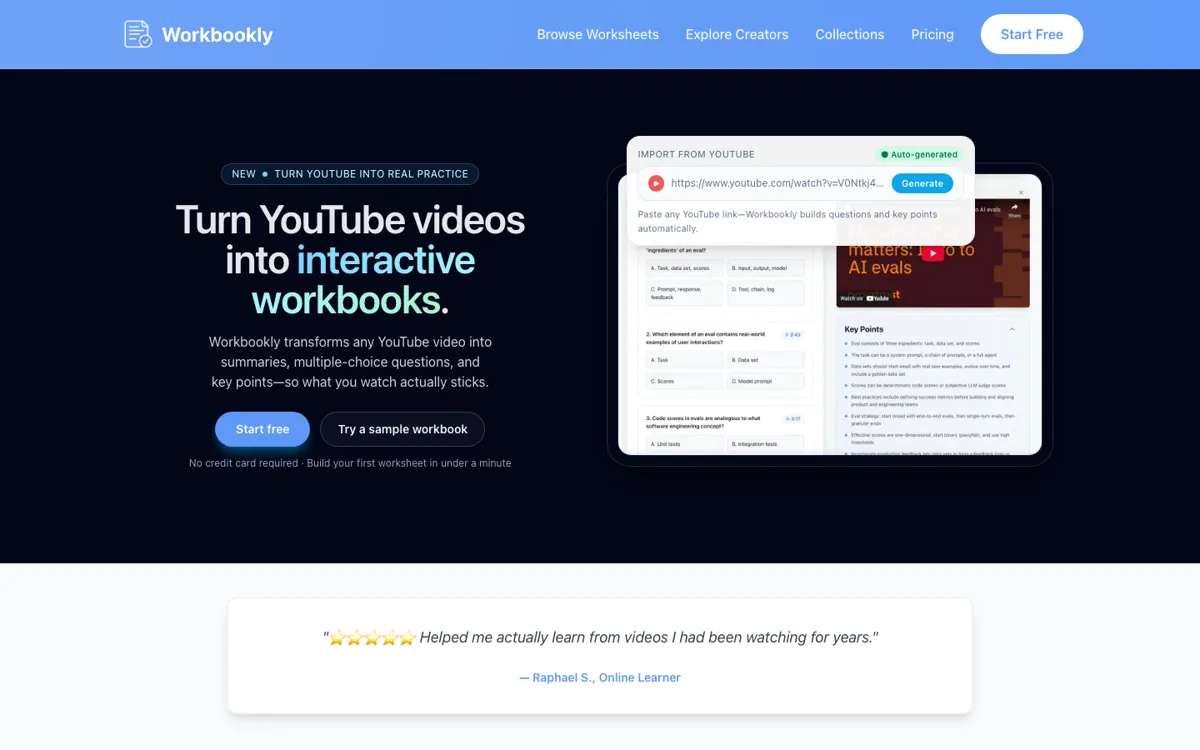
Official Website Snapshot Visit Site ↗

check_circle Pros

  • It solves a specific learning problem well: turning passive video watching into guided practice without hand-building worksheets every time.
  • The product workflow is concrete and easy to picture, from paste-a-link generation to side-panel practice, timestamp jumps, flashcards, and printable PDFs.
  • Playlist syncing is a smart fit for recurring channels and creators because it reduces the repeated import work that would otherwise kill the habit.
  • The docs explain the learning objects clearly, so educators can understand what a worksheet, workbook, and collection actually mean before adopting it.

cancel Cons

  • Public pricing details are still lighter than the feature explanations, so it is harder to judge long-term cost than day-one usefulness.
  • The product is tightly tied to YouTube and transcripts, which narrows its usefulness if your teaching materials live elsewhere.
  • Auto-generated practice quality will vary with the source video and caption quality, especially for dense technical or messy spoken content.
  • If you already run a full LMS with your own assessment workflow, Workbookly may feel like an extra layer rather than the core system.

Should you use it?

Best for: Teachers, educational creators, and self-learners who already rely on YouTube lessons and want those videos turned into worksheets, flashcards, and printable practice without building every exercise by hand.

Skip it if: Skip it if your material is not mainly YouTube-based, or if you need a full course platform with grading, class management, and native assessments rather than a video-to-practice layer.

Is it worth the price?

Freemium

Workbookly looks easy to start because the public site pushes low-friction use and no-card onboarding, but the real decision depends on how much worksheet volume and creator workflow you need over time. Treat it as a workflow fit check first, not a pricing-led buy.

The Free Tier

Homepage says no credit card required, but publicly extracted plan limits were not clearly exposed during this review.

Paid Upgrade
Contact for pricing

Pricing page exists, but extracted public text exposed FAQs more clearly than plan tiers, so exact paid inclusions remain unclear from directly readable public evidence.

One thing to know before you start

Test it on one repeat-use video series first. If the generated worksheet and flashcard quality saves you real prep time on that series, then playlist sync becomes the feature that turns Workbookly from a novelty into a habit.

What people actually use it for

Turn educational YouTube videos into homework sheets

Teachers can take an existing lesson video and quickly turn it into a printable or online worksheet with timestamp-linked questions instead of preparing a separate quiz document from scratch.

Help self-learners retain tutorial content

Students following language, coding, or exam-prep videos can use Workbookly to generate questions, flashcards, and summaries that make the lesson stick after the video ends.

Auto-build practice from recurring creator playlists

Creators or learning communities that follow a channel over time can connect a playlist once and let new practice sheets appear automatically as fresh videos are published.

What does Workbookly actually do?

Workbookly is valuable because it targets a very specific gap in online learning. People watch tutorials, lectures, and explainers on YouTube every day, but most of that learning stays passive. Unless someone takes notes, writes questions, or revisits the material later, the benefit fades fast. Workbookly tries to close that gap by generating practice directly from the video itself. That is a better use case than generic AI tutoring claims because it starts from a real behavior people already have: learning from YouTube without ever turning that watching into recall or reinforcement.

The product also has a sensible shape for both educators and solo learners. On the learner side, the Chrome side panel and clickable timestamps matter because they keep the study loop close to the source material. On the educator side, PDF export, workbook collections, and playlist syncing matter because they turn one-off video lessons into reusable teaching assets. The docs are especially helpful here because they explain the building blocks in plain language, including worksheets, workbooks, collections, timestamps, and how generated questions depend on transcripts. That reduces the usual confusion around what an education AI tool actually produces.

The main boundary is that Workbookly is not trying to be the whole classroom stack. It does not present itself as a full LMS, a grading suite, or a broad course authoring platform. Its strength is much narrower and more useful: taking YouTube content and converting it into guided practice materials. That focus is a plus if video is already central to how you teach or learn. It is a minus if your curriculum lives in PDFs, slide decks, private video systems, or teacher-made assessments outside YouTube. In other words, Workbookly works best when your learning workflow already starts with videos and just needs a stronger way to make them stick.

What you can do with it

Generate interactive worksheets with multiple-choice, fill-in-the-blank, and matching questions from YouTube videos.
Create study decks and study guides automatically so learners can review the same video in more than one format.
Practice beside the video through a Chrome side panel instead of switching between tabs and separate notes.
Export worksheets as print-ready PDFs and auto-sync public YouTube playlists into new practice materials.

Technical details

platform
Web app plus Chrome extension
deployment
Cloud SaaS
api_available
No public API mentioned

Top Alternatives to Workbookly

If Workbookly is close but still misses the job, try one of these instead.

Key Questions

What does Workbookly actually make from a YouTube video?
It generates practice materials, not just a summary. The public site and docs describe worksheets, multiple-choice questions, fill-in-the-blank items, matching prompts, flashcards, study guides, and timestamp-linked review flow.
Is Workbookly for teachers only?
No. It also fits students, self-learners, and creators who want video content to become something interactive and reviewable rather than something people only watch once.
Does Workbookly work outside YouTube?
The public product story is heavily centered on YouTube links, playlists, transcripts, and a side panel next to videos. Based on the currently visible evidence, YouTube is the core workflow rather than just one optional source.
Can you trust the pricing from the public site yet?
Only partly. The site clearly points to pricing and low-friction onboarding, but the directly readable public text exposed the learning workflow more clearly than exact plan numbers, so you should verify the paid tiers inside the live pricing flow before committing.