KwaKwa Course Creator Review

6.9/10

Turn your expertise or PDF into a mobile-first course you can publish and sell.

Review updated May 2026 By The AI Way Editorial Tested 133+ tools across the site 6 min read
KwaKwa Lesson Planning Web-Based Freemium from $19.00/mo

Our Verdict

KwaKwa Course Creator is most compelling for creators who already have knowledge, notes, or a PDF and want that material turned into a phone-first course they can publish fast. Its biggest advantage is that creation and selling live in the same flow instead of stopping at draft generation. The tradeoff is that the product seems built around a specific mobile social-course format, so it is less attractive if you need a broader LMS or deeper course-production controls.

Try it
Free to start, then pay when the limits stop you. Starts at $19.00 USD.
open_in_new Try KwaKwa Course Creator
Official Website Snapshot Visit Site ↗

check_circle Pros

  • It gives you three clear starting points, prompt, PDF, or blank canvas, which lowers the friction when you already have source material but do not want to rebuild it manually.
  • KwaKwa is not only generating course content, it is also positioned to help package and sell that content, which matters more than a plain text generator for solo educators and creators.
  • The mobile-first viewing format makes the product easier to understand than many vague AI course builders, because the output style is opinionated instead of completely open-ended.

cancel Cons

  • The product appears optimized for mobile social courses, so it may feel restrictive if you need desktop-heavy learning experiences or many delivery formats.
  • Public pricing transparency is still thin on the official site itself, so the clearest price signal in this review comes from TAAFT rather than a first-party pricing page.
  • The official materials reviewed do not surface much about collaborative authoring, offline access, or enterprise learning controls, which leaves gaps for larger training teams.

Should you use it?

Best for: Best for turning a workshop PDF, lesson outline, or rough teaching topic into a swipeable mobile course you can publish or sell without piecing together a separate course builder and checkout flow.

Skip it if: Skip this if you need a conventional LMS with deeper admin structure, rich desktop lesson design, or highly flexible course presentation beyond the swipeable mobile format. Also skip it if your purchase decision depends on first-party public pricing detail before signup.

Is it worth the price?

Freemium Starts at $19.00 USD

The entry price looks reachable for solo creators, but the real question is whether the mobile-course format matches how your audience actually learns. If you only need AI help drafting lessons and already have a course platform, KwaKwa can end up duplicating part of your stack rather than replacing it.

The Free Tier

TAAFT lists the product as freemium, but the official homepage reviewed does not clearly spell out what the free tier includes or blocks.

Paid Upgrade
$19/month

TAAFT shows a paid starting point, but the official homepage reviewed does not publicly enumerate the exact paid plan unlocks.

One thing to know before you start

Start with a finished PDF or a well-scoped course topic instead of asking it to invent your teaching angle from scratch. KwaKwa makes the clearest promise when the source material already exists and needs packaging, not when the whole curriculum is still fuzzy.

What people actually use it for

Turn an existing PDF guide into a sellable mini-course

If you already have a workshop handout, ebook, or training PDF, KwaKwa gives you a direct path to upload that file and turn it into a structured mobile course. That is more useful than a generic chatbot when the real bottleneck is packaging and delivery, not idea generation. It is especially attractive for solo creators who want to test a paid educational product without building a course area from scratch.

Launch a quick social course from a topic prompt

A coach or educator with a clear topic but no finished course materials can start from the prompt flow and generate an initial course structure fast. The gain is speed to first draft, especially when the goal is a short mobile learning experience rather than a full certification program. It is less ideal for teams that need long review cycles, deep curriculum mapping, or highly customized lesson layouts.

Package expertise into challenges or membership-style products

KwaKwa’s official messaging is not limited to one-off courses. It also points toward workshops, interactive challenges, digital products, and membership clubs, which suggests a broader creator-monetization angle. That makes it a better fit for people building a small paid knowledge business than for someone who only wants a private internal training outline.

What does KwaKwa Course Creator actually do?

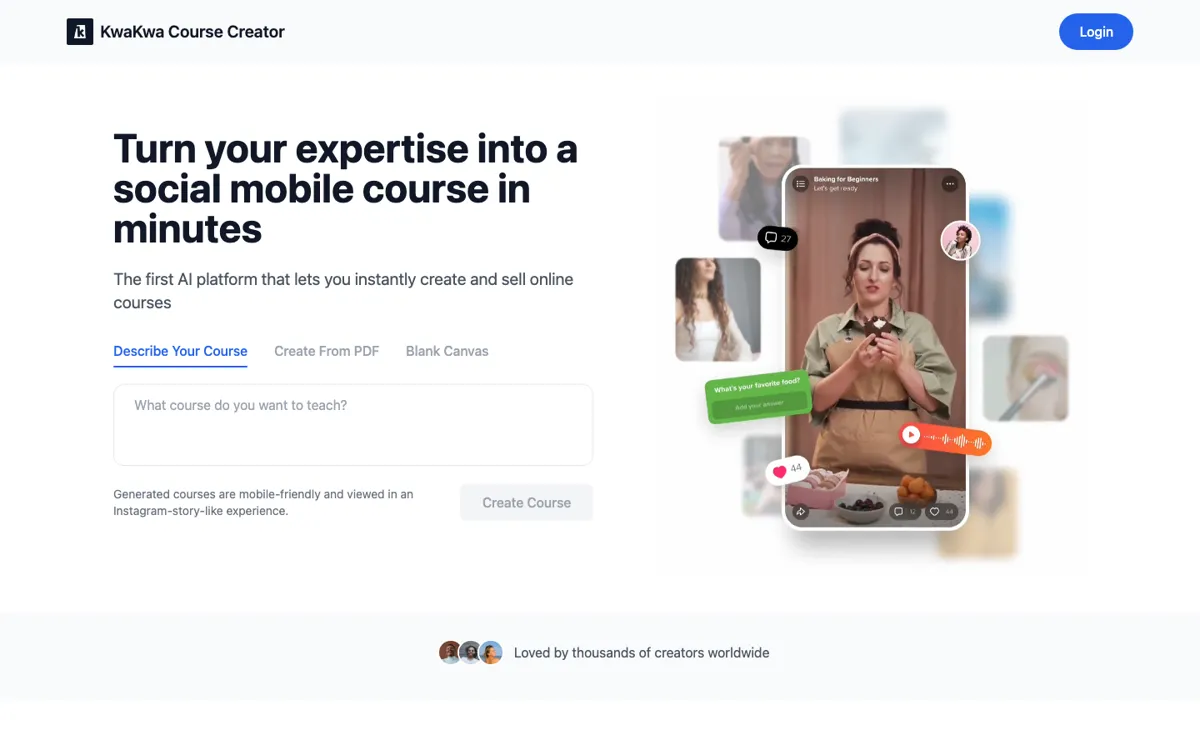
Most AI course tools sound helpful until you picture the actual work. The hard part is often not writing one paragraph about a topic. It is taking expertise that already exists in your head, your notes, or a finished PDF, then reshaping it into something learners can move through without getting lost. KwaKwa is aimed at that packaging problem. Its homepage immediately asks whether you want to describe a course, upload a PDF, or start from a blank canvas, which tells you the product is trying to meet creators at different starting points instead of assuming everyone begins with a clean outline.

The strongest differentiator is format. KwaKwa says generated courses are mobile-friendly and viewed in an Instagram-story-like experience, and the on-page product flow plus frontend bundle support that phone-first framing. It also positions the product around selling, not just authoring. Official copy talks about turning expertise into workshops, challenges, digital products, and membership clubs, while the app code references course creation, PDF processing, quiz handling, analytics, and Stripe checkout. So the value is not just that AI drafts course content. The value is that the drafted material is being pushed toward a specific kind of mobile learning product you can actually publish.

That same clarity creates a limit. KwaKwa does not look like a neutral all-purpose learning system where every output format is equally supported. The public evidence reviewed points toward one opinionated workflow: generate or upload source material, convert it into a social mobile course, then package and sell it. For solo experts, educators, and creators, that focus can be a strength because it cuts setup overhead. For training teams that need richer collaboration, deeper admin structure, or more conventional desktop learning environments, the product may feel too narrow and not transparent enough yet about advanced controls or plan boundaries.

What you can do with it

Start a course from a text prompt, a PDF upload, or a blank canvas.
Generate mobile-first courses designed to be viewed in an Instagram-story-like format.
Turn uploaded PDF content into structured chapters through an AI-assisted creation flow.
Package expertise into courses, workshops, challenges, digital products, and membership-style offerings.
Publish and sell courses from the same product instead of exporting content into a separate selling tool.

Technical details

platform
Web app
deployment
Cloud
api_available
No public API or developer docs surfaced on the official pages reviewed

Top Alternatives to KwaKwa Course Creator

If KwaKwa Course Creator is close but still misses the job, try one of these instead.

Key Questions

Can KwaKwa create a course from a PDF instead of a blank prompt?
Yes. Both the homepage flow and the frontend code show a dedicated PDF upload path, which is one of the product's clearest practical advantages. It is most useful when you already have source material and want packaging help more than open-ended brainstorming.
Is KwaKwa more like an LMS or more like a creator course tool?
It looks closer to a creator-focused course tool. The public product framing centers on turning expertise into mobile courses, workshops, challenges, and sellable digital products rather than on broad institutional learning management.
What makes KwaKwa different from a generic AI writing tool?
It is trying to carry the work past content generation into course packaging and selling. If all you want is lesson text, a general AI writer may be enough, but KwaKwa is more interesting when the real job is building a mobile-ready learning product.
Is the pricing easy to verify from the official site?
Not fully from the public pages reviewed here. The strongest visible price signal came from TAAFT, which lists KwaKwa as freemium with paid options from $19 per month, so buyers who need first-party plan detail should still verify inside the product or signup flow.