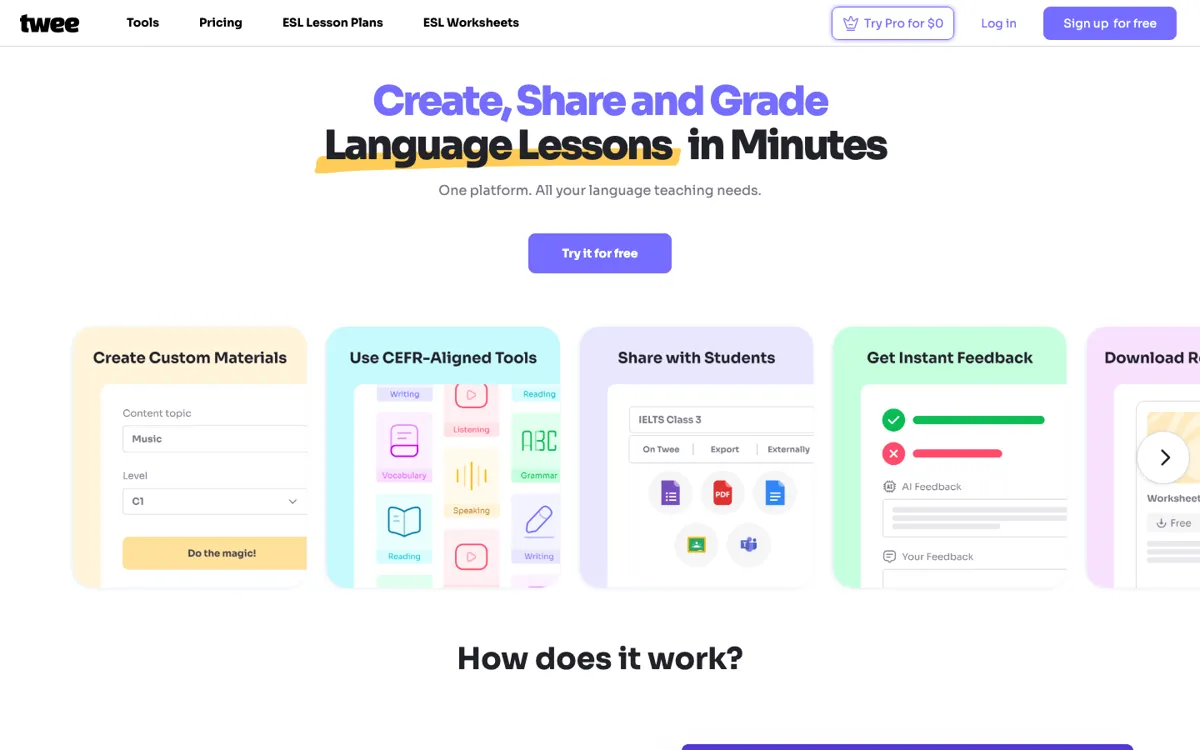
Twee Review

8.7/10

AI lesson creation and grading tools for language teachers.

Review updated May 2026 By The AI Way Editorial Tested 99+ tools across the site 5 min read
Twee AI LLC Lesson Planning Summarization Team Collaboration Transcription Web-Based Writing Assistant Freemium from $6.50/mo

Our Verdict

Twee is strongest when a language teacher keeps rebuilding the same kinds of lesson materials and wants one place to generate, share, and check them faster. Its advantage is not one flashy AI trick, but the fact that dozens of narrow classroom tasks already exist as purpose-built tools instead of generic prompts. But the real upside shows up only if you actually teach languages often enough to use that library, because casual users will not get the same value from a platform shaped around CEFR, classroom workflow, and recurring prep.

Try it
Free to start, then pay when the limits stop you. Starts at $6.50 USD.
open_in_new Try Twee
Official Website Snapshot Visit Site ↗

What people actually use it for

Building a full CEFR-matched lesson from one topic or text

A language teacher often starts with a single article, topic, video, or vocabulary set and then has to turn it into multiple classroom pieces: reading tasks, comprehension questions, speaking prompts, and follow-up writing work. Twee is built for that repetitive conversion step. Instead of opening separate apps or hand-writing every task, a teacher can generate several activity types from the same source and keep the level tied to CEFR. The gain is biggest when lesson prep repeats week after week and the teacher wants consistency without rebuilding each activity format from scratch.

Sharing assignments digitally while keeping printable options

Some classes still need printable worksheets, while others work better through links, forms, or shared docs. Twee supports both ends of that split workflow. Teachers can export materials to PDF, Google Docs, or Google Forms, or share them as interactive assignments through a link. That matters when one class is online, another is in person, or a teacher wants the same lesson in multiple delivery formats. The practical benefit is less reformatting by hand after content generation, especially for teachers juggling mixed teaching environments.

Reducing grading time on recurring language exercises

The platform is not only about generating worksheets. It also pushes into the repetitive grading side of language teaching by checking student responses with AI. That is most useful for teachers who regularly collect written answers, comprehension tasks, or other response-based exercises and want a quicker first pass before manual review. It will not remove teacher judgment, but it can cut the slowest part of the loop, especially when the same types of assignments come back every week across multiple student groups.

check_circle Pros

  • The tool library is built around concrete classroom jobs, so teachers do not have to invent prompts for every worksheet or activity from scratch.
  • It covers the workflow after generation too, with exports, interactive sharing, and AI-assisted checking inside the same platform.
  • CEFR alignment and multi-language support make it easier to adapt materials to student level instead of rewriting outputs by hand.
  • Audio, video, reading, vocabulary, and grading tools live together, which reduces hopping between separate teaching apps.

cancel Cons

  • A large tool catalog can still feel overwhelming if you only need a couple of simple classroom tasks.
  • Several of the more valuable capabilities sit behind Pro, so the free or basic path works better for testing than for replacing most prep work.
  • The product is tightly shaped around language teaching, which limits its usefulness for broader education workflows outside that niche.

Should you use it?

Best for: Best for language teachers who repeatedly need to build CEFR-aligned exercises, share them with students, and speed up grading without stitching together multiple classroom tools.

Skip it if: Skip this if you are not teaching languages or if you mainly want a general-purpose AI writer with no classroom structure. It is also a poor fit if your workflow does not need exports, student sharing, or repeated lesson-material generation.

Is it worth the price?

Freemium Starts at $6.50 USD

The trial and lower tiers are enough to test whether the workflow fits your classroom, but the platform becomes much more complete once you need grading help, richer exports, and wider tool access. If you only generate occasional materials, you may never need the jump, but frequent classroom use will push many teachers toward Pro fairly fast.

The Free Tier

Trial includes 5 runs for non-Pro tools, 500 text-to-audio credits, and free-tier lesson and worksheet resources.

Paid Upgrade
$6.50/month

Basic adds 100 runs per month for non-Pro tools, while Pro unlocks Pro tools, AI checking, transcription, exports, and fuller library access.

One thing to know before you start

Start with one recurring lesson format you already teach every week, then rebuild that workflow inside Twee. That is the fastest way to tell whether the platform saves real prep time or just adds another interface to learn.

What does Twee actually do?

Language teachers rarely need just one AI output. They usually need a chain of materials built around the same lesson goal: a text, a set of comprehension questions, a vocabulary task, maybe a discussion prompt, and later some way to share or grade it. Doing that by hand eats time because every lesson becomes a formatting and rewriting exercise on top of the actual teaching decision. Generic AI chat tools can help in pieces, but they still leave the teacher to prompt for every format, clean up the result, and move it into another tool for distribution. Twee exists to compress that repeated prep loop into a product that already understands common classroom tasks.

The site’s strongest point is the breadth of purpose-built tools rather than one flagship feature. Twee says it has more than 40 tools across reading, listening, speaking, grammar, vocabulary, writing, and utility tasks. The examples on the tools page are specific: CEFR level checking, audio and video question creation, transcript generation, discussion prompts, word-definition matching, gap fills, and custom text generation from teacher-provided vocabulary. That library matters because it shortens the distance between an idea for a lesson and a usable classroom artifact. On top of that, the platform layers exports, interactive sharing, class management, and AI assessment, which means the content does not stop at generation.

The limitation is that Twee is most valuable inside a recurring language-teaching workflow, not as a general education app for everyone. Its pricing structure shows that clearly: the trial is useful for testing, the basic tier expands non-Pro usage, and the Pro tier unlocks many of the features that make the platform feel complete, such as Pro tools, broader exports, assessment, transcription, and full library access. Teachers who only need occasional worksheet help may not need that depth. The product makes more sense when lesson prep, sharing, and grading happen often enough that one organized platform beats bouncing between documents, forms, video tools, and AI chat every day.

What you can do with it

Generate CEFR-aligned lesson texts, dialogues, and exercises from a topic, link, or word list.
Create reading, listening, speaking, grammar, and vocabulary activities from one tool library.
Share assignments interactively by link or export them to PDF, Google Docs, and Google Forms.
Use AI to check student responses and speed up grading for classroom work.
Convert audio or video into transcript-based teaching materials.
Manage classes, assignments, and student workflow inside the same platform.

Technical details

platform
Web app
deployment
Cloud
api_available

Top Alternatives to Twee

If Twee is close but still misses the job, try one of these instead.

Key Questions

Can you actually try Twee without paying first?
Yes. The pricing page shows a trial tier with 5 runs for non-Pro tools, 500 text-to-audio credits, and access to free lesson and worksheet resources.
Is Twee mainly for English teachers or for language teachers more broadly?
It is broader than one English-only worksheet generator. The homepage says the platform supports 10 languages and the tool structure is built around language-teaching tasks tied to CEFR levels.
Does Twee stop at material generation, or can it help with grading too?
It goes beyond content creation. The site says Pro plans can check student responses with AI, which makes the platform more useful for recurring assignment workflows than a simple worksheet generator.
When does the paid plan start to matter?
The upgrade matters when you need more than trial-level generation and want the higher-value classroom workflow features. Pro is the point where exports, Pro tools, transcription, and AI response checking combine into a more complete teaching system.