pookie Review

7.4/10

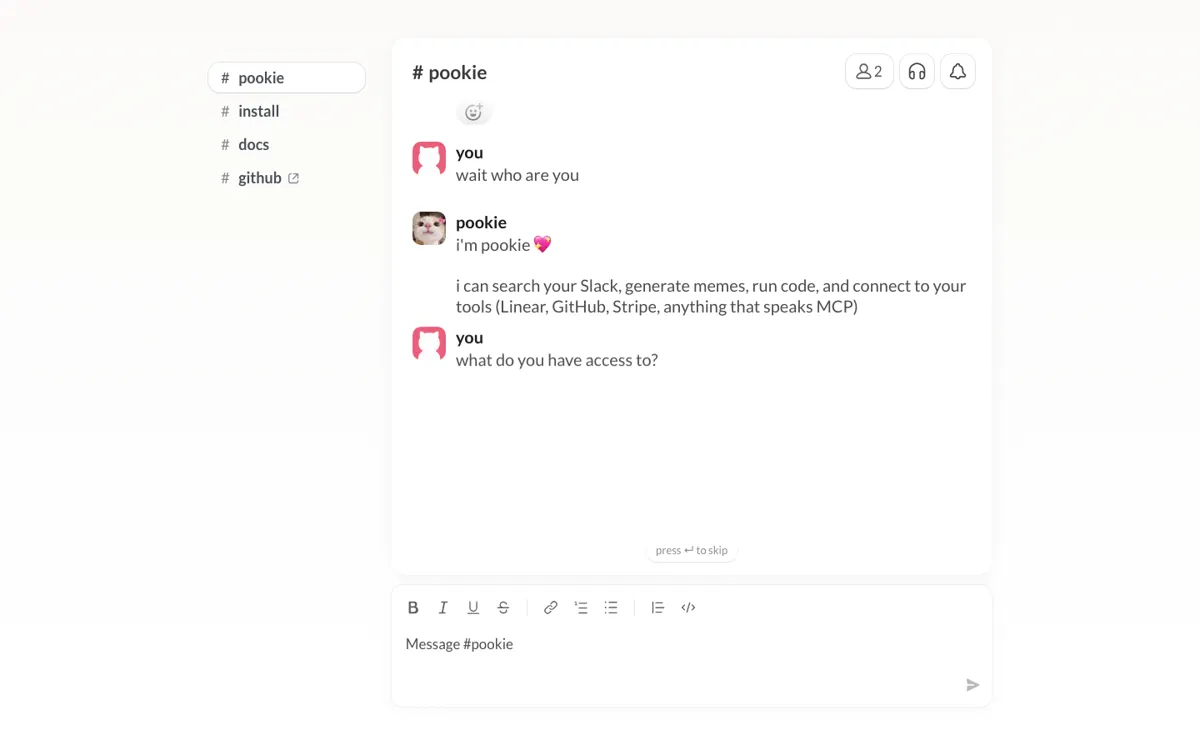
A Slack helper that searches workspace messages and connects tools like Linear, GitHub, and Stripe from one assistant.

Review updated May 2026 By The AI Way Editorial Tested 99+ tools across the site 5 min read
pookie App Integration Team Collaboration Web-Based

Our Verdict

pookie is useful when Slack has become the messy front door to too many systems and the real problem is finding context fast without opening everything one by one. The value is not that it adds one more chat box. The value is that it treats Slack history, connected tools, and quick retrieval as one operating surface. But if your team already keeps information structured outside chat, pookie can feel like a patch for a problem you may have already solved elsewhere.

Try it
Paid product.
open_in_new Visit pookie
Official Website Snapshot Visit Site ↗

check_circle Pros

  • The product job is specific and easy to picture: search workspace messages and pull linked work context without manual digging.
  • The connection points to Linear, GitHub, and Stripe make it more useful than a message-only Slack bot.
  • The public install flow, docs, and GitHub repo make it look like a real setup path instead of a thin landing page with no follow-through.

cancel Cons

  • Public pricing is missing in the captured pages, so it is hard to judge commitment level before setup.
  • The value depends heavily on how chaotic your Slack usage already is, which means teams with cleaner systems may feel less payoff.
  • Adding another assistant into Slack can create its own noise if the team is already bot-heavy.

Should you use it?

Best for: Best for searching Slack history and pulling work context across messages, tickets, code, and billing links when chat has become the place where everything gets buried.

Skip it if: Skip this if your team already keeps knowledge, tickets, and updates in structured systems outside Slack, or if you are trying to reduce bot clutter inside the workspace.

Is it worth the price?

The product may be easy to understand, but the captured pages do not show a clear public price. That means you can judge the workflow fit faster than you can judge the financial commitment, which weakens the self-serve buying story.

One thing to know before you start

Judge pookie against the last few times someone asked a question that was already answered somewhere in Slack. If that happens constantly, the product case gets much stronger.

What people actually use it for

Finding buried decisions in Slack before opening five other tools

A common Slack problem is that the answer technically exists, but only inside a channel you forgot, a thread you did not save, or a linked ticket you do not want to chase manually. pookie is built for that exact moment. Instead of jumping between Slack, Linear, GitHub, and Stripe yourself, you ask one assistant to help surface the context faster. That is much more useful for teams whose real work leaks into chat than for teams that already keep clean written systems elsewhere.

Using Slack as the shortcut layer for connected work tools

The product becomes easier to justify when Slack is already the place where people ask for status, bugs, customer issues, and billing context. In that setup, pookie is not just searching old messages. It is acting like a shortcut layer across the tools already linked to the workspace. That is stronger than a simple chat search story, but it also means the value drops if your team barely uses Slack for real operational work.

What does pookie actually do?

Slack often becomes the place where work goes to get lost. Someone answers the question in a thread three weeks ago, another person drops a GitHub link in a different channel, somebody else mentions the Stripe issue in passing, and by the time you need the full picture, you are piecing it together from fragments. That is the pain pookie is aimed at. The newsletter description is unusually useful because it does not hide behind vague assistant language. It says what the product actually does: search workspace messages, generate memes, and connect tools like Linear, GitHub, and Stripe. That already tells you whether the problem is real in your team or not.

What makes pookie more than a gimmick is the combination of search and tool context inside Slack. The official site gives it more credibility through an install page, quickstart docs, and a public GitHub repo, which together suggest this is meant to be set up and used rather than merely admired. The core benefit is not abstract intelligence. It is reducing the number of manual steps between “I know this was discussed somewhere” and “here is the message, ticket, code change, or payment context I actually needed.” That is a strong pitch for teams where Slack has turned into the unofficial memory layer of the company.

The limit is that pookie gets more useful as your Slack habits get messier. That can be a strength, but it can also reveal that the product is compensating for a workflow problem your team might prefer to solve another way. If your org already keeps tickets, documentation, and updates structured outside chat, the payoff gets smaller. The captured pages also do not show a clear public price, so you are evaluating a Slack habit change and a bot adoption decision before you can clearly evaluate cost. For teams already exhausted by bot noise, that is a real barrier, not a minor footnote.

What you can do with it

Search Slack workspace messages from one assistant surface.
Connect external tools like Linear, GitHub, and Stripe into the workflow.
Use install and quickstart flows built specifically around Slack setup.
Pull context out of message history instead of manually digging through channels and threads.
Add lighter workspace functions like meme generation alongside work search and retrieval.

Technical details

platform
Slack-first assistant with web docs and GitHub setup resources
deployment
Cloud
api_available

Top Alternatives to pookie

If pookie is close but still misses the job, try one of these instead.

Key Questions

Is pookie just a Slack search wrapper?
No, at least not by the public pitch. The product is framed around searching workspace messages and working across connected tools like Linear, GitHub, and Stripe, which makes it broader than plain message lookup.
Who gets the most value from pookie?
Teams that let a lot of real work happen inside Slack get the most value. If questions, updates, tickets, and links constantly pass through chat, pookie has more context to recover and connect.
Do the captured pages show a public price?
No. The captured site, install flow, and docs do not show a clear public pricing page, so the buying commitment stays fuzzy from the public material alone.
Why might a team pass on pookie even if the search idea sounds good?
Because the product adds another assistant into Slack. Teams that are already tired of bot noise or already keep work organized outside chat may decide the extra layer is not worth it.