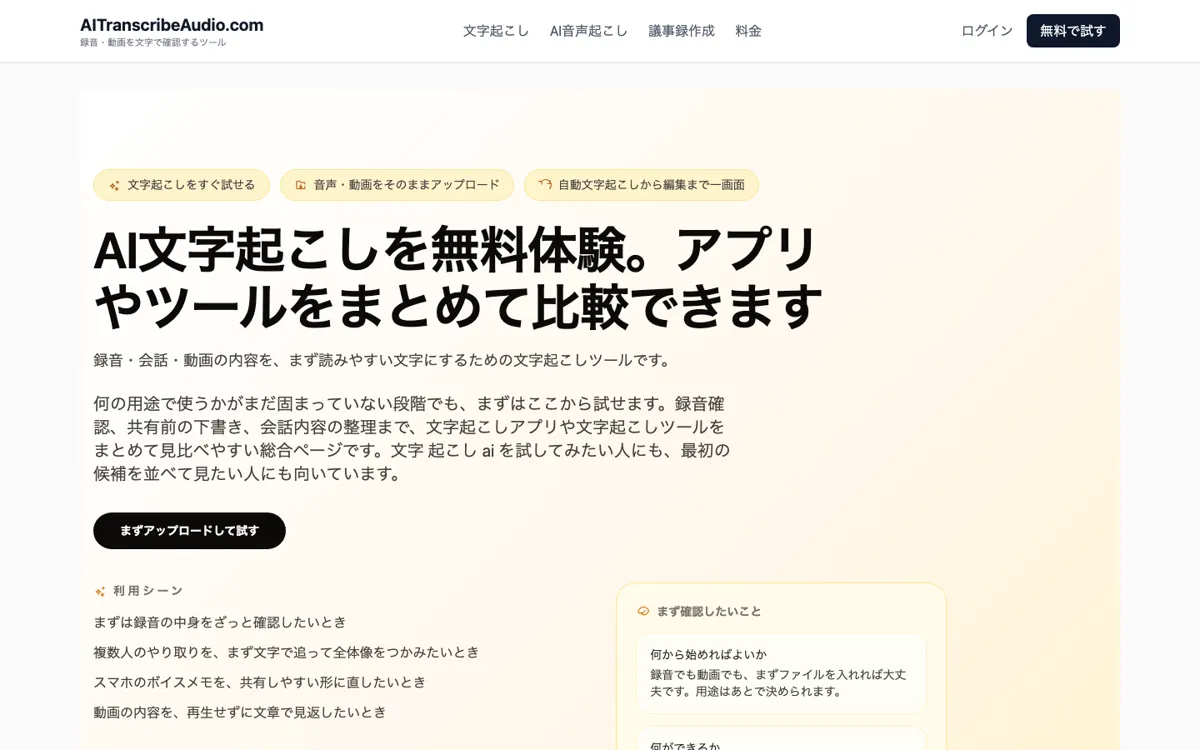
AI文字起こし Review

8.8/10

Upload recorded audio or video, turn it into text, review speakers, and export the result in one workflow.

Review updated May 2026 By The AI Way Editorial Tested 99+ tools across the site 5 min read
AI文字起こし Auto Subtitles Free Forever Meeting Notes Transcription Web-Based Freemium from $980.00/mo

Our Verdict

AI文字起こし makes the most sense when you already have an audio or video file and need readable text fast, not when you want an all-in-one meeting copilot. Its best point is that it keeps transcription, speaker cleanup, and export in one straightforward Japanese workflow without hiding core file handling behind a higher enterprise tier. But it still works like a minutes-and-files utility, so if you expect it to fully write polished meeting summaries or act like a live assistant, you will hit the product boundary quickly.

Try it
Free to start, then pay when the limits stop you. Starts at $980.00 JPY.
open_in_new Try AI文字起こし
Official Website Snapshot Visit Site ↗

check_circle Pros

  • You can move from uploaded recording to editable text and export without jumping between separate tools.
  • The pricing page openly says paid plans already include speaker separation, video upload, editing, and export, which reduces unpleasant surprises.
  • It handles both plain transcription and meeting-record draft prep, so it still fits once the recording has more than one speaker or a more formal handoff target.

cancel Cons

  • The product explicitly stops at helping you build the draft layer for meeting records, so it will not finish the final polished minutes for you.
  • Uploaded files and export results are described as being deleted after 24 hours, which is fine for quick work but not for long-lived storage workflows.
  • The site positions itself mainly around Japanese usage, so people needing deeper multilingual workflow detail may find the public explanation thin.

Should you use it?

Best for: Turning meeting recordings, interviews, voice memos, or spoken video files into editable Japanese text that you can review, organize by speaker, and export quickly.

Skip it if: Skip this if you need a live meeting assistant, long-term cloud archive, or a tool that writes finished formal minutes without your review. Also skip it if your workflow depends on keeping uploaded files around for more than a short processing window.

Is it worth the price?

Freemium Starts at $980.00 JPY

The free tier is enough to understand the workflow, especially with signup and daily bonus minutes, but regular use quickly becomes a minute-budget question. The paid entry plan is not expensive, yet the real decision is whether your monthly recording volume stays predictable or keeps pushing you into extra packs.

The Free Tier

Free plan includes signup and daily login bonus minutes for trying audio and video transcription.

Paid Upgrade
¥980/month

Paid plans include speaker separation, video upload, editing, and export, with minute packs available for extra usage.

One thing to know before you start

Use one realistic multi-speaker recording as your first test, not a clean solo memo. The real value check is whether the speaker cleanup and export flow still save time once the audio gets messy.

What people actually use it for

Turn a meeting recording into a usable draft before sharing it internally

If your team already records meetings but still wastes time replaying audio to build the first draft, AI文字起こし can shorten that step. You upload the recording, review the transcript while fixing speaker names, then export the text in a format that can move into your normal documentation flow. That is especially useful when the real pain is getting from spoken content to a readable base document, not producing a perfectly polished memo in one click.

Convert interviews or voice memos into editable text with export options

For interviews, field notes, or long voice memos, the product gives you a simple route from recorded speech to editable text without asking you to learn a broader media tool. TXT, SRT, and DOCX export options make it easier to move the result into writing, subtitle prep, or reporting workflows. The catch is that you should treat the service like short-term processing, not like storage, because the site tells users not to rely on keeping files there beyond 24 hours.

What does AI文字起こし actually do?

A lot of transcription tools blur together because they all promise some version of audio in, text out. The real difference usually shows up after the first transcript appears. Someone still has to check speaker turns, scan for important lines, and move the result into a usable file before the recording becomes practical. AI文字起こし is aimed at that exact handoff point. The homepage frames it as a place to upload audio or video, confirm the generated text, organize speaker names, and export the result. That matters because the product is not pretending to replace every downstream writing task. It is focused on getting from recorded speech to a usable working document quickly.

The surrounding pages make the workflow feel more grounded than a generic AI landing page. The pricing page spells out that speaker separation, video upload, editing, and export are included across paid tiers, while extra usage can be handled with minute packs instead of forcing a different product jump. The meeting-record page goes further and says the tool helps build the base layer for minutes rather than auto-completing the final document. That combination is useful because it sets the right expectation: this is a file-based transcription and cleanup tool, with enough structure to support meetings, interviews, and internal records, but without pretending to be a full autonomous assistant.

The limitations are practical rather than dramatic. First, the public copy explicitly recommends not relying on file storage beyond 24 hours, which is fine for quick processing but weak for teams wanting a persistent archive. Second, the product still expects human review when speaker labels or meeting text matter, so it is not the right fit if you want finished polished minutes with no second pass. Third, although the site notes English audio can be handled, the clearest positioning is Japanese-first. That makes it strongest for Japanese business and content workflows where the main problem is turning recorded speech into editable text fast, not building a multilingual collaboration system from scratch.

What you can do with it

Upload audio files, voice memos, or videos and convert them into text.
Review and organize speaker names after the first transcript pass.
Export the transcript in TXT, SRT, or DOCX formats.
Use the same flow for meeting recordings and spoken video files.
Add extra usage through minute packs instead of switching to a separate product.

Technical details

deployment
Web
open_source
false

Top Alternatives to AI文字起こし

If AI文字起こし is close but still misses the job, try one of these instead.

Key Questions

What kinds of files can you upload here?
It supports recorded audio, voice memos, and video files with speech. The site presents them as part of the same file-based transcription flow.
Can it handle recordings with multiple speakers?
Yes, but with a review mindset. The product says it is built so you can check and organize speaker names after transcription rather than blindly trust the first pass.
Does it automatically finish the final meeting minutes for you?
No. The meeting-record page is clear that it helps build the draft foundation, not a fully finished formal minutes document with no human editing.
How long do uploaded files stay available?
Do not count on long storage. The site says uploaded files and export results are deleted after 24 hours, so you should download what you need quickly.