Komos Review

8.1/10

Run browser automation and repetitive business workflows through AI agents without babysitting brittle scripts.

Review updated May 2026 By The AI Way Editorial Tested 133+ tools across the site 5 min read
Komos B2B Browser Automation SaaS Workflow Builder Paid from $999.00/mo

Our Verdict

Komos is strongest when repetitive browser work is already painful enough that your team wants the automation layer managed, not merely generated. Its edge is not cheap access to AI agents, but reducing the maintenance burden that kills many DIY browser automations. But if your workflow volume is small or your team mainly wants a low-cost sandbox, Komos will feel too heavy and too expensive fast.

Try it
Paid product. Starts at $999.00 USD.
open_in_new Visit Komos
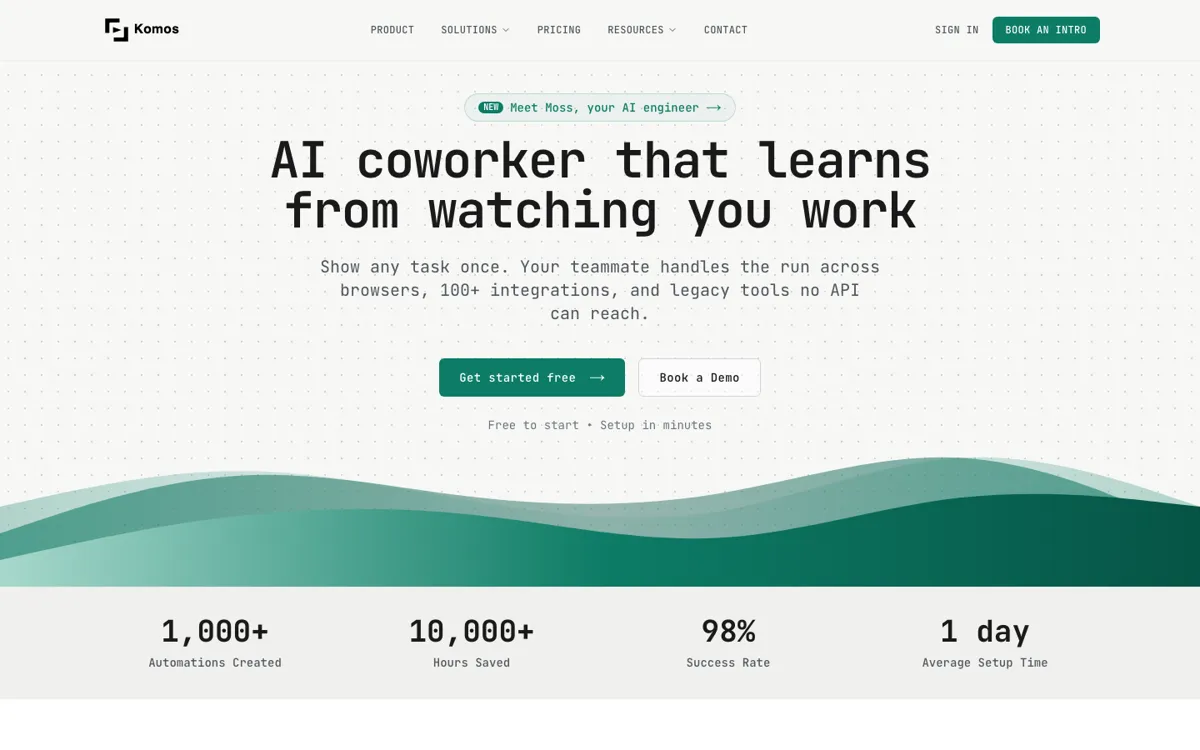
Official Website Snapshot Visit Site ↗

check_circle Pros

  • It sells managed durability, which is exactly where many browser automations fail after the demo looks good.
  • Workflow APIs make the product more useful for real business systems than isolated one-off browser bots.
  • The compare pages make its positioning clearer than many agent products because it directly addresses RPA brittleness and upkeep.

cancel Cons

  • The entry price is high enough that small teams or experimental users may rule it out immediately.
  • This is not a casual self-serve toy, so teams looking for quick low-budget automation will likely find it too much product.
  • Managed automation can reduce operational pain, but it also means less appeal for teams that strongly prefer building and owning everything themselves.

Should you use it?

Best for: Best for operations, support, and internal workflow teams that need browser-based repetitive work to keep running without constant script babysitting.

Skip it if: Skip this if you only need lightweight browser automation or want a cheap environment for experimenting with agents. Also skip it if your team prefers owning every automation component rather than paying for managed upkeep.

Is it worth the price?

Paid Starts at $999.00 USD

Komos is priced for teams with a real automation pain point, not for curious dabblers. The product starts making sense when broken or manually maintained workflows already cost more than the monthly bill in staff time, reliability, or missed operations.

Paid Upgrade
$999/month

Starter tier buys managed browser automation and workflow API capability without the team owning all maintenance itself.

One thing to know before you start

Test Komos on one workflow that already breaks often or burns staff time every week. That is the fastest way to see whether managed automation changes the economics, because easy demo tasks do not show where the product really earns its keep.

What people actually use it for

Keep repetitive browser workflows running after website changes

Komos makes the most sense when your team already knows the painful part of automation is not the first version, but the upkeep after interfaces change. In that situation, managed browser automation can be more valuable than building another fragile bot internally. The benefit is much weaker if your workflows are simple and rarely break.

Expose internal repetitive work as workflow APIs instead of manual team tasks

Some business processes still live in browser tabs because they were never formalized into systems. Komos is useful when those tasks are repeatable enough to turn into APIs and automation, but annoying enough that staff keep doing them by hand. It is less compelling when the process volume is too low to justify structured automation.

Replace brittle RPA maintenance with a managed AI automation layer

Traditional RPA often looks fine until maintenance becomes the main cost center. Komos is more convincing when a team already knows that pain and wants the operational burden shifted outward. It is a weaker fit for companies that are still in low-stakes experimentation and have not yet felt the cost of breakage.

What does Komos actually do?

A lot of automation products are judged too early, at the point where the first workflow works once. The real problem shows up later, when websites change, browser behavior shifts, and someone has to keep the whole thing alive. Komos is built around that later problem. The official site, pricing, and compare pages all emphasize managed AI browser automation rather than just browser control itself, which immediately changes what kind of buyer should care. This is not mainly about making a clever demo. It is about whether repetitive browser work stays reliable enough to trust in operations.

That is what gives Komos a clearer business role than many agent products. The platform is not presented as a sandbox for playing with automation. It is presented as a managed layer that builds, maintains, and exposes workflows as usable business infrastructure. The compare pages against RPA and browser-use setups reinforce the point that maintenance burden is part of the product pitch, not a side note. For teams handling support operations, back-office processes, or repetitive internal workflows, that can matter more than model novelty because reliability is what determines whether the automation survives after rollout.

The limitation is that managed reliability costs money and only feels worth it when the problem is already expensive. If a team just wants cheap automation or light experimentation, the product starts looking oversized immediately. Starter pricing is already well above hobby or small-team tooling, and the product framing makes it clear that Komos is chasing serious operational use rather than casual use. So the best fit is not someone who wonders whether automation might be nice, but someone who already knows browser workflow maintenance is a recurring business problem.

What you can do with it

Run browser-based repetitive workflows through managed AI automation instead of hand-maintained scripts.
Expose workflows as APIs so internal teams can trigger business tasks programmatically.
Offload automation maintenance to Komos instead of owning every website change and breakage yourself.
Use AI agents for repetitive work where traditional RPA becomes brittle or expensive to maintain.

Technical details

platform
Web app with workflow API model
deployment
Managed cloud automation platform
api_available
Yes, workflow APIs are a core part of the official positioning

Top Alternatives to Komos

If Komos is close but still misses the job, try one of these instead.

Key Questions

Is Komos just another browser agent demo tool?
No. The official site frames it as a managed browser automation platform for repetitive business work, with maintenance and workflow APIs as core parts of the value rather than side effects.
Who gets the most value from Komos?
Teams with repetitive browser-based operations and real maintenance pain get the clearest value. It matters most when workflow breakage or manual upkeep is already expensive.
When is Komos the wrong tool to open?
It is the wrong fit when you only want a cheap automation sandbox or occasional browser-task experiments. In those cases, the managed enterprise posture and pricing will likely feel too heavy.
Why choose Komos over building automation internally?
Because the hard part is often not the first workflow, but keeping it alive. Komos is aimed at teams that would rather pay for managed reliability and upkeep than own another brittle automation stack themselves.