To Teach AI Review

8.2/10

AI lesson planning and worksheet generation for classroom teachers.

Review updated May 2026 By The AI Way Editorial Tested 99+ tools across the site 5 min read
To Teach Lesson Planning Summarization Web-Based Writing Assistant Freemium from $6.00/mo

Our Verdict

To Teach AI is most useful for teachers who repeatedly turn topics, videos, and curriculum goals into worksheets and lesson plans under time pressure. Its strength is not originality, but speed across several very ordinary classroom tasks that otherwise eat prep hours one by one. But if your teaching workflow is already well stocked with reusable material, or you need assessment, class management, and delivery in one deep system, this stays closer to a content-production helper than a complete classroom platform.

Try it
Free to start, then pay when the limits stop you. Starts at $6.00 EUR.
open_in_new Try To Teach AI
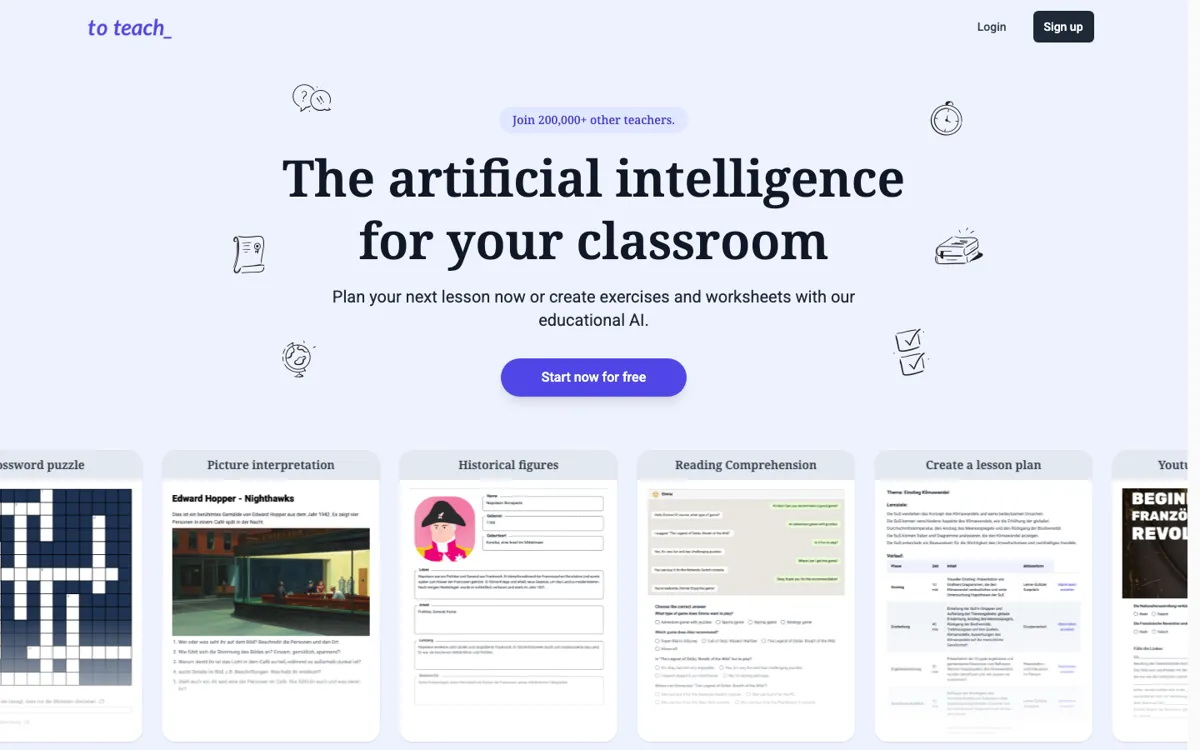
Official Website Snapshot Visit Site ↗

What people actually use it for

Building a lesson plan from a topic and classroom constraints

Teachers often know the topic they need to cover but still have to turn it into a lesson structure that fits age, duration, curriculum requirements, and student level. To Teach AI is clearly built for that first planning step. The lesson-plan page asks for classroom variables like age range, topic, duration, and focus, which makes it more targeted than a generic chat prompt. This is most useful when lesson prep has to happen fast and the teacher needs a workable first draft instead of starting with a blank page.

Turning a YouTube video into a worksheet quickly

A common classroom workflow starts with a source video and then branches into comprehension questions, vocabulary tasks, or discussion prompts. The YouTube-to-worksheet tool is aimed directly at that conversion step. Instead of manually watching, pausing, and writing tasks around a clip, the teacher can use one tool built specifically for this format. That is most valuable when video-based lessons are common and the teacher needs fresh supporting material more often than they can realistically build it by hand.

Creating differentiated material for mixed-level learners

Mixed-level classes are one of the fastest ways to turn simple lesson prep into a longer editing job. The homepage positions To Teach AI as a way to customize material according to student language level, interest, and format. That matters because the real time cost is often not creating the first worksheet, but adjusting it so one group is not lost and another group is not bored. This use case makes the most sense for teachers who repeatedly need multiple versions of similar material rather than a single standard worksheet.

check_circle Pros

  • The product stays focused on concrete teaching outputs instead of drifting into vague “AI for education” language.
  • It covers multiple prep formats, from lesson plans to YouTube worksheets, which matches real teacher workflow better than a single-purpose tool.
  • Inputs like age, duration, curriculum basis, and language level make the generated material easier to aim at actual classroom conditions.
  • H5P and LMS-oriented language suggests it can fit into existing digital teaching workflows rather than forcing a separate process.

cancel Cons

  • The value is strongest for teachers who build materials often, so lighter users may not need a dedicated tool for this workflow.
  • The site emphasizes creation more than feedback loops or classroom management depth, which limits how far the platform can replace a broader edtech stack.
  • Public third-party validation was limited in this run, so the strongest claims still need teacher-side testing.

Should you use it?

Best for: Best for classroom teachers who regularly create lesson plans, worksheets, and differentiated practice material from topics, videos, or curriculum goals.

Skip it if: Skip this if you already rely on a strong existing resource bank and rarely build fresh materials from scratch. It is also a weak fit if you need a full teaching platform with deeper grading, analytics, or student-management workflows rather than a content-generation helper.

Is it worth the price?

Freemium Starts at $6.00 EUR

The starter tier is enough to test whether the prep workflow fits your classroom, but recurring material generation will push active users into paid plans quickly. The paid tiers make sense when AI-generated lesson materials become part of weekly planning rather than occasional backup help.

The Free Tier

Free plan exists on the pricing page.

Paid Upgrade
€6/month

Paid tiers unlock broader ongoing use beyond the free path, with Pro positioned as the higher-access classroom workflow plan.

One thing to know before you start

Test it on a topic you already teach well and compare the output against the materials you would normally make yourself. That is the quickest way to see whether it is actually saving prep time or just generating extra cleanup work.

What does To Teach AI actually do?

Many teachers do not need another broad AI chatbot. They need help with a set of small, repetitive preparation tasks that pile up before class: turning a topic into a lesson outline, converting a YouTube clip into a worksheet, building grammar and vocabulary practice, or adjusting the same material for different ability levels. Each task is manageable on its own, but the time drain comes from having to do them over and over under schedule pressure. That is the problem To Teach AI is pointed at. It is less about inventing new pedagogy and more about shrinking the mechanical part of lesson preparation so teachers can spend less time formatting and more time deciding what is actually worth teaching.

The site backs that positioning with specific tools rather than a vague “AI for teachers” promise. On the homepage, the product is tied to outputs like lesson plans, grammar exercises, vocabulary tests, mindmaps, reading comprehension tasks, and YouTube worksheets. The dedicated lesson-plan page goes further by asking for age, duration, lesson topic, type, curriculum basis, and focus, which makes the generation flow look more classroom-aware than a simple prompt box. The site also mentions H5P readiness, LMS compatibility, and differentiated materials. That combination suggests To Teach AI is designed to fit into regular planning and content production, especially for teachers who need to keep producing fresh material across different learner levels.

The limitation is that To Teach AI appears strongest at content creation, not at the full lifecycle of classroom delivery and evaluation. If the teacher’s main problem is grading, analytics, or student-management depth, this will not replace a broader education platform. It also matters whether the teacher actually builds materials from scratch often enough to justify another tool. For someone with a mature resource library, AI generation may create as much cleanup as it saves. For someone constantly assembling new worksheets, video tasks, and differentiated lesson plans, that same generation speed can remove a real prep bottleneck. The product makes the most sense when classroom material creation is the pain, not just teaching in general.

What you can do with it

Generate lesson plans from a chosen topic, age range, duration, and curriculum focus.
Turn a YouTube video into a classroom worksheet with one click.
Create grammar exercises, vocabulary tests, reading comprehension tasks, and other classroom materials.
Adjust materials to different language levels and student interests.
Produce differentiated teaching content that fits curriculum-based planning.
Export or integrate materials into LMS workflows with H5P-ready formats.

Technical details

platform
Web app
deployment
Cloud
api_available

Top Alternatives to To Teach AI

If To Teach AI is close but still misses the job, try one of these instead.

Key Questions

Can you try To Teach AI without paying first?
Yes. The pricing page shows a free option alongside paid Starter and Pro tiers, which makes it possible to test the workflow before committing to a subscription.
Is this mainly for lesson planning or for worksheets too?
It covers both. The site highlights lesson-plan generation, YouTube-to-worksheet conversion, grammar exercises, vocabulary tests, and reading comprehension materials as part of the same platform.
Does it adapt to classroom level and curriculum needs?
Yes, at least that is a central part of the product positioning. The lesson-plan flow asks for age, duration, topic, and curriculum basis, while the homepage also mentions multiple language levels and differentiated materials.
When is a paid plan likely to become necessary?
A paid plan becomes more likely once you are generating lesson materials regularly rather than only testing the workflow. Teachers who build fresh resources every week will hit the limits of the free path much sooner than occasional users.