Shadow Review

9.0/10

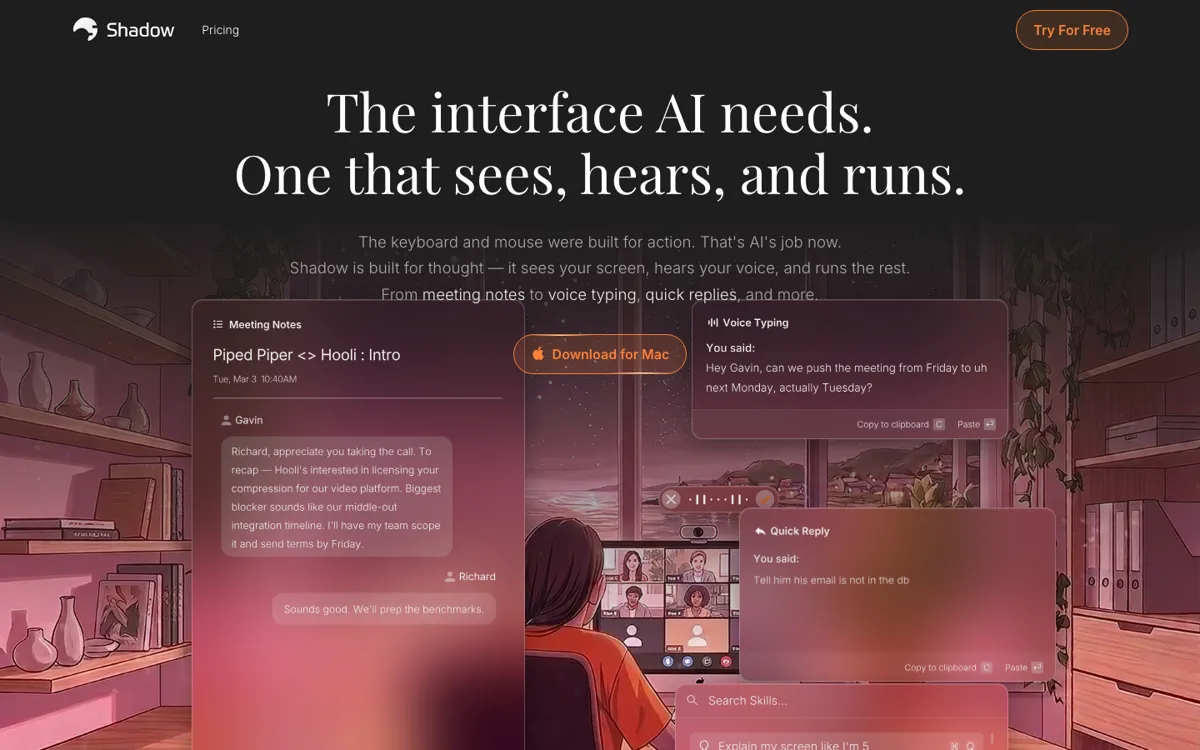
AI interface for your Mac that sees your screen, hears your voice, and runs custom actions

Review updated May 2026 By The AI Way Editorial Tested 204+ tools across the site 5 min read
Shadow Mac App Meeting Notes Privacy Focused Transcription Voice AI Workflow Builder Freemium from $8.00/mo

Our Verdict

Shadow is worth opening when the hard part is not writing itself, but turning live speech and screen context into the next useful thing without manual cleanup. Its edge is that it combines no-bot meeting capture, shortcut-triggered actions, and editable Skills in one Mac-native layer instead of making you stitch together separate note takers and text helpers. The catch is focus: if you do not work from a Mac or you rarely need to transform meetings and on-screen context into follow-ups, the product loses a lot of its point.

Try it
Free to start, then pay when the limits stop you. Starts at $8.00 USD.
open_in_new Try Shadow
Official Website Snapshot Visit Site ↗

check_circle Pros

  • It captures both what was said and what was shown, which is a real step up from meeting tools that only leave you with a transcript and no screen context.
  • The editable Skill model gives it more range than a fixed meeting summarizer, because the same capture layer can generate notes, replies, BANT breakdowns, pasted text, or other prompt-driven outputs.
  • The privacy posture is stronger than most cloud-first recorders, with on-device transcription and speaker diarization by default and AI calls only when you deliberately trigger a Skill.

cancel Cons

  • The strongest experience is still tied to Mac, while Windows and other devices are pushed to a waitlist rather than a usable current product.
  • Its best value depends on shaping or editing Skills, so users who want a dead-simple one-button note taker may find the product more configurable than necessary.
  • The paid tier is simple, but the real upgrade line is AI-heavy usage, so the free plan can feel complete at first and then suddenly narrow once custom actions become part of your daily routine.

Should you use it?

Best for: Turning meetings, spoken thoughts, or whatever is on your current screen into a written next step, especially when that next step is a follow-up email, action-item list, typed text, or structured summary you would otherwise clean up by hand.

Skip it if: Skip it if you need a cross-platform recorder for a mixed-device team right now, or if your real need is just plain transcription without custom actions, prompt logic, or screen-aware capture.

Is it worth the price?

Freemium Starts at $8.00 USD

The free tier is genuinely useful because it lets you test real meeting capture and recording behavior without hitting a fake teaser wall. The moment Shadow becomes a daily engine for AI notes, action skills, and shortcut-triggered outputs, Plus stops being optional and starts being the real product.

The Free Tier

Free includes unlimited transcription, unlimited audio recording, unlimited smart screenshots, and a 2-week Plus trial with no card required.

Paid Upgrade
$8/month

Plus unlocks unlimited AI features, including unlimited Action Skills, AI meeting notes, Meeting Skills, and AI chat.

One thing to know before you start

Start with one repetitive job, not ten. Shadow gets clearer once you pick a single output such as follow-up emails or cleaned-up voice typing, then tune one Skill until it saves real cleanup time.

What people actually use it for

Turning a finished meeting into follow-up work before context fades

Shadow is strongest when a call ends and the real pain starts. Instead of replaying the conversation, copying rough notes, and drafting an email from memory, you let the meeting capture feed a Skill that turns the call into action items, a recap, a BANT summary, or a follow-up draft right away. That saves the most time when the meeting included slides or on-screen walkthroughs that would be lost in a transcript-only tool.

Using speech plus screen context to draft text inside the app you already have open

Action Skills make more sense when you are already staring at a message, a doc, or a customer thread and do not want to re-explain the context in a chat window. Hit the shortcut, say what you want, let Shadow look at the active window, and get back a reply, summary, notes, or cleaned-up text. That is better than plain dictation when the screen itself is part of the instruction.

What does Shadow actually do?

A lot of AI meeting tools still force the same brittle pattern: invite a bot, hope everyone tolerates it, then live with a transcript that misses whatever was actually being shown on screen. The same fragmentation shows up outside meetings too. You might dictate into one tool, summarize in another, and paste replies manually into a third. Shadow is going after that mess directly. Its core bet is that speech alone is not enough context, and raw transcription alone is not enough output. The valuable layer is seeing the meeting window, hearing the discussion, and turning both into the next action without making you reconstruct the scene afterward.

That is where the Skill model matters. Shadow does not stop at recording. It lets you define what should happen after a call or after a shortcut-triggered capture, whether that is meeting notes, a BANT breakdown, an email draft, cleaned-up voice typing, or another custom prompt. The product also claims useful supporting pieces around that flow: speaker identification, smart screenshots of meeting windows, markdown export, webhook delivery, and local-first transcription. Put together, that makes it feel less like a single-use note taker and more like a capture-to-output layer that can sit on top of everyday Mac work.

The limitation is that Shadow is still narrow in where it fits cleanly. The Mac app is ready now, but Windows and other devices are still waitlist territory, so it is not the right default for a mixed-platform team that needs parity today. It also makes more sense for people who repeatedly turn calls or spoken thoughts into written artifacts. If your real need is just searchable transcripts, or if you never want to touch a custom prompt, simpler tools will feel lighter and more obvious. Shadow earns its complexity only when screen context and post-capture automation are the actual bottlenecks.

What you can do with it

Capture meetings without adding a bot and turn the call into notes, follow-ups, or structured summaries
Press a keyboard shortcut on any screen and turn voice plus screen context into pasted text, replies, notes, or code
Edit or write custom Skills so meeting and action flows run on your own prompts instead of fixed templates
Detect speakers, take smart screenshots of meeting windows, and export outputs through markdown files or webhooks
Keep transcription on-device by default while only sending AI tasks out when you actually trigger a Skill

Technical details

platform
Mac app available now, with Windows and other devices still on a waitlist
deployment
Local-first desktop product, with on-device transcription and speaker diarization plus cloud calls only when a triggered AI Skill needs them
api_available
Not an API-first product; the product surface is shortcut-triggered capture and in-app Skills, with webhook export as the main outward automation hook

Top Alternatives to Shadow

If Shadow is close but still misses the job, try one of these instead.

Key Questions

Is Shadow mainly a meeting bot like Otter or Fireflies?
No. Meetings are a big use case, but the product is broader than a bot recorder. Its real pitch is that it can capture meetings without joining as a bot, then also run shortcut-based actions anywhere else on your Mac using voice and screen context.
Can you test Shadow properly without paying?
Yes. The free tier is enough to test its core capture behavior because transcription, audio recording, and smart screenshots are not locked away. You only hit the real paywall once unlimited AI-driven outputs become part of regular use.
What is the biggest reason not to choose Shadow?
Platform fit. If you are not working from a Mac, or if you only need plain transcripts instead of custom actions and screen-aware capture, a simpler recorder will usually make more sense.