AuthorVoices AI Review

7.6/10

Turn an EPUB manuscript into AI-narrated audiobook files with chapter-level editing and export tools.

Review updated May 2026 By The AI Way Editorial Tested 99+ tools across the site 5 min read
AuthorVoices Content Repurposing Text-to-Speech Voice Cloning Web-Based Freemium from $22.50/mo

Our Verdict

AuthorVoices AI makes the most sense when you already have a finished book and want to hear it as an audiobook before paying for human narration or stitching audio by hand. Its real strength is the audiobook-specific workflow, with chapter splitting, voice previews, paragraph-level fixes, and export steps all aimed at one job instead of a generic text-to-speech sandbox. But you do need to watch the tradeoff between the two pricing tracks, because instant one-off credits buy speed and full narrator access while the cheaper subscription path adds queue time, monthly resets, and fewer eligible narrators.

Try it
Free to start, then pay when the limits stop you. Starts at $22.50 USD.
open_in_new Try AuthorVoices AI
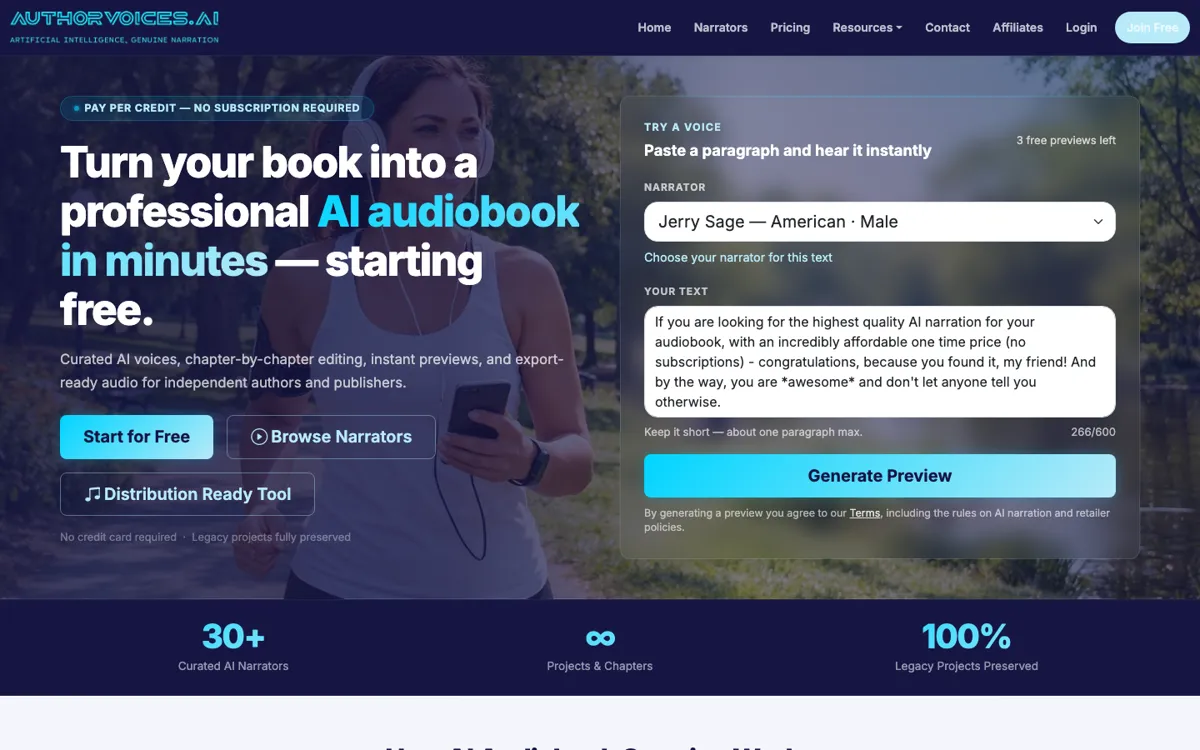
Official Website Snapshot Visit Site ↗

check_circle Pros

  • It starts from an EPUB manuscript and organizes chapters automatically, which removes a lot of manual setup before narration even begins.
  • You can preview voices and fix sections one by one instead of redoing an entire audiobook every time a paragraph sounds wrong.
  • The pricing page explains two distinct paths, instant credit packs for fast one-off work and Studio plans for repeat production, so the cost model is clearer than many AI voice tools.

cancel Cons

  • Studio subscriptions only work with 36 Studio-eligible narrators, while the instant credit path is the one that unlocks all 55 narrators.
  • Studio whole-book renders are queued and typically take 2 to 5 hours, so it is not the best fit if you need a full book turned around immediately.
  • Studio Credits and monthly Instant Credits reset each month, which can waste value if your audiobook schedule is irregular.

Should you use it?

Best for: Best for turning a finished EPUB manuscript into an audiobook draft you can audition, tweak section by section, and export without leaving a browser-based workflow.

Skip it if: Skip this if you need one flat subscription that includes every narrator with no queue tradeoff, or if you want a general voice API instead of an audiobook production workflow.

Is it worth the price?

Freemium Starts at $22.50 USD

The free entry point is useful for testing voices and the basic workflow, but real audiobook production quickly turns into a pricing choice between metered instant credits and a subscription with queue limits. If you only release one or two books a year, the one-time packs are easier to justify than paying monthly for credits that reset.

The Free Tier

Free account includes voice previews, but full production requires credit purchases or a Studio subscription.

Paid Upgrade
22.50

Paid plans unlock audiobook rendering, with Instant Credits enabling near real-time narration and access to all 55 narrators.

One thing to know before you start

Use the free voice previews and section-level edits on a representative chapter before buying a larger credit pack. That catches tone mismatch early and tells you whether you need instant rendering or can live with Studio queue times.

What people actually use it for

Auditioning an audiobook voice before committing to full production

You paste a representative paragraph, try several narrators, and hear how dialogue, pacing, and genre tone land before generating the whole book. That matters because audiobook voice mismatch is expensive to discover late. AuthorVoices AI is useful here because it gives free previews and curated narrator choices, but the payoff is highest when your manuscript is already stable and you are testing delivery rather than still rewriting chapters.

Turning a finished EPUB into a distributable audiobook draft

You bring in an EPUB manuscript, let the platform split chapters and sections automatically, then generate the book in pieces so you can correct weak paragraphs without rebuilding everything from zero. This saves time compared with manually assembling narration clips in a generic voice tool. It is less attractive if you need a fully human-style performance pass, because the platform is optimizing for structured AI production, not bespoke direction for every line.

Producing occasional audiobooks without a standing monthly narration budget

If you publish one or two books a year, the one-time Instant Credit packs are easier to map to a real release schedule than a subscription that resets every month. You can buy credits, use all 55 narrators, and render when you actually need the book. The tradeoff is that costs stay metered, so heavy repeat production may push you toward Studio plans if you can tolerate queue times and narrator restrictions.

What does AuthorVoices AI actually do?

A lot of authors do not need a general AI voice lab. They need a way to take a manuscript that is already written, hear what it sounds like as an audiobook, and fix rough narration spots without wrestling with audio software chapter by chapter. AuthorVoices AI is clearly framed around that job. The homepage flow starts with uploading an EPUB or building a project manually, then automatically detecting chapters and sections for audiobook production. That matters because the annoying part is often not just generating speech, it is keeping long-form book structure intact while you audition voices, check pacing, and avoid discovering obvious mistakes only after a full render finishes.

The product solves that problem by narrowing the workflow to a few concrete actions. You can browse more than 30 curated narrators on the homepage, use free previews by pasting a paragraph, pick a narrator that matches genre and tone, then generate narration section by section and fine-tune individual paragraphs before export. The FAQ adds a few important details: private cloned voices can be created and kept as long as credits remain in the account, and the platform can export files that feed directly into its distribution flow. This makes the tool feel less like generic text-to-speech and more like an audiobook assembly line with checkpoints where authors can still catch mistakes.

The main limitation is pricing complexity rather than missing core features. AuthorVoices AI splits usage into Instant Credits and Studio plans. Instant Credits work with all 55 narrators, render in near real time, and never expire, but they are metered purchases. Studio subscriptions shift toward predictable monthly spending, yet only 36 narrators are eligible there, whole-book renders are queued for roughly 2 to 5 hours, monthly credit buckets reset, and you can only start one Studio book per day. So the platform is strongest for authors who understand their production rhythm. If you expect unlimited immediate rendering under one flat monthly plan, this setup will feel tighter than it first appears.

What you can do with it

Upload an EPUB manuscript and have chapters and sections detected automatically.
Browse curated AI narrators, listen to samples, and preview a voice with pasted text.
Generate narration section by section and rework individual paragraphs before export.
Export finished audiobook audio and use the built-in distribution-ready workflow.
Create private cloned voices that remain private to your account and can be recreated from a new sample if deleted.

Technical details

platform
Web app
deployment
Cloud
api_available
No public API mentioned

Top Alternatives to AuthorVoices AI

If AuthorVoices AI is close but still misses the job, try one of these instead.

Key Questions

Is the free account enough to judge whether the voices fit your book?
Yes for initial testing, because the site offers free previews and no credit card is required to start. No for full production, because complete audiobook rendering depends on bought credits or a Studio subscription.
Can you fix only the weak parts of a narration instead of rerendering the whole book?
Yes, that is one of the more practical parts of the workflow. The platform lets you edit individual sections and regenerate as needed, which is much more useful for audiobook cleanup than starting over from scratch.
What is the catch with the Studio subscription plans?
The tradeoff is usage rules. Studio plans can make repeat production easier to budget, but they come with monthly credit resets, queue-based whole-book rendering, and only 36 Studio-eligible narrators.
Does AuthorVoices AI help with audiobook distribution too?
Yes, it supports a distribution workflow once your MP3 ZIP and M4B files are ready. The limitation is that Audible and Amazon are excluded, because their policies do not allow AI-narrated audiobooks.