MESA Review

8.2/10

Describe a Shopify task in plain English and MESA turns it into working store automation.

Review updated May 2026 By The AI Way Editorial Tested 99+ tools across the site 5 min read
MESA API Available App Integration Customer Support Web-Based Workflow Builder Freemium

Our Verdict

MESA is for Shopify teams that know the busywork they want removed but do not want to build brittle flows node by node. The strongest pitch is that you describe the store task and MESA turns it into automation that can touch real merchant operations, not just generate suggestions. But the product is tightly tied to Shopify workflows, so it is much less interesting if your problem is broader than commerce ops or if you need a general-purpose AI agent.

Try it
Free to start, then pay when the limits stop you.
open_in_new Try MESA
Official Website Snapshot Visit Site ↗

check_circle Pros

  • It starts from a merchant instruction instead of a blank workflow canvas, which cuts out one of the most annoying parts of store automation setup.
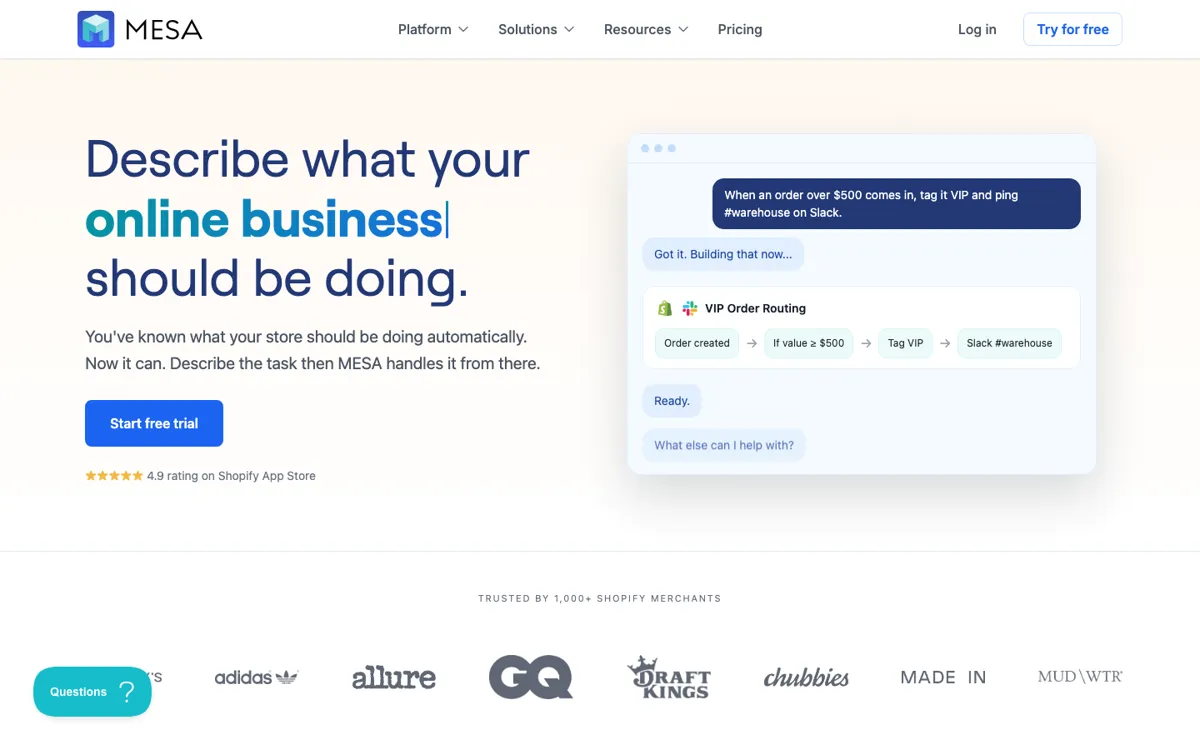
  • The Shopify examples on the homepage are specific enough to show real operational work, like routing VIP orders or handling repetitive back-office steps.
  • The mix of app integrations and human review makes it easier to automate real store processes without forcing everything into a risky full-autopilot mode.

cancel Cons

  • Most of the value is concentrated in Shopify operations, so teams outside that ecosystem will hit the product boundary quickly.
  • If your workflows are complex but poorly defined, natural-language setup can still leave you doing cleanup because store logic is messier than the prompt makes it look.
  • Merchants who only need a couple of simple rules may find a purpose-built Shopify app simpler than adding a broader automation layer.

Should you use it?

Best for: Best for turning repeat Shopify store tasks like order routing, inventory handling, or support handoffs into working automations without building the flow manually.

Skip it if: Skip this if your work is not centered on Shopify operations or if you only need a handful of narrow automations that a single-purpose app already handles.

Is it worth the price?

Freemium

The free entry is useful for testing whether MESA can actually map your store logic, but the real decision point is how fast your workflows become central to operations. Once automations start touching fulfillment, support, or multi-app processes every day, this stops being a casual add-on and becomes infrastructure you either commit to or replace.

The Free Tier

Free trial is offered from the pricing path, but the captured pricing copy should be checked carefully before assuming long-term free use.

Paid Upgrade
Contact for pricing

Paid plans are positioned for deeper operational automation across connected Shopify workflows.

One thing to know before you start

Start with one automation that already costs real time every day, like order tagging or warehouse alerts. If that first workflow does not hold up under real store conditions, adding more flows will not fix the mismatch.

What people actually use it for

Routing high-value or special-case Shopify orders

MESA fits when a merchant already knows the rule they want, like flagging orders above a threshold, tagging them, and notifying a team channel. The product is useful here because the job is not ideation, it is getting store logic into a working automation without building the whole thing manually. This saves the most time when the same operational exception keeps showing up every week.

Automating repetitive store operations across multiple apps

The product gets more interesting when store work spills across order management, inventory, support, fulfillment, and other connected apps. Instead of treating each app as a separate island, MESA tries to sit above them as the workflow layer. That is valuable for merchants with enough operational sprawl to feel the pain, but it can be too much tool for stores that only need a couple of basic triggers.

What does MESA actually do?

A lot of automation tools fail merchants at the same moment: the team knows exactly what repetitive store behavior they want, but still has to translate that idea into a logic tree, app mappings, edge cases, and trigger wiring. MESA is aimed at that gap. The homepage does not ask the user to think in workflow-diagram language first. It starts from a merchant sentence about what the store should be doing, then positions the product as the layer that turns that sentence into an actual automation. That is a more valuable promise than generic no-code language because the hard part for many store teams is not knowing the task, it is getting it built correctly.

The concrete examples help. The site talks about orders, inventory, fulfillment, customer support, Slack alerts, and 100+ app connections, which gives the product a grounded operational footprint instead of a vague AI wrapper feel. The built-in tools, templates, and human-in-the-loop framing also matter because store operations often break when one hidden assumption is wrong. MESA is not selling pure autopilot as the only mode. It is selling a faster way to get real workflows into place while keeping an escape hatch for the steps that should still be reviewed.

The boundary is also clear. MESA is strongest when the merchant problem is already inside Shopify and already repetitive enough to deserve a workflow layer. If the business mostly lives outside Shopify, or if the jobs are so simple that one dedicated app solves them, the product becomes harder to justify. It is also worth being skeptical of any natural-language automation promise when the underlying store logic is messy. The tool can remove setup friction, but it cannot magically make unclear business rules become clean automation just because they were typed into a chat-style prompt.

What you can do with it

Turn a plain-English Shopify request into a working automation flow.
Connect 100+ apps to move data and actions across store operations.
Automate order, inventory, fulfillment, and support tasks from one workflow layer.
Keep humans in the loop for steps that should not auto-run without review.
Use built-in tools and templates instead of wiring every automation from zero.
Handle Shopify-specific triggers and actions without needing a developer for every change.

Technical details

tool_use
100+ app integrations
deployment
Web app for Shopify automation
open_source
No
api_available
Yes

Top Alternatives to MESA

If MESA is close but still misses the job, try one of these instead.

Key Questions

Is MESA a general AI automation tool or mainly a Shopify product?
It is mainly a Shopify product. The homepage is centered on store operations like orders, inventory, fulfillment, and support, so the product makes the most sense when those workflows already define your day-to-day work.
Do you still have to build workflows step by step yourself?
Not in the way a blank-canvas automation tool usually expects. MESA's pitch is that you describe the task in plain English and it helps build the workflow from there, though real store logic may still need review and adjustment.
Is MESA useful for very small automation needs?
Sometimes, but not always. If you only need one or two narrow Shopify rules, a single-purpose app may be simpler, while MESA becomes more compelling once the work spans several repeated store processes.
Why would a merchant choose this over a normal workflow builder?
The main reason is that MESA tries to remove the workflow-design step itself. That matters if your team already knows the outcome it wants but does not want to spend time wiring every trigger, branch, and app handoff by hand.