Rows Review

8.2/10

AI spreadsheet for pulling, cleaning, and analyzing business data without SQL or formulas.

Review updated May 2026 By The AI Way Editorial Tested 262+ tools across the site 5 min read
Rows API Available App Integration Chrome Extension Free Forever No Credit Card Required Web-Based Freemium from $8.00/mo

Our Verdict

Rows is worth opening when the painful part of your spreadsheet work is not storing rows, but pulling messy business data into one place and getting answers without writing formulas or SQL. The tradeoff is that its best AI-heavy workflows are gated by monthly task limits, so it makes more sense for recurring ops and reporting work than for endless ad hoc analysis on the free tier.

Try it
Free to start, then pay when the limits stop you. Starts at $8.00 USD.
open_in_new Try Rows
Official Website Snapshot Visit Site ↗

check_circle Pros

  • It turns common spreadsheet chores like lookups, joins, pivots, and chart building into plain-language requests, which cuts a lot of formula wrangling for non-analysts.
  • It handles ugly source material that normal sheets hate, including PDFs, invoices, and images, then drops the result back into editable tables.
  • The pricing page is unusually concrete about AI task limits, file size caps, guest seats, API quotas, and automation frequency, so you can tell fast whether the free or Plus tier is enough.

cancel Cons

  • The free plan is a real teaser, not a serious operating tier, because five AI tasks per month disappears almost immediately once you start testing file extraction or analysis prompts.
  • Rows is strongest inside spreadsheet-shaped workflows, so teams wanting narrative BI dashboards or warehouse-grade analytics will still hit its ceiling and move back to dedicated data tools.
  • Some support and docs paths are harder to pin down from the public site than the product and pricing pages, which makes deep technical evaluation less straightforward than the marketing flow.

Should you use it?

Best for: Ops, finance, growth, and business users who live in spreadsheets and want to clean imports, merge tables, extract structured data from files, and answer routine analysis questions without waiting on SQL help.

Skip it if: Skip Rows if your team already works in a full BI stack and needs governed dashboards, warehouse modeling, or unlimited exploratory analysis without counting AI task quotas.

Is it worth the price?

Freemium Starts at $8.00 USD

The free plan is good enough to verify the core workflow, but not enough to run real weekly analysis work. The first practical paid step is Plus, and Pro is where automation and heavier AI usage start to look like an actual team tool instead of a demo account.

The Free Tier

Free plan includes 5 AI tasks per month, manual data table imports, 10 integrations accounts, up to 3 guests, and no credit card requirement.

Paid Upgrade
Plus starts at $8/user/month billed monthly, or $6/user/month billed annually.

Paid plans expand AI task quotas, automation frequency, file import size, API call limits, guest access, and integration capacity.

One thing to know before you start

Use Rows for the messy middle of business analysis, where data arrives in PDFs, screenshots, exports, and app integrations. If your source tables are already clean and your warehouse logic is settled, its AI layer matters less than its competitors in standard spreadsheet land.

What people actually use it for

Turn files into analyzable tables

A strong fit when invoices, reports, and image-based tables keep landing in your inbox and someone still has to key them into a sheet before any analysis can start. Rows lets you pull those files into structured tables, then keep working in the same spreadsheet instead of bouncing between OCR tools, manual cleanup, and another reporting layer.

Merge business exports without SQL help

Useful when ops or finance teams keep downloading exports from different tools and then lose half a day doing lookups, joins, and summary tables by hand. Rows is built for that middle layer, where the question is not warehouse design but getting one workable answer out of several mismatched tables fast.

Handle recurring spreadsheet reporting

A good match for weekly reporting loops where the same cleanups, charts, and summary questions come up again and again. Paid tiers matter here because daily or minute-level automation is what turns Rows from an interesting AI spreadsheet into a repeatable reporting tool.

What does Rows actually do?

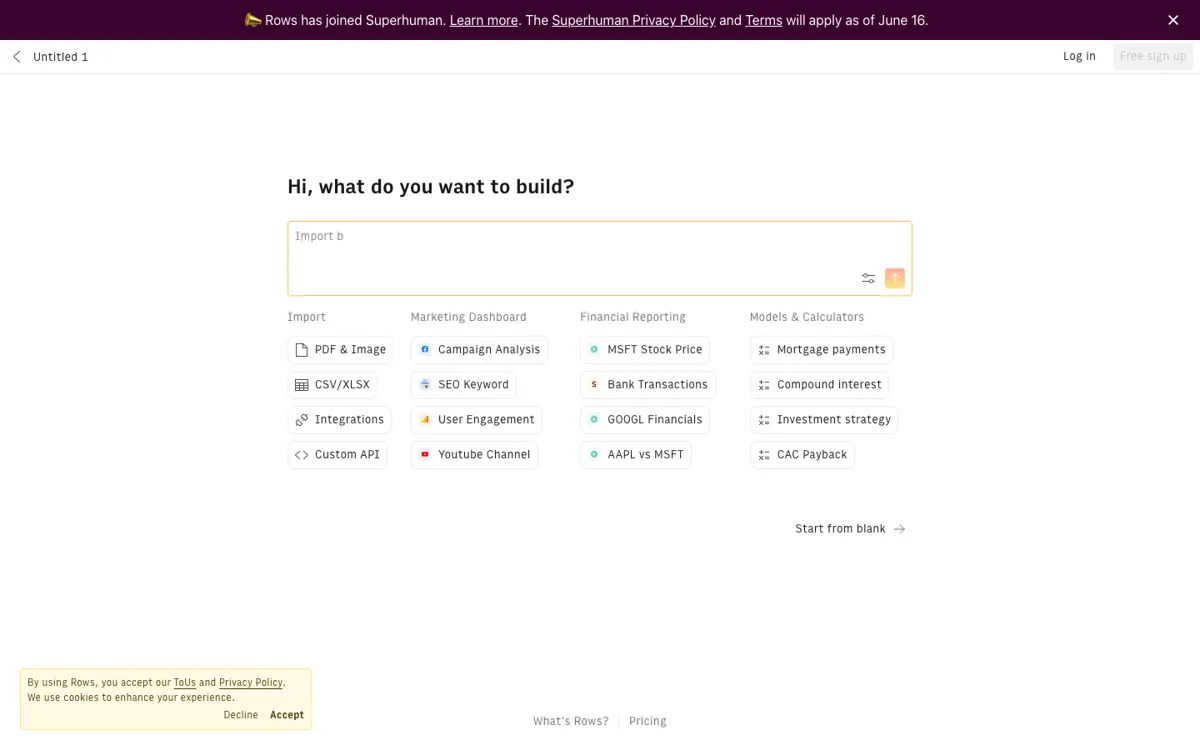
Rows is trying to win a very specific fight: the one where business teams already know the answer should be sitting somewhere in a spreadsheet, but the path to get there is miserable. Maybe the data is trapped in a PDF, spread across several exports, or blocked behind formulas nobody wants to maintain. Its value is not that it adds AI to a grid. Its value is that it collapses several annoying steps, extraction, cleanup, lookup, summarization, and charting, into one place where non-technical users already know how to work.

The product feels most differentiated when the job is multi-step and spreadsheet-native at the same time. You can ask for joins between tables, create calculated columns, run what-if analysis, classify text, or reconcile mismatched records without dropping into SQL or separate scripts. That is useful for ops, finance, and growth work where the bottleneck is often not lack of data, but the human glue work required to make disconnected tables usable. If your team spends more time fixing sheet logic than deciding what the numbers mean, Rows is aimed straight at that pain.

Its boundary is just as important as its promise. Rows is not the obvious pick for teams that already have a mature BI stack, warehouse models, and analysts comfortable in SQL. The free plan proves the concept but does not support heavy use, and the AI-task meter becomes part of the buying decision fast. That means Rows works best when you need spreadsheet speed with smarter ingestion and analysis, not when you need unlimited deep exploration or a governed analytics platform for an entire company.

What you can do with it

Ask for formulas, charts, pivots, and table operations directly in a cell.
Join, lookup, append, and reconcile tables with natural language prompts.
Extract tables and fields from PDFs, invoices, and images into editable sheets.
Run forecasting, outlier checks, what-if analysis, and cohort-style analysis without code.
Connect business tools and automate table refreshes on paid plans.

Technical details

platform
Web app with a Chrome extension for capturing contacts and a desktop app download linked from the site footer.
deployment
Cloud CRM with SOC 2 Type I and GDPR compliance claims, plus Google security certification noted on the site.
api_available
Yes. Pricing page lists Rows API calls on all plans, with higher monthly limits on paid tiers and custom endpoints on Enterprise.

Top Alternatives to Rows

If Rows is close but still misses the job, try one of these instead.

Key Questions

Is Rows actually free to use?
Yes, but only for light testing. The free plan is permanent and does not need a credit card, but five AI tasks per month means you will hit the wall quickly if you use file extraction or multi-step analysis more than casually.
Who gets the most value from Rows?
Teams that already run on spreadsheets but lose time on cleanup, joins, imports, and repetitive analysis get the clearest win. It is especially useful when the work starts with messy source files or disconnected business data instead of a clean warehouse table.
When should I choose something else?
Pick a standard spreadsheet if your work is mostly manual modeling and collaboration, or a BI tool if you need governed dashboards and deeper warehouse analytics. Rows sits in the middle, where the pain is turning scattered inputs into usable spreadsheet analysis fast.