Image3D Review

8.4/10

Generate production-ready 3D models from text or images in your browser.

Review updated May 2026 By The AI Way Editorial Tested 99+ tools across the site 5 min read
Image3D API Available No Credit Card Required Web-Based Freemium from $0.99/mo

Our Verdict

Image3D is useful when you need to get from a text prompt or flat image to a workable 3D asset without opening a full modeling package first. Its biggest advantage is speed plus format export, because it is trying to hand you a model you can move onward instead of trapping you in a browser preview. But it is still a generator-first workflow, so it makes less sense if your job depends on deep manual control over mesh quality, scene assembly, or advanced texture work from the start.

Try it
Free to start, then pay when the limits stop you. Starts at $0.99 USD.
open_in_new Try Image3D
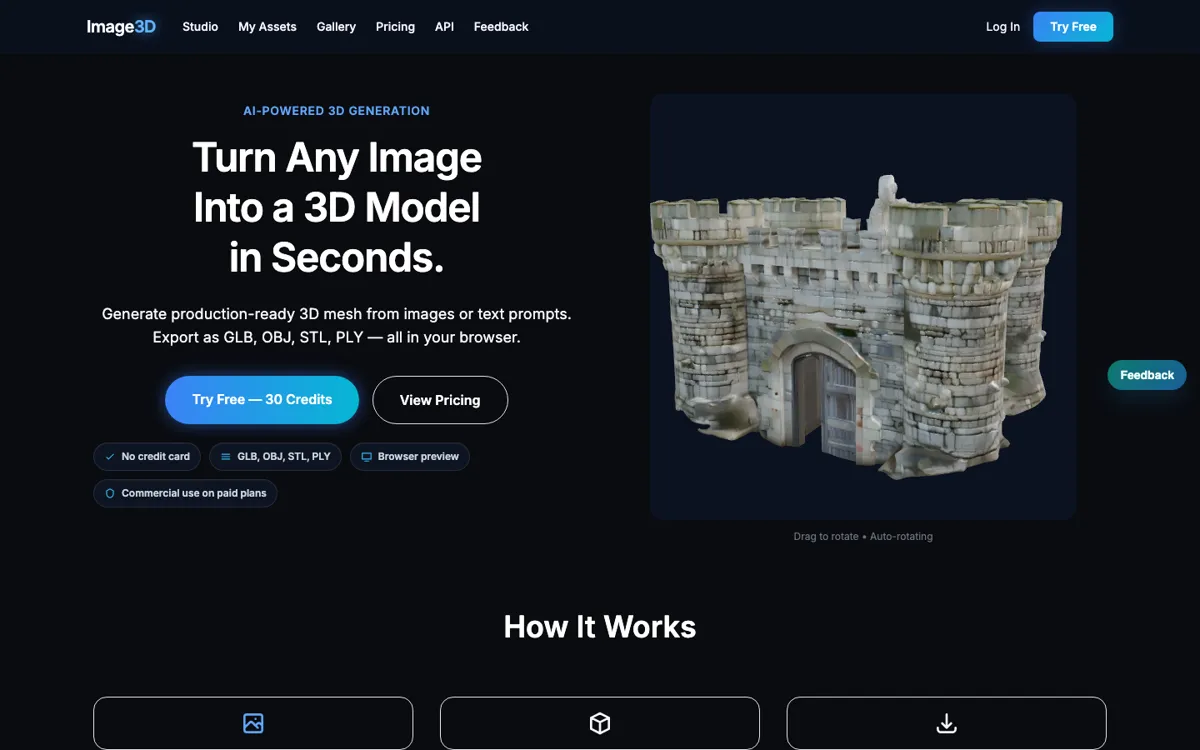
Official Website Snapshot Visit Site ↗

check_circle Pros

  • It supports both text-to-3D and image-to-3D, which makes it more flexible when some projects start from prompts and others start from product photos or sketches.
  • The browser workflow lowers setup friction, so you can test ideas before committing to a heavier 3D pipeline.
  • Export support for GLB, OBJ, STL, and PLY makes the output easier to hand off into other modeling, printing, or rendering workflows.
  • The official docs include an API, which gives teams a path to automate asset generation instead of clicking through the Studio every time.

cancel Cons

  • The credits model is easy to outgrow if you are running lots of experiments instead of a few deliberate generations.
  • This is faster than manual modeling, but it is not a replacement for artists who need precise control over topology and finishing details.
  • The free entry point is real, but meaningful production use will still turn into paid credit spend once iteration volume rises.

Should you use it?

Best for: Best for turning prompts or reference images into exportable 3D assets for mockups, prototype reviews, or downstream modeling and printing workflows.

Skip it if: Skip this if you need a full 3D creation suite with hands-on modeling control, or if your workflow burns through lots of test generations and credit-based pricing will become annoying fast.

Is it worth the price?

Freemium Starts at $0.99 USD

The free tier is enough to see whether the exported models are usable in your actual workflow. The cost problem starts when a single asset takes multiple retries, because credit-based pricing feels light at first and then punishes heavy experimentation.

The Free Tier

Free tier includes 10 credits, with 30 credits unlocked for $0.99 and no credit card required to start.

Paid Upgrade
$0.99

Unlock more credits for additional generations beyond the free allowance.

One thing to know before you start

Use the free credits to test the same asset idea in both image-to-3D and text-to-3D modes before paying. The real question is not whether it can generate something, but which input style gives you fewer cleanup steps afterward.

What people actually use it for

Prototype a product or concept from a single reference image

A designer or marketer can upload a product shot, concept sketch, or visual reference and get a 3D model without starting from a blank scene in a traditional modeling tool. That saves time when the first goal is proving shape and presence, not polishing every geometric detail.

Create rough 3D assets from prompts for downstream editing

If you already know the object you want but do not want to model the first version by hand, Image3D can produce a base asset from text and let you export it into another workflow. This is most useful when the generated result is a starting point you plan to refine later, not the untouched final deliverable.

Automate 3D generation inside a production pipeline

The API matters when a team wants to generate or test many assets programmatically instead of relying only on the browser Studio. That is valuable for internal pipelines or repeated generation tasks, but the economics depend on how often you spend credits and how much cleanup each generated model still needs.

What does Image3D actually do?

The hard part of using AI for 3D work is usually not getting any result at all. It is getting something that can leave the demo page and enter a real workflow. Many tools are fine at producing a quick visual tease, but much weaker when you actually need an object file for a mockup, print test, or downstream render pipeline. Image3D is interesting because the homepage anchors the experience around image-to-3D and text-to-3D in the browser, then immediately backs that up with export formats that people actually use. That makes it easier to imagine a concrete job: upload a product image, generate a 3D version, export it, and move on to the next step instead of staying trapped in preview mode.

The practical solution here is speed plus portability. The Studio runs in the browser, so the first barrier is low, and the official pages point to exports like GLB, OBJ, STL, and PLY, which makes the output more interoperable than a closed viewer format. The API documentation adds a second layer of usefulness, because this is not limited to manual clicking in a web app. A team can use it as a generation service when they need lots of repetitive asset work. That combination is what keeps Image3D from feeling like a novelty generator. It is not just producing a visual; it is trying to produce something you can carry into a larger workflow.

The tradeoff is that a generator-first workflow is still different from a modeling-first workflow. If you need exact topology, hand-tuned surfaces, or scene-level craft from the beginning, a traditional 3D tool will still fit better. The pricing page also signals the usual credit-system tension: there is a real free starting point and even a cheap unlock, but repeated experimentation adds up. So Image3D looks strongest for fast asset prototyping, quick conversions, and early-stage object generation. It looks weaker for artists who already know they need meticulous control rather than fast starting geometry.

What you can do with it

Generate 3D models from a text prompt directly in the browser.
Turn a reference image into a downloadable 3D model.
Export models in GLB, OBJ, STL, and PLY formats.
Use the API to generate 3D assets programmatically.
Unlock more generations with a credits system instead of a fixed seat plan.
Work from the Studio web app without installing a desktop tool first.

Technical details

platform
Web app
deployment
Cloud
api_available
Yes

Top Alternatives to Image3D

If Image3D is close but still misses the job, try one of these instead.

Key Questions

Can Image3D work from both prompts and reference images?
Yes. The official site explicitly positions it as both text-to-3D and image-to-3D, so you can either describe an object or start from a visual reference. Which one works better depends on whether your source image already captures the shape you need.
Is this only a web demo, or can you export the model?
You can export the model. The official site lists GLB, OBJ, STL, and PLY support, which is the main reason the tool is useful beyond casual experimentation.
Is there a real free way to try it?
Yes. The pricing page shows a free tier with credits and says no credit card is required to start. That is enough to test output quality before deciding whether paid credits are worth it for your workload.
Who should not use Image3D as their main 3D tool?
People who need deep manual control should not treat it as a full replacement for a traditional 3D package. It is better as a fast generation and export tool than as a full craft environment for precise modeling work.