Image to Image AI Review

8.1/10

Transform an existing image with text prompts using AI editing tools.

Review updated May 2026 By The AI Way Editorial Tested 99+ tools across the site 5 min read
Image2Image.ai Commercial Rights Image-to-Image Product Photography SaaS Text-to-Image Web-Based Freemium from $8.00/mo

Our Verdict

Image to Image AI makes the most sense when you already have a source image and want to push it somewhere else fast, not when you need to direct every pixel from zero. Its value is the speed of prompt-based rewrites for variations, cleanup, and styling, especially inside a broader browser-based image workflow. But if you need exact composition control or repeatable professional editing decisions, the same AI looseness that makes it fast can also make it harder to trust for precision work.

Try it
Free to start, then pay when the limits stop you. Starts at $8.00 USD.
open_in_new Try Image to Image AI
Official Website Snapshot Visit Site ↗

check_circle Pros

  • It solves the common case where the user wants to modify an existing image instead of generating a brand-new one from text.
  • The surrounding tool suite makes it easier to keep iterating in one place instead of bouncing between separate AI image utilities.
  • Paid plans clearly add commercial-use rights and priority processing, which matters when the output is headed into client or storefront work.
  • The browser workflow lowers the barrier for quick concept edits, style changes, and visual experiments.

cancel Cons

  • Prompt-based editing is fast, but it is still less precise than manual layer-based design tools when details really matter.
  • The free path is good for testing, but daily generation limits push regular use into paid plans quickly.
  • Public third-party validation was limited in this run, so the strongest claims still need user-side testing.

Should you use it?

Best for: Best for creators, marketers, sellers, and casual designers who already have a source image and want quick AI-driven variations, cleanup, or style changes in the browser.

Skip it if: Skip this if you need pixel-level control, layered editing, or highly consistent production design outcomes. It is also a weak fit if you mostly need brand-new image generation rather than edits on an existing asset.

Is it worth the price?

Freemium Starts at $8.00 USD

The free tier is enough to see whether the prompt-editing workflow works for you, but regular image iteration will hit the paid wall quickly. The paid plans make more sense when you repeatedly need commercial-use outputs and do enough generations to care about faster processing.

The Free Tier

Free includes limited daily generations and does not allow commercial use.

Paid Upgrade
$8/month

Paid plans add unlimited daily generations, commercial-use rights, and priority processing.

One thing to know before you start

Use a source image that already has the framing and subject placement you want. That is usually the fastest way to get a useful result from image-to-image tools, because the model can spend its effort on transformation instead of guessing structure.

What people actually use it for

Turning one source image into multiple visual directions

A common creative bottleneck is not generating the first image, but exploring several directions once one decent source image already exists. Image to Image AI is built for that step. You can upload the image you already like, then push it into a different style, mood, background, or composition variant through prompts. That is useful for creators or marketers who need options quickly without rebuilding the concept from zero. The value is highest when speed matters more than exact control over each edit.

Cleaning up or restyling product and profile visuals

Many users do not need full illustration workflows. They need to remove distractions, improve a photo, change the presentation, or turn a rough image into something more polished for a profile, storefront, or campaign. Because Image to Image AI sits next to tools like watermark removal and headshot generation, it fits well into this kind of practical cleanup workflow. The benefit is that you can keep moving inside a browser-first suite instead of switching between multiple narrow apps for each small change.

Fast experimentation before committing to manual design work

Sometimes the best use of AI editing is not the final asset. It is the draft stage where you need to test concepts cheaply before deciding which direction deserves deeper manual work. Image to Image AI works well in that role because it can generate variations from an existing image with very little setup. That makes it useful for moodboarding, concept testing, or client optioning. The tradeoff is that once a direction needs exact polish, a traditional editor may still be the safer finishing tool.

What does Image to Image AI actually do?

A lot of visual work starts from the wrong assumption that the user needs a brand-new image. In practice, many people already have a source photo, product shot, portrait, or rough concept and just want to change it without rebuilding everything from zero. That is where image-to-image tools matter. They shorten the path from “this is close” to “this is usable” by letting the user preserve some structure while rewriting style, detail, or context. The old alternative is usually a slower mix of manual editing, stock searching, or starting over with text-to-image prompts that may lose the composition the user wanted to keep in the first place.

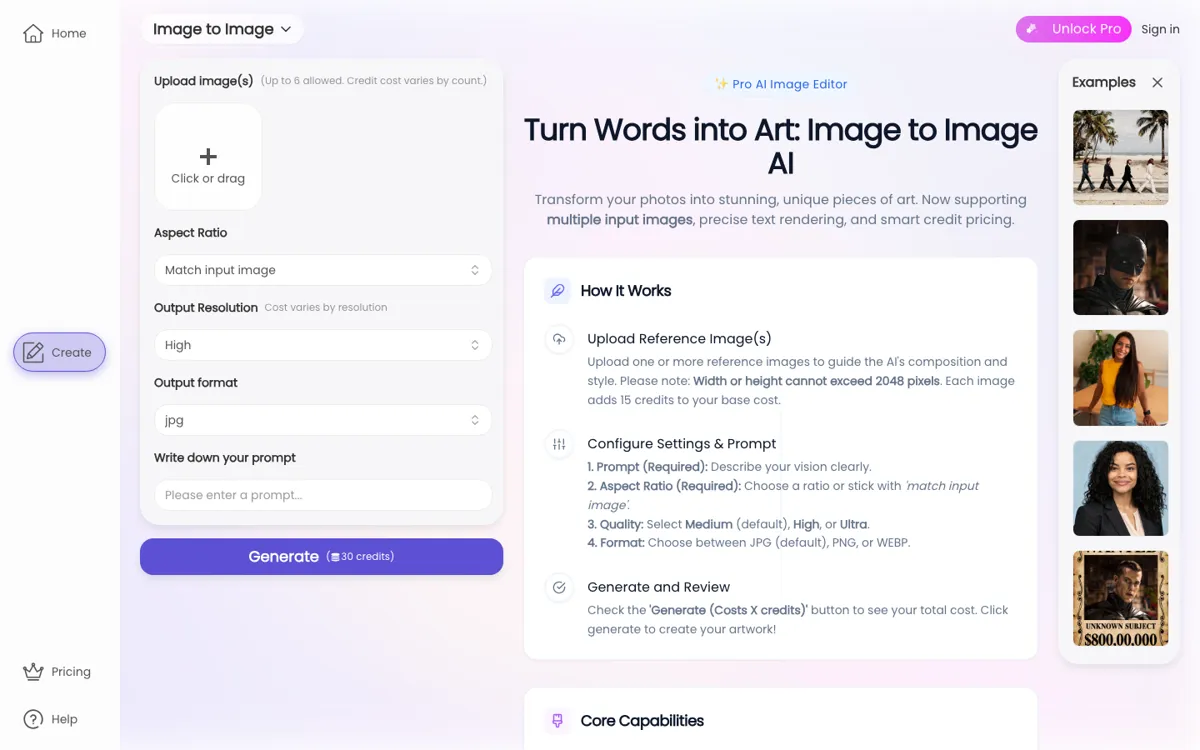
Image to Image AI is positioned directly around this transformation step. The site frames it as a browser-based tool where the user uploads an image and applies text-guided edits to reshape the result. It sits inside a larger AI image suite with related tools like text-to-image, watermark removal, headshot generation, and prompt-based image editing, which gives it more practical value than a single isolated demo tool. That surrounding context matters because users often need more than one move in a session: restyle the image, clean it up, remove clutter, or turn it into a more polished deliverable. The product is strongest when used as part of this fast, iterative editing loop.

The limitation is precision. Prompt-based image editing can move quickly, but it is still not the same as controlling layers, masks, selections, and exact adjustments in traditional creative software. That means the product fits users who want speed, variation, and low-friction experimentation more than users who need strict predictability or brand-perfect execution. The free tier is enough to prove whether the workflow feels natural, but regular output and commercial use push many users into paid plans. If the job needs exact art direction, AI variations may create extra review work. If the job needs many quick concept edits, the same looseness becomes the reason to use it.

What you can do with it

Upload an existing image and transform it with a text prompt instead of starting from scratch.
Apply style changes, object edits, background changes, and scene variations to source images.
Use the tool as part of a broader AI image suite with prompt editing, watermark removal, and headshot generation.
Generate commercial-use outputs on paid plans with copyright ownership stated on the pricing page.
Edit images through a browser workflow without installing desktop software.
Access higher-quality generations and priority processing on paid plans.

Technical details

platform
Web app
deployment
Cloud
api_available

Top Alternatives to Image to Image AI

If Image to Image AI is close but still misses the job, try one of these instead.

Key Questions

Can you use Image to Image AI for free first?
Yes. The pricing page positions the free plan as a way to start testing the workflow, but it comes with limited daily generations and without commercial-use rights.
Is this better for editing an existing image or creating a new one from scratch?
It is better for editing an existing image. The core workflow is built around uploading a source image and transforming it with a prompt rather than inventing the whole composition from zero.
Do paid plans change the rights and output quality in a meaningful way?
Yes, in practical terms they do. The pricing page says paid plans add commercial-use rights, unlimited daily generations, and priority processing, which makes them more suitable for regular creative work than the free tier.
When should you skip a tool like this and use traditional editing software instead?
Skip it when exact control matters more than speed. If the job depends on precise retouching, predictable layout control, or fine-grained adjustments, a traditional editor is still the safer final tool.