AI Translate Video Review

8.6/10

Translate uploaded or linked videos into 50+ languages with AI dubbing, lip-sync, and SRT export.

Review updated May 2026 By The AI Way Editorial Tested 99+ tools across the site 5 min read
AI Translate Video Auto Subtitles Lip Syncing Video Translation Voice Cloning Web-Based Freemium from $19.00/mo

Our Verdict

AI Translate Video is easiest to justify when you already have a finished video and the real bottleneck is getting it into other languages fast. Its strongest point is that it bundles subtitles, dubbing, voice cloning, and lip-sync into one translation-first workflow instead of making you chain separate tools together. But it is still a credit-metered service, so heavy localization work can turn into an ongoing usage bill rather than a one-time software decision.

Try it
Free to start, then pay when the limits stop you. Starts at $19.00 USD.
open_in_new Try AI Translate Video
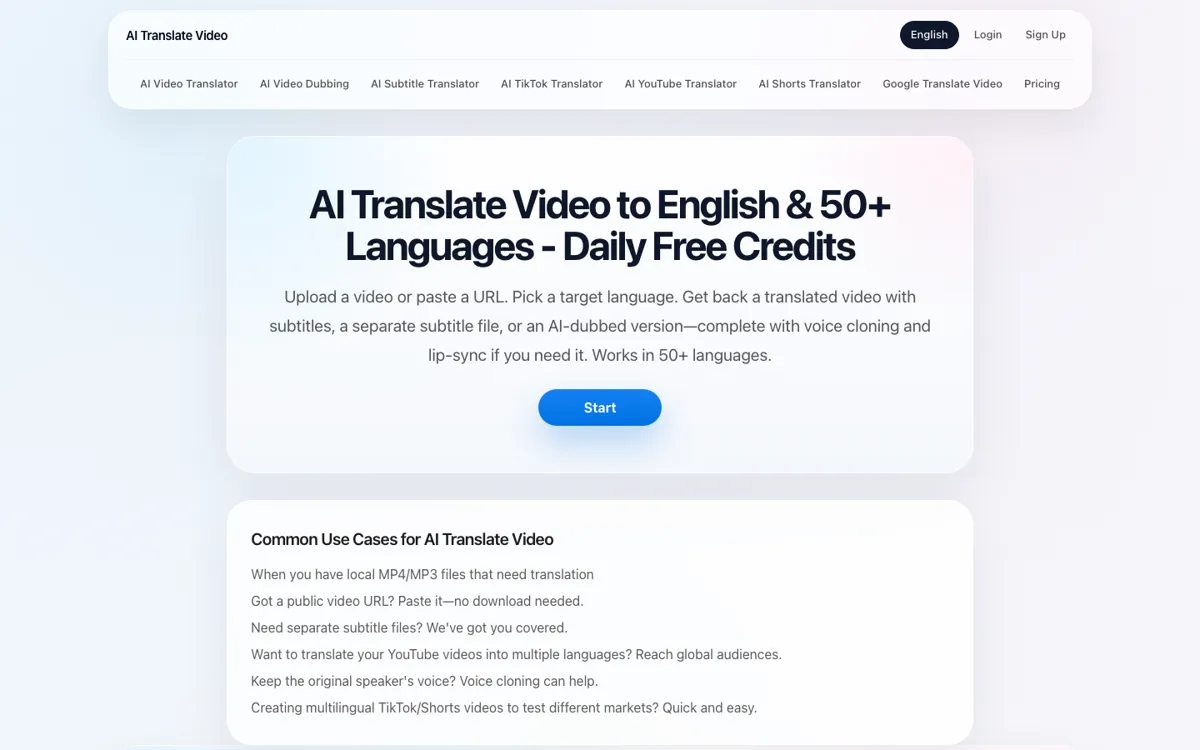
Official Website Snapshot Visit Site ↗

check_circle Pros

  • It keeps the workflow simple, bring a finished video or public URL, choose a language, and get translated output without rebuilding the edit from scratch.
  • The product covers several localization outputs in one place, subtitles, dubbed audio, lip-sync, and SRT export.
  • The pricing page is unusually clear about plan tiers, top-ups, and output modes, which reduces guesswork before testing.

cancel Cons

  • The service is usage-based through a credit system, so recurring translation volume can get more expensive than the entry price suggests.
  • This is a post-production localization tool, not a full video editor, so it will not help if your source video itself still needs heavy cutting or cleanup.
  • The site promises voice cloning and lip-sync, but it does not expose much detail on edge cases like accents, overlapping speakers, or difficult source audio.

Should you use it?

Best for: Turning an already finished video, course clip, marketing asset, YouTube upload, or social short into other languages without manually rebuilding subtitles and dubbed audio by hand.

Skip it if: Skip this if your main problem is editing raw footage, fixing bad audio, or producing a video from scratch. Also skip it if you need predictable flat-cost localization at scale, because the credit model is part of the product economics.

Is it worth the price?

Freemium Starts at $19.00 USD

The free tier is good for seeing whether the workflow and output modes fit your needs, but the real cost question starts once you localize video regularly. If you are translating on an ongoing schedule, the credit system matters more than the headline $19 starting plan.

The Free Tier

Free plan is for trying subtitle translation and short AI dubbing tasks; signup bonus 20 credits included.

Paid Upgrade
$19/month

Paid tiers are built for more recurring subtitle, dubbing, and lip-sync translation volume, with top-up packs for extra usage.

One thing to know before you start

Test one representative video before moving a whole batch. The key question is not whether it can translate at all, but whether its dubbing and lip-sync output hold up on the kind of speaking pace and delivery your videos actually use.

What people actually use it for

Translate a finished YouTube or course video into other languages

If the edit is already locked and you just need the same content to work in another language, AI Translate Video gives you a cleaner route than redoing subtitles, dubbing, and export steps separately. You upload the finished file or paste the public video URL, pick the target language, and choose whether subtitle-only output is enough or whether you need dubbed and lip-synced delivery. That is most useful when the asset is already good and the delay is purely in localization.

Localize short-form marketing clips faster than a manual dubbing process

For teams pushing the same video into several markets, the product compresses multiple handoff steps into one service. You can translate the spoken content, keep subtitles visible, and move to dubbed delivery without booking a separate voice workflow first. That saves time on fast-moving campaigns, but the economics still depend on how often you need extra credits and whether lip-sync quality matters more than simple speed.

What does AI Translate Video actually do?

Video localization usually becomes painful after the creative work is already done. The cut is approved, the pacing works, and the message is ready, but now someone has to turn that same asset into several languages without breaking timing, subtitles, or spoken delivery. The slow version means separate subtitling, separate dubbing, manual export, and often another round of cleanup when things drift out of sync. AI Translate Video is aimed at that exact bottleneck. The homepage leads with a direct workflow, upload a video or paste a public URL, then translate it into English or 50+ other languages with subtitles, dubbing, and optional lip-sync layered onto the finished asset.

What makes the product useful is not one isolated feature but the way the outputs are grouped around a finished-video workflow. The official copy says you can translate uploaded or URL-based videos, generate AI dubbed output, clone the voice, add lip-sync if needed, and export both burned-in subtitles and downloadable SRT files. The subtitle-translator page reinforces that the product can be used in lighter subtitle-first scenarios too, while the pricing page shows separate positioning for subtitle-only translation, dubbed translation, and lip-sync dubbed translation. That combination matters because many teams do not need a new editor. They need one service that handles the localization layer cleanly enough to publish faster.

The tradeoff is that AI Translate Video is still a metered service, not a flat unlimited utility. The pricing page shows a free plan, paid tiers starting at $19, and extra top-up packs, which signals that usage management is part of the experience. That is fine for testing and occasional projects, but it becomes a bigger decision if you are localizing frequently or running long videos through higher-end output modes. There is also a natural product boundary here: if your source video has poor audio, messy edits, or creative problems that should have been fixed before localization, this tool does not replace upstream production work. It is strongest when the video is already finished and the translation layer is the real blocker.

What you can do with it

Upload a video file or paste a public video URL for translation.
Translate finished videos into English and 50+ languages.
Generate AI dubbed output with optional voice cloning.
Create lip-synced translated videos when you need spoken delivery to match the face.
Export burned-in subtitles or downloadable SRT subtitle files.

Technical details

deployment
Web
open_source
false

Top Alternatives to AI Translate Video

If AI Translate Video is close but still misses the job, try one of these instead.

Key Questions

Can this translate a video from a link, or do you have to upload a file?
It supports both. The official site says you can upload a video file or paste a public video URL, which makes it easier to test existing YouTube or hosted content without re-exporting first.
Is this only for subtitles, or can it also dub the voice?
It does more than subtitles. The product also offers AI dubbing, voice cloning, and a lip-sync mode for translated video output.
How many languages does it support?
The site says English plus 50+ languages. The practical question is less the count and more whether the dubbing quality holds up for the languages you actually need, so testing one representative video first is the safer move.
Is the cheapest plan enough for regular localization work?
Probably only for lighter or occasional use. The paid entry point starts at $19, but the service also uses credits and top-ups, so regular production use depends on how much video volume you put through it.