UniMusic AI Review

7.8/10

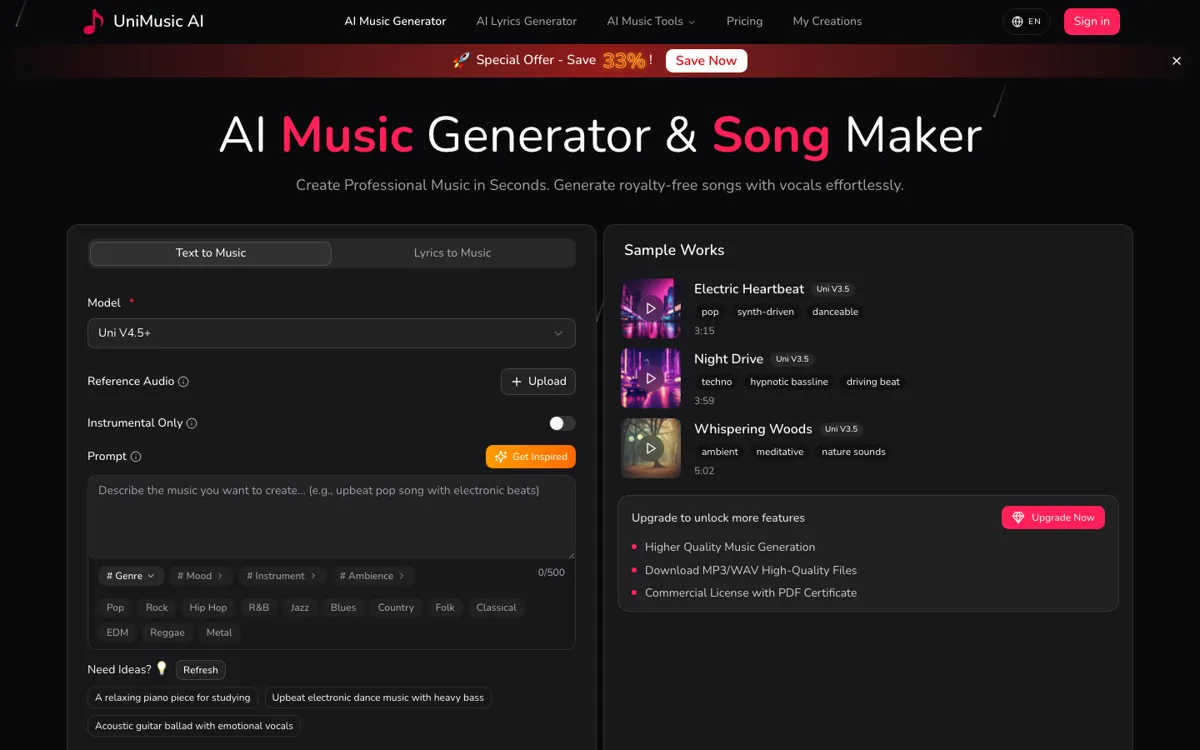
Generate royalty-free songs and instrumentals from prompts, lyrics, or reference audio.

Review updated May 2026 By The AI Way Editorial Tested 133+ tools across the site 5 min read
UniMusic AI Commercial Rights Music Generation Songwriting Web-Based Freemium from $24.00/mo

Our Verdict

UniMusic AI is strongest when you need music output fast and often, not when you want to handcraft one track end to end. Its real appeal is the combination of prompt-based generation, commercial-use framing, and adjacent editing utilities like stem splitting, which makes it easier to fit into content workflows than a bare music toy. But once you rely on it heavily, the credit model and plan boundaries start to matter a lot more than the demo experience, so this works best for volume-driven asset creation rather than for perfectionist production work.

Try it
Free to start, then pay when the limits stop you. Starts at $24.00 USD.
open_in_new Try UniMusic AI
Official Website Snapshot Visit Site ↗

check_circle Pros

  • It covers more than one input style, so you can start from a prompt, lyrics, or reference material instead of being locked into a single generation path.
  • The paid plans add practical workflow extras like stem splitting, vocal removal, and commercial-use rights rather than only increasing raw generation count.
  • The browser-based setup makes it much faster to test multiple music directions than opening a full audio project from scratch.

cancel Cons

  • The useful rights and workflow features are tied to paid plans, so the free tier is better for testing than for serious content production.
  • Because the product runs on monthly credits, heavy experimentation can turn into plan pressure quickly if you generate a lot of drafts.
  • The site sells breadth and speed well, but it gives less evidence about how much fine-grained control experienced producers will get over arrangement details.

Should you use it?

Best for: Best for making soundtrack drafts, social media music beds, demo songs, or quick concept tracks when the main goal is to generate enough options fast. It fits creators and teams who need music assets feeding a broader publishing workflow, not a single perfectionist release cycle.

Skip it if: Skip this if you need surgical control over arrangement, mixing, and production decisions inside a traditional music workflow. Also skip it if you expect the free tier to cover commercial output at scale, because the valuable rights and export features sit behind paid plans.

Is it worth the price?

Freemium Starts at $24.00 USD

The free tier is useful as a test bench, but the product becomes real only when you start paying for credits, rights, and higher-value outputs. If you generate music in batches for client or channel work, the monthly plan choice matters more than the headline demo because volume is exactly what triggers the upgrade pressure.

The Free Tier

Free tier includes limited monthly credits and basic generation for testing.

Paid Upgrade
$24/month

More monthly credits plus commercial-use rights and higher-value music utilities.

One thing to know before you start

Use the free tier to learn what kinds of prompts and song structures the model handles well before spending credits at scale. The product will feel much more cost-effective once you know which requests reliably get you close on the first few tries.

What people actually use it for

Make music beds for short-form content

A creator cutting multiple shorts, explainers, or promo clips each week can use UniMusic AI to turn a rough vibe description into background music fast. The value is not in replacing a composer for one masterpiece track, it is in producing enough workable options that editing does not stall while waiting for music. The paid rights matter here because once the clip goes public or client-facing, the licensing side stops being theoretical.

Draft full songs from lyric ideas

If someone already has lyrics or a song concept but does not want to build everything in a DAW from zero, UniMusic AI can turn that text into a first-pass musical direction. That saves time at the ideation stage and gives the user something concrete to react to instead of just imagining arrangement choices. It is most useful when speed matters more than micro-level control over every musical element.

Generate stems for quick post-production reuse

Teams making recurring video content often need to pull a track apart, reuse an instrumental bed, or remove vocals before dropping the piece into an edit. UniMusic AI is useful here because it combines generation with utility features like stem splitting and vocal removal. That makes it easier to keep assets moving across multiple edits, although users with deep audio-post standards may still want to finish the final polish elsewhere.

What does UniMusic AI actually do?

The main reason people open AI music tools is rarely artistic purity. It is usually because they need music now, for a video, a product demo, a trailer stub, a social post, or a rough song concept, and opening a full production workflow is too slow for that first pass. UniMusic AI is aimed directly at that pressure. The product asks you for a prompt, lyrics, or another starting point, then tries to turn that input into something you can actually listen to and react to instead of leaving the idea stuck in text.

What makes UniMusic AI more usable than a one-button novelty is the surrounding toolset and licensing framing. The pricing page points to a free tier for testing, then paid tiers that add more monthly credits, commercial-use rights, and utilities like vocal removal or stem splitting. That means the product is not just about generating a song-shaped file. It is trying to become a practical source of music assets that can move into editing, publishing, or client work without forcing the user to leave the browser every time a track needs to be repurposed.

The limitation is that speed and convenience come with a meter running in the background. Once your workflow depends on frequent experiments, retries, and multiple versions, the credit system starts shaping how you use the tool. The site also says less about deep arrangement control than it does about breadth, which is a clue about where the product is strongest. UniMusic AI makes the most sense for rapid music generation and reuse. It makes less sense for users who want detailed producer-level control over every structural and sonic decision.

What you can do with it

Generate full songs or instrumentals from text prompts, lyrics, or reference inputs.
Use a prompt enhancer and newer model options to shape style and arrangement faster.
Download royalty-free tracks in higher quality on paid plans.
Split stems or remove vocals for reuse and editing workflows.
Apply commercial-use rights on paid tiers for content and business projects.

Technical details

platform
Web app
deployment
Cloud
api_available
No public API mentioned

Top Alternatives to UniMusic AI

If UniMusic AI is close but still misses the job, try one of these instead.

Key Questions

Is the free plan enough to test UniMusic AI properly?
Yes, for learning the workflow. The pricing page shows a free tier, but the paid plans are where the more meaningful output volume and commercial-use value start to appear.
What changes once I move to a paid plan?
You get more than extra generations. The paid tiers add larger monthly credit pools and higher-value features like commercial-use rights and music utility tools such as stem-related workflows.
Can UniMusic AI help beyond raw song generation?
Yes. The site positions it as more than a prompt-to-song toy by including tools like vocal removal and stem splitting, which matter if you plan to reuse tracks in edits or other content pipelines.
Who is likely to outgrow UniMusic AI fastest?
Users who need deep production control or generate large numbers of drafts every month will hit the limits first. The product is strongest as a fast generation and reuse layer, not as a full substitute for a detailed music-production environment.