Song.do Review

8.1/10

Generate full songs from text, lyrics, and style controls in a browser.

Review updated May 2026 By The AI Way Editorial Tested 99+ tools across the site 5 min read
Song.do Music Generation Songwriting Voice AI Web-Based Freemium from $10.00/mo

Our Verdict

Song.do is for people who want to go from a text idea to a playable song without opening music software. Its best point is not just that it generates songs, but that it lets you steer genre, mood, voice, instruments, and tempo before you render, which gives casual users more direction than a single prompt box. But the free tier is tight enough that repeat use turns into a credits decision fast, and the public product pages do not suggest deep post-generation editing for people who want production-grade control.

Try it
Free to start, then pay when the limits stop you. Starts at $10.00 USD.
open_in_new Try Song.do
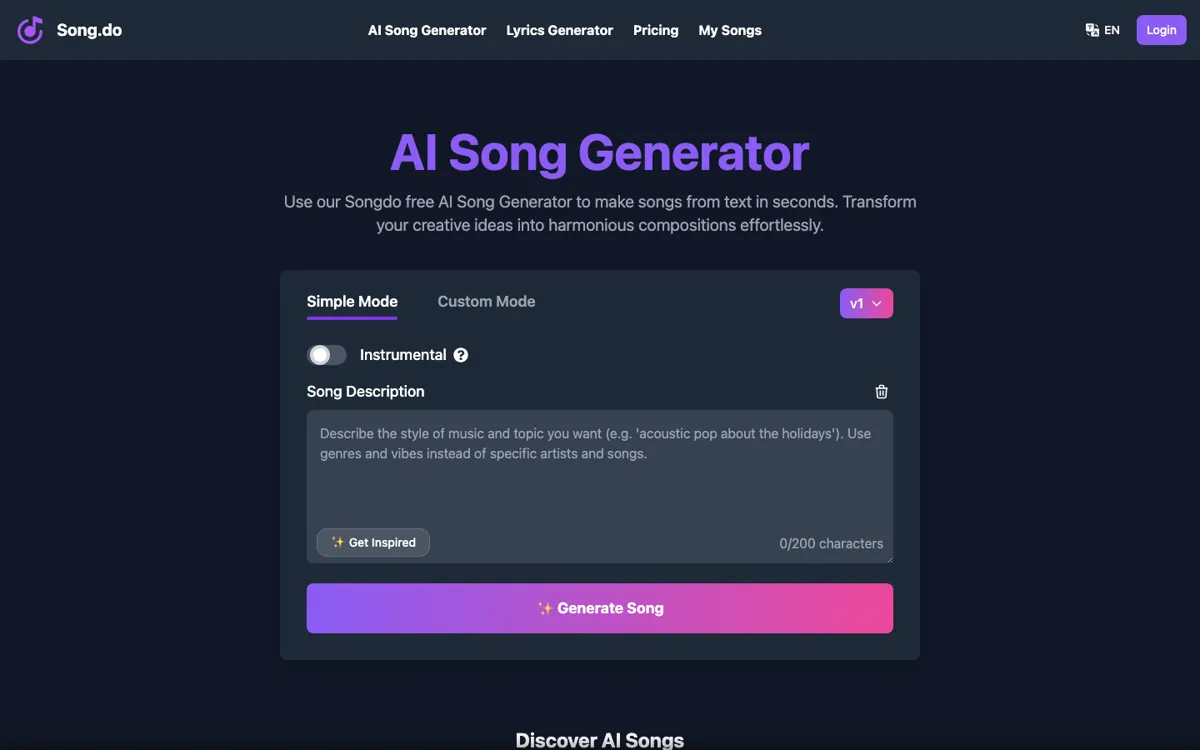
Official Website Snapshot Visit Site ↗

check_circle Pros

  • The main generator exposes a lot of practical controls on one screen, including genre, moods, voices, instruments, and tempo.
  • It supports both lyric-based songs and instrumental generation, so you do not need a separate flow just to skip vocals.
  • Paid plans include practical export and account-control features like WAV downloads, private generations, and longer cloud storage.
  • The product family covers adjacent jobs too, including lyrics generation and text-to-song entry points.

cancel Cons

  • The free plan only gives three credits per day and 30-day cloud storage, so regular use hits the limit quickly.
  • The public pages emphasize fast generation, but they do not show detailed editing, stems, or arrangement tools for users who need fine control after the first render.
  • Pricing is built around credits and plan ceilings, so heavy use is easier to predict than pay-as-you-go tools, but still pushes frequent creators into a subscription quickly.

Should you use it?

Best for: Best for turning a prompt, a rough lyric sheet, or a social-post idea into a quick song demo, meme track, gift song, or content soundtrack without using a traditional music toolchain.

Skip it if: Skip this if you need stem-by-stem editing, detailed mixing control, or a serious production workflow after generation, because Song.do is built to give you a finished result quickly, not to replace a full music workstation.

Is it worth the price?

Freemium Starts at $10.00 USD

The free tier is enough to test whether the sound and control panel fit your taste, but not enough for steady publishing or experimentation across many prompts. If you plan to generate songs in batches or keep retrying ideas until one lands, the subscription becomes the real product very quickly.

The Free Tier

Free plan gives 3 credits per day, up to 3 song generations per day, and 30-day cloud storage.

Paid Upgrade
$10/month

Starter adds 150 credits per month, commercial license language, private generations, unlimited MP3/WAV downloads, extend song, faster generation, lyric videos, and 730-day cloud storage.

One thing to know before you start

Use custom mode first, not simple mode, if you already know the mood or vocal direction you want. Picking genre, voice, and tempo up front will usually save more retries than trying to fix the result with another vague prompt.

What people actually use it for

Turn a short idea into a gift or joke song

Type a few lines about a birthday, inside joke, relationship, or event, then let Song.do turn that idea into a complete track with vocals and backing music. This is where the tool feels strongest, because the user does not need music theory, recording gear, or lyric discipline to get something playable fast. It is a good fit when speed matters more than polish, but less useful if the song needs detailed revision after generation.

Draft a quick topline or songwriter demo

Paste rough lyrics, choose a genre, mood, and voice, then use the generated song as a first-pass sketch before you decide what deserves more work. That can save time when you want to hear whether a hook or lyrical idea has energy before moving deeper into production. It is less valuable if your process depends on editing stems, arranging sections by hand, or refining the mix inside the same tool.

Generate background music for short-form content

Use text-to-song or instrumental mode to create a quick soundtrack for TikTok, Reels, or lightweight promo content when speed matters more than bespoke composition. The useful part is being able to aim the result with mood, tempo, and instrument choices instead of gambling on one generic prompt. The tradeoff is that frequent creators will hit the free cap quickly and need a paid plan to make this a real content workflow.

What does Song.do actually do?

Most people looking for an AI song tool are not trying to learn production, they are trying to hear an idea immediately. That could be a joke chorus for a friend, a rough hook for a social clip, or a fast soundtrack for a short video. Traditional music tools ask for too much too early, like arrangement decisions, recording quality, plug-ins, or instrument skill. Song.do is built around avoiding that friction. On the homepage, the main screen is already the generator: type lyrics or a prompt, decide whether you want instrumental only, then steer genre, mood, voice, instrument set, and tempo. That makes the product feel closer to a fast output machine than a composition environment.

The strongest practical advantage is the amount of pre-generation control available without burying the user in production language. You can choose from genres like pop, EDM, jazz, trap, or classical, layer in moods like cinematic, nostalgic, or uplifting, then nudge the output further with vocal types, instruments, and rhythm speed. The paid plans add concrete utility on top of the generation itself, including private generations, WAV downloads, fast-track generation, extend song, dynamic lyric videos, and much longer cloud storage. That combination matters because it turns the tool from a one-off novelty into something a content creator or casual songwriter might actually reuse across multiple tracks.

The limits are easy to spot too. The free plan gives only three credits per day and 30-day cloud storage, which is enough to taste the product but not enough to experiment heavily. More importantly, the public pages show very little about what happens after the first render beyond extension and downloads. There is no visible sign of detailed arrangement editing, stem separation, manual section control, or mix-level refinement. So Song.do makes sense when the goal is to get to a listenable result fast. It makes less sense when the real task is high-control music production, repeated revision, or professional finishing work inside the same environment.

What you can do with it

Generate full songs from short text prompts or pasted lyrics.
Choose genre, mood, vocal style, instruments, tempo, and rhythm before rendering.
Create instrumental tracks without lyrics.
Generate lyrics from a song idea inside the same product family.
Download songs in MP3 or WAV on supported plans.
Extend a generated song and create dynamic lyric videos on paid plans.

Technical details

platform
Web app
deployment
Cloud
api_available
No public API mentioned

Top Alternatives to Song.do

If Song.do is close but still misses the job, try one of these instead.

Key Questions

Is Song.do actually free to use?
Yes, but only in a limited way. The free plan gives three credits per day and up to three song generations per day, so it works for testing but not for steady output.
Can you make instrumental tracks instead of vocal songs?
Yes. The generator includes an instrumental option for creating a song without lyrics, so you do not have to force a vocal track when you only need background music.
What do paid plans change the most?
The main jump is not just more credits. Paid plans also add private generations, broader download options like WAV, faster queueing, extend song, lyric video generation, and much longer cloud storage.
Is this a full music production tool?
No, not from what the public pages show. Song.do looks built for fast song generation and export, not for deep arrangement or mix-level editing after the first render.