PDF Notes AI Review

8.0/10

Turn PDFs into study notes, flashcards, quiz questions, answer keys, and cited page references.

Review updated June 2026 By The AI Way Editorial Tested 321+ tools across the site 4 min read
PDF Notes AI No Credit Card Required Note-Taking PDF Analyzer SaaS Summarization Web-Based Freemium from $7.00/mo

Our Verdict

Use PDF Notes AI when the job is turning one reading into notes, flashcards, and quiz practice with page references. It is narrower than a generic PDF chat tool, and that narrowness is the value: students get an exam study pack instead of a conversation thread. The free preview is useful enough to test on a real short PDF before paying.

Try it
Free to start, then pay when the limits stop you. Starts at $7.00 USD.
open_in_new Try PDF Notes AI
Official Website Snapshot Visit Site ↗

check_circle Pros

  • Turns one PDF into notes, flashcards, quiz questions, answer keys, and a study guide instead of only a summary.
  • Keeps page references visible, so students can check generated answers against the source document.
  • Makes pricing and limits easy to understand: free preview, $7/month Starter, $15/month Pro, and a $19 30-day Exam Pass.

cancel Cons

  • Scanned PDFs, long documents, full exports, and saved history sit behind paid plans.

Should you use it?

Best for: Students, tutors, and teachers who need to turn lecture slides, handouts, textbook chapters, or research excerpts into review notes and practice questions.

Skip it if: Skip it if you want open-ended PDF chat across a large document library; this is a study-output generator, not a multi-file research assistant.

Is it worth the price?

Freemium Starts at $7.00 USD

The free preview is enough to judge output quality on one short text PDF. Starter at $7/month is the natural step for weekly readings, while Pro at $15/month is the better fit for scanned files, long PDFs, DOCX, Anki, Quizlet, Forms exports, and saved history.

The Free Tier

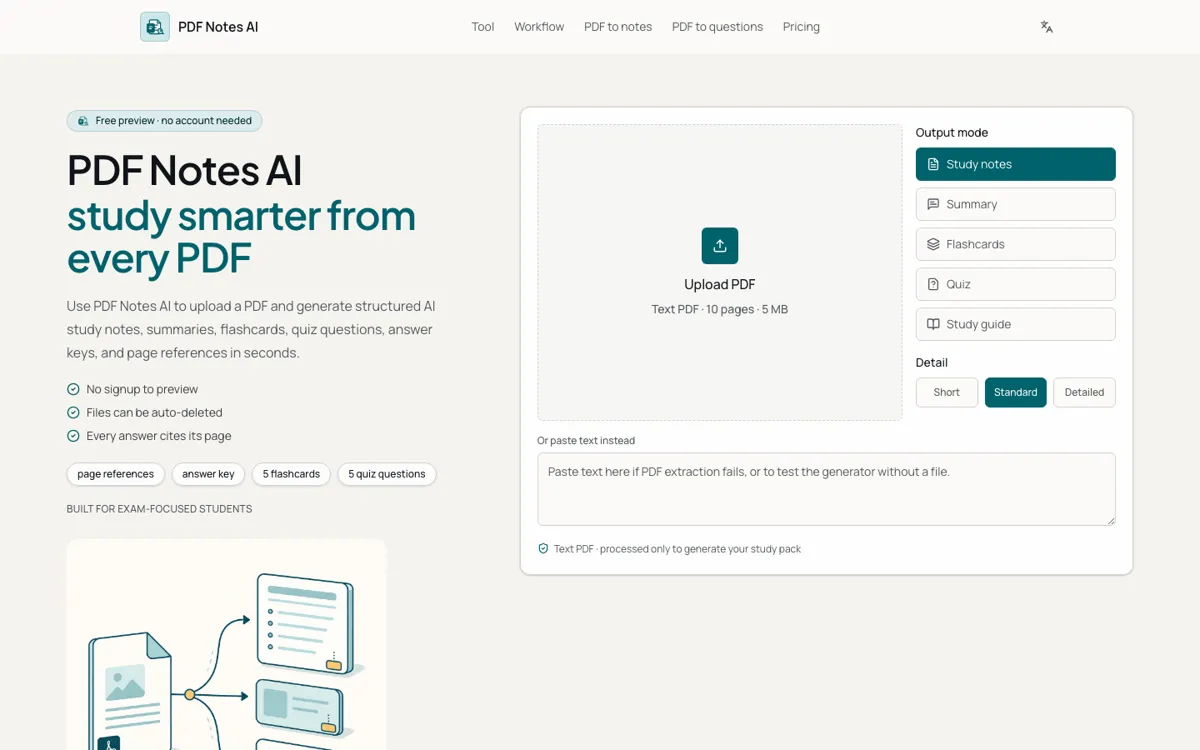
1 PDF per day, no signup, up to 10 pages or 5 MB, notes, 5 flashcards, 5 quiz questions, page citations, and Markdown copy.

Paid Upgrade
$7/month Starter

Higher PDF volume and page limits, PDF export, saved history, full notes/flashcards/quiz, and Pro upgrades for OCR, DOCX, Anki, Quizlet, Forms exports, cloud history, and difficulty controls.

One thing to know before you start

Start with the quiz output first, not the notes. Weak questions or mismatched answer keys expose extraction problems faster than a polished-looking summary.

What people actually use it for

Prepare for an exam from one chapter

Upload a text-based chapter PDF, generate notes, flashcards, and quiz questions, then use page chips to check weak areas against the original reading.

Create a first draft of class questions

Turn a handout or lecture PDF into multiple-choice and short-answer questions with answer keys that a teacher can edit before sharing.

Convert pasted study text into practice

Paste extracted notes or reading text when a PDF is not available, then generate a smaller study pack for quick review.

What does PDF Notes AI actually do?

PDF Notes AI is most useful because it chooses a specific study output instead of chasing every possible PDF task. A student does not upload a chapter just to receive one paragraph. They need notes they can scan, cards they can memorize, questions they can answer, and source pages they can revisit. The product keeps those pieces together, which makes it more useful for exam prep than a simple PDF summarizer.

The pricing page is unusually clear for a small AI study tool. Free users get 1 PDF per day with no signup, up to 10 pages or 5 MB, notes, 5 flashcards, 5 quiz questions, page citations, and Markdown copy. Starter costs $7 per month for 100 PDFs per month and 50 pages per PDF. Pro costs $15 per month for 500 PDFs per month, 200 pages per PDF, OCR quota, cloud history, difficulty controls, and richer export targets.

The main buying reason is verification. Page references appear beside the generated study material, so a student can check whether a claim came from page 2 or page 14 before memorizing it. That matters for both students and teachers because AI-generated questions can look confident even when they drift from the source. PDF Notes AI reduces that risk by making the source page part of the study object.

What you can do with it

Uploads one text-based PDF or accepts pasted text for the free preview.
Generates structured study notes, summaries, flashcards, quiz questions, answer keys, and study guides.
Shows page chips beside notes, cards, questions, and answers so users can verify the source.
Lets users copy generated content and unlock richer exports on paid plans.
Keeps scanned-PDF OCR, long documents, saved history, DOCX, Anki, Quizlet, and Google Forms exports as paid upgrades.
Publishes clear free, monthly, yearly, and 30-day exam-pass pricing.

Technical details

platform
Web-based PDF study generator with upload, pasted-text fallback, output mode controls, detail controls, and export paths.
deployment
Free preview processes one text-based PDF up to 10 pages or 5 MB; paid plans add higher PDF limits, OCR, exports, and saved history.
api_available
No public API documentation or developer endpoint is visible.

Top Alternatives to PDF Notes AI

If PDF Notes AI is close but still misses the job, try one of these instead.

Key Questions

What does PDF Notes AI create from a PDF?
It creates a study pack: structured notes, summaries, flashcards, quiz questions, answer keys, explanations, and page references from a text-based PDF or pasted text.
Is PDF Notes AI free to try?
Yes. The free preview allows 1 PDF per day with no signup, up to 10 pages or 5 MB, plus notes, 5 flashcards, 5 quiz questions, page citations, and Markdown copy.
Does PDF Notes AI support scanned PDFs?
Scanned PDFs are a paid use case. The Pro plan includes an OCR quota, while the free preview is focused on text-based PDFs.
When should someone upgrade?
Upgrade when short previews are no longer enough: longer PDFs, saved history, PDF/DOCX export, OCR, Anki, Quizlet, Google Forms, and larger question sets all sit behind paid plans.