Paseo Review

8.7/10

Control Claude Code, Codex, Copilot, OpenCode, and other coding agents from one app.

Review updated June 2026 By The AI Way Editorial Tested 311+ tools across the site 6 min read
Paseo AI Agents CLI Tool Open Source Privacy Focused Self-Hosted Web-Based Free

Our Verdict

Paseo is worth tracking if coding agents have moved from experiments into daily work. Its value is not that it writes code better than Claude Code or Codex; it gives those agents a shared control surface across desktop, phone, browser, and terminal. The cost is dependency sprawl: users still manage provider CLIs, credentials, model limits, local daemon security, and the judgement call of when remote mobile coding is helpful instead of unhealthy.

Try it
Free to start.
open_in_new Try Paseo

What people keep saying about it

The HN thread was active enough to matter: 90 points and 52 comments, with one user reporting a few days of successful use and another saying it unlocked multi-agent work. Praise centered on cross-device control, open source, and a single surface for several agents. Pushback focused on whether shipping from a phone is healthy, whether the interface is truly beautiful or just functional, and whether token/cost visibility is deep enough for long coding-agent sessions.

Official Website Snapshot Visit Site ↗

check_circle Pros

  • It keeps agent execution on the user machine while giving remote control from phone, desktop, web, or CLI, which is a strong privacy and setup split for developers with real local environments.
  • The provider list is unusually broad for this category, covering Claude Code, Codex, Copilot, OpenCode, Pi, Cursor, Gemini CLI, Qwen Code, Cline, goose, and many more native agents.
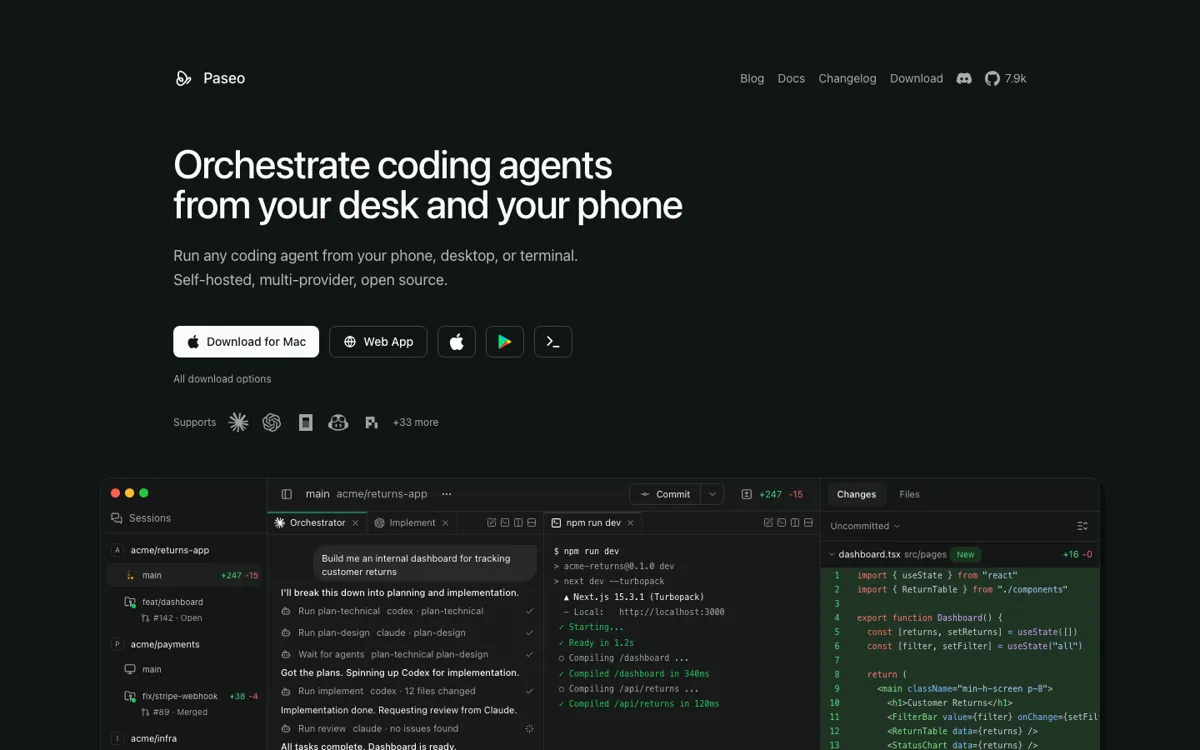
  • The app goes beyond chat by putting terminals, diffs, browser previews, logs, branch state, PR actions, and worktree context next to the agent conversation.
  • The launch already has real user feedback, alternative comparisons, design critique, token-cost questions, and mobile coding pushback, so the product has better market signal than a quiet repo with only stars.

cancel Cons

  • It does not remove the need to install and authenticate the underlying agent CLIs; each provider still brings its own account, limits, cost model, and failure modes.
  • The mobile-control pitch divides developers. Some will love checking agent progress away from the desk, while others will see it as another way to never stop working.
  • Context and token-cost visibility came up in HN comments, and that matters because long agent runs can burn input tokens across repeated tool and observation cycles.
  • The repo is active but still early, with 0.1.x releases and fast-moving changelog entries, so teams should expect frequent upgrades rather than settled enterprise polish.

Should you use it?

Best for: Developers who already run coding agents on local machines, VMs, or dev servers and want one place to start sessions, watch progress, review diffs, preview services, and control agents from desktop, phone, web, or terminal.

Skip it if: Skip it if you only use one coding assistant inside a single editor, do not want to run a local daemon, or need a hosted cloud development environment where setup, compute, and agent execution are managed for you.

Is it worth the price?

Free

Paseo itself is free and open source. The real cost sits outside the product: Claude Code, Codex, Copilot, OpenCode, Pi, or other provider subscriptions and API usage still apply, and heavy agent users should watch model spend even when the control app costs nothing.

The Free Tier

Paseo is free and open source; users still need their own installed provider CLIs and credentials for Claude Code, Codex, Copilot, OpenCode, Pi, or other agents.

One thing to know before you start

Start with direct local connection or a trusted private network before relying on the hosted relay. Then run one low-risk worktree task and check whether previews, diffs, PR actions, and mobile review actually reduce desk time without lowering review quality.

What people actually use it for

Monitor coding agents from a phone

A developer can leave an agent running on a laptop or dev server, then use the mobile app to check status, read messages, send follow-up instructions, or stop the session.

Run different agents for different steps

A team member can plan with Claude Code, implement with Codex or another provider, and review the result from the same workspace without switching between separate agent UIs.

Review and ship an agent branch

Use worktrees, changed-file views, browser previews, terminal output, commit actions, pull request actions, and merge controls to move a ready branch from agent output toward shipping.

Control a headless dev server

Install the CLI on a VPS, Mac mini, or dev box, pair a phone or browser client, and run agent sessions without keeping the full desktop app open.

What does Paseo actually do?

Paseo is aimed at the new problem created by coding agents: once several agents can work in parallel, the hard part becomes control. The product gives developers one place to start sessions, watch output, inspect changes, open previews, manage branches, and hand off work between providers. It is not trying to be the model or the IDE. It sits above installed agents and turns a laptop, VM, or dev server into a machine that can be steered from desktop, web, mobile, or terminal.

The strongest product boundary is local execution. Paseo does not send code to its own cloud service for execution; the daemon runs where the developer works, and each provider CLI handles its own credentials and model calls. Remote access can happen through direct connection, a private network, a tunnel, or the end-to-end encrypted relay. That makes the tool attractive for developers who want phone or browser control without moving their entire development environment into a hosted cloud box or rebuilding every project inside rented machines.

The risk is that orchestration can hide cost and attention problems. HN commenters asked about context management, token visibility, and whether mobile coding is a good habit at all. Those concerns are not side issues; they are the buying criteria. Paseo is most convincing when it gives a developer better review surfaces, clearer agent status, safer worktrees, and faster handoff between providers. It is less convincing if it simply makes it easier to approve code while distracted or to keep work leaking into every device.

What you can do with it

Run supported coding agents from desktop, mobile, web, or CLI while the agent process stays on the user machine.
Control 38 native agent CLIs, including Claude Code, Codex, OpenCode, GitHub Copilot, Pi, Cursor, Gemini CLI, Qwen Code, Cline, goose, and more.
Create worktrees, inspect diffs, preview running services, commit, open pull requests, and merge from the same workspace.
Use direct connections, Tailscale-style tunnels, or an end-to-end encrypted relay for remote access to the local daemon.
Run local voice input, split panes, browser previews, terminals, diffs, logs, schedules, and scriptable CLI commands around agent sessions.
Install desktop apps, mobile apps, web access, or a headless server path through npm, Homebrew, GitHub releases, App Store, Google Play, Nix, DEB, RPM, APK, or AppImage.

Technical details

platform
Local daemon with desktop, mobile, web, and CLI clients; packages include Electron desktop, Expo mobile/web app, CLI package, server daemon, relay package, and website/docs in a TypeScript monorepo.
deployment
Open-source AGPL-3.0 project; GitHub API captured 7,920 stars, 743 forks, TypeScript as primary language, current release v0.1.91-beta.2, and stable download page at v0.1.90.
api_available
Paseo exposes daemon and CLI control for starting agents, listing sessions, attaching to output, sending follow-up tasks, viewing logs, waiting, managing permissions, using worktrees, and connecting via MCP or scripts.

Top Alternatives to Paseo

If Paseo is close but still misses the job, try one of these instead.

Key Questions

Is Paseo free?
Yes. Paseo is free and open source, but users still need their own Claude Code, Codex, Copilot, OpenCode, Pi, or other agent credentials.
Does Paseo run the coding agents in its own cloud?
No. The daemon runs on the user machine, VM, or dev server, and the provider CLIs run there with the user's existing credentials.
Can Paseo be used without the desktop app?
Yes. The desktop app bundles the daemon, but users can also install the CLI with npm, run the daemon headless, and connect from mobile, web, or CLI.
Does Paseo send code through its relay?
The relay can carry remote access traffic, but the security docs describe it as end-to-end encrypted, with the relay unable to read message contents or forge commands after pairing.
What is the main reason to choose Paseo over staying inside one coding assistant?
Choose Paseo when several agents, devices, worktrees, terminals, previews, and PR actions need to be controlled from one surface. Stay inside one assistant if a single editor or CLI already covers the job.