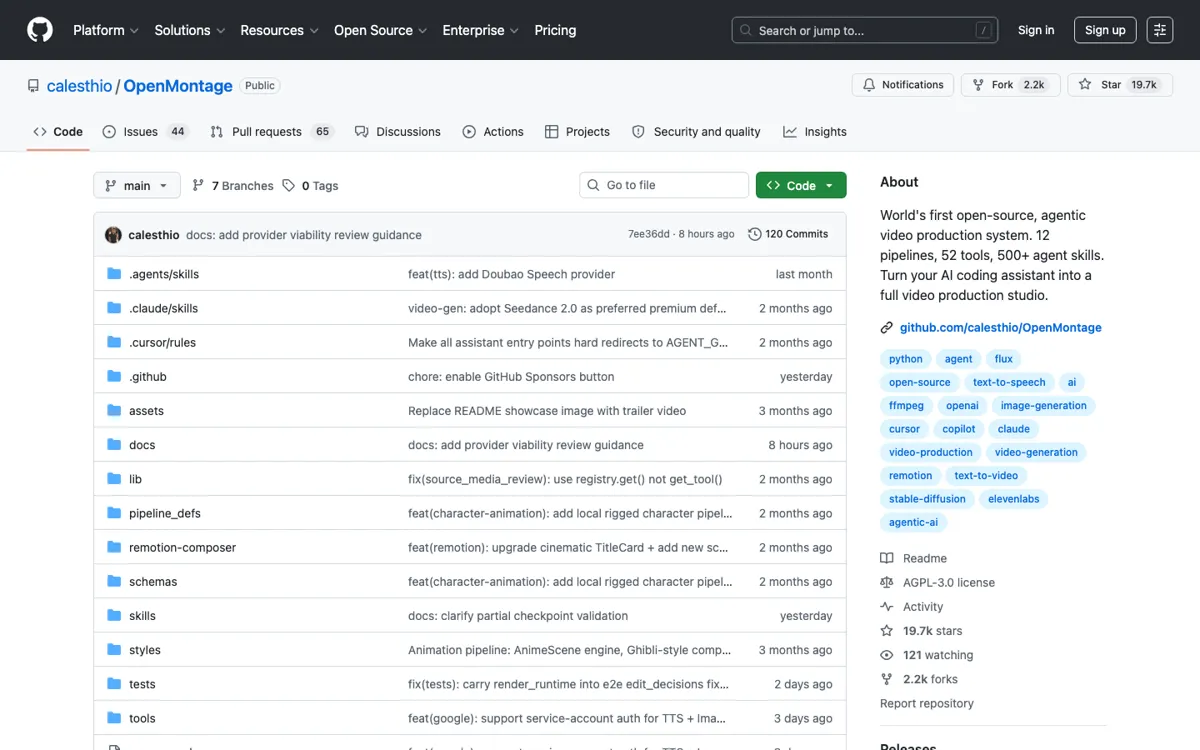
OpenMontage Review

7.1/10

Turn a coding agent into a video production system for scripts, assets, voice, editing, and final render.

Review updated June 2026 By The AI Way Editorial 4 min read
calesthio AI Agents Open Source Self-Hosted Video Editing

Read this first

Do not pick OpenMontage for non-technical users who expect a polished web app. The repo is the product surface, and setup skill is part of the cost.

Our Verdict

OpenMontage is worth the effort when control matters more than convenience. It gives you a coding-agent workflow for the whole video chain, from planning and scripting to render and cost checks. The price is obvious from the start: setup, provider decisions, and repo rough edges instead of a clean hosted editor.

Official site
Public pricing is not confirmed. Verify it on the official site.
open_in_new Visit OpenMontage
Official Website Snapshot Visit Site ↗

check_circle Pros

  • It covers the full video build: planning, script, assets, voice, captions, music, composition, review, and render.
  • The zero-key path is useful for testing the system before paying for video models, even if the best outputs still depend on better providers.
  • Provider choice is treated as a decision, not a hidden default, with scoring, cost estimates, spend caps, and approval checkpoints.

cancel Cons

  • It is not a normal SaaS onboarding flow; users need Python, FFmpeg, npm, local commands, provider keys, and an agent that can follow repo instructions.
  • No public pricing page exists because the project itself is open-source; real cost comes from the cloud models, TTS, music, video generation, and compute choices you connect.
  • The repo is moving fast, with many open issues and no tagged releases in the GitHub API check, so expect rough edges around rendering, provider setup, and platform-specific bugs.

Should you use it?

Technical creators, growth teams, and AI builders who want a coding agent to produce repeatable explainers, product ads, documentary montages, or social videos from controlled pipeline files.

Skip it if: you need a hosted editor, drag-and-drop timeline, or support staff instead of a repo and local setup

Is it worth the price?

Pricing not confirmed

There is no official SaaS price to compare. The project can run some paths without paid keys, but serious output usually shifts cost into fal.ai, OpenAI, Google, ElevenLabs, Runway, HeyGen, local GPU time, or your own debugging hours.

One thing to know before you start

The best first run is the cheapest one that actually renders. Once that works, swap one layer at a time so you can tell which provider change helped and which one just added cost.

What people actually use it for

Agent-made product ads with cost control

Use OpenMontage when you want a coding agent to turn a product brief into a short ad with script, generated assets, voice, subtitles, music, and a final render. The useful part is not one magic model; it is the decision trail around provider choice, estimated spend, runtime selection, and review checks before expensive generation starts.

Reference-video planning for repeatable formats

Paste a YouTube Short, Reel, TikTok, or local clip and ask the agent to preserve the pacing, hook shape, scene structure, or tone while changing the topic. This fits teams trying to recreate a repeatable format without manually reverse-engineering every cut, caption beat, and voiceover decision.

Open-source video pipeline experiments

Use the repo as a sandbox for testing provider mixes, local tools, Remotion scenes, FFmpeg post-production, and markdown-driven production instructions. It is especially useful when the goal is learning or customizing the chain rather than buying a finished editor.

What does OpenMontage actually do?

OpenMontage is for people who want a coding agent to run a production process, not just return one generated clip. That gives technical teams more control over assets, scripts, rendering, and provider choice than a normal browser video tool.

The tradeoff is setup and maturity. Provider decisions, local tooling, and repo rough edges are all part of the cost, so this makes more sense as a production kit to inspect and adapt than as a polished editor for casual teams.

What you can do with it

Runs video requests through named production pipelines instead of stopping at a single prompt-to-clip output.
Can start from a YouTube video, Short, Reel, TikTok, local clip, topic, or plain-language brief.
Creates production plans that include concept, script, scene plan, asset generation, narration, music, subtitles, and render path.
Supports zero-key video paths with local tools and free media sources, then adds cloud providers when API keys are configured.
Includes quality gates, cost estimates, spend caps, and decision logs so production choices can be reviewed.

Technical details

platform
Open-source GitHub project driven by AI coding assistants such as Claude Code, Cursor, Copilot, Windsurf, and Codex; built around Python tools, YAML pipeline manifests, markdown skills, and a Remotion composer.
deployment
Self-hosted local setup with Python 3.10+, FFmpeg, npm/Remotion dependencies, optional GPU paths, optional provider API keys, AGPL-3.0 license, and no tagged releases found in the GitHub API check.
api_available
No hosted public product API is presented; the repo exposes local Python tools, selector patterns, provider integrations, and command-driven operation.

Top Alternatives to OpenMontage

If OpenMontage is close but still misses the job, try one of these instead.

Key Questions

Is OpenMontage a hosted AI video editor?
No. It is much closer to an open-source production kit than to a hosted editor, so local setup and provider wiring are part of the deal.
Can OpenMontage make videos without paid API keys?
Yes, some paths can run with local tools and free sources, but the best-looking motion, voice, image, or music outputs may still require paid providers or local hardware.
What does OpenMontage do differently from text-to-video tools?
It coordinates the whole production chain instead of only generating a clip. The agent handles planning, research, script, assets, narration, captions, music, composition, review, and render decisions.
What is the main reason not to use OpenMontage?
The main reason is setup burden. If Python, FFmpeg, npm, provider credentials, GitHub issues, and agent instructions sound like blockers, a hosted AI video tool will be faster.