Marqly Review

7.8/10

Save links, auto-tag them with AI, and search your bookmarks by meaning.

Review updated June 2026 By The AI Way Editorial Tested 298+ tools across the site 5 min read
Marqly AI Search Chrome Extension Knowledge Base No Credit Card Required Summarization Web-Based Freemium from $84.00/mo

Our Verdict

Marqly is strongest when your bookmark problem is retrieval, not saving. The value is in turning a messy link pile into something you can search by meaning, tag, or context, with summaries and reader mode for saved articles. The hard limit is pricing: the free plan stops at 50 bookmarks and excludes the AI layer, so a serious web library moves to Pro fast.

Try it
Free to start, then pay when the limits stop you. Starts at $84.00 USD.
open_in_new Try Marqly
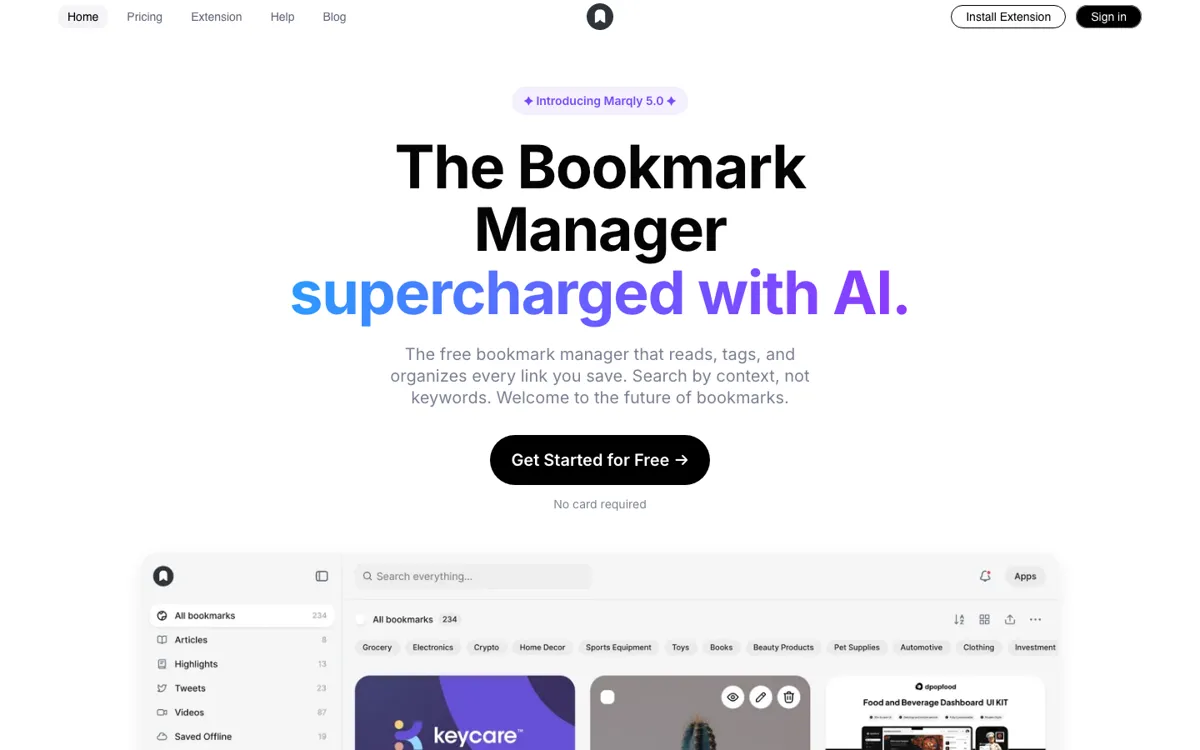
Official Website Snapshot Visit Site ↗

What people actually use it for

Recover articles when you forgot the headline

Save research links over several weeks, then search by the idea you remember instead of the exact title. This is the clearest Marqly use case because semantic search directly attacks the normal bookmark failure mode.

Replace a browser bookmark pile with tagged project boards

Move project links into boards or collections, let Marqly apply tags, and keep notes or highlights beside important pages. It works best for solo research piles that are too messy for folders but too small for a full workspace.

Turn saved reading into quick context

Use reader view and AI summaries when you need the point of a saved article without reopening every tab. This is useful for newsletters, tutorials, and comparison research where you mainly need enough context to decide whether to read deeper.

check_circle Pros

  • Semantic search fits the real failure mode of bookmarks: remembering the topic but not the title or exact keyword.
  • AI tagging, boards, notes, highlights, and reader mode cover more of the read-it-later loop than a plain browser bookmark bar.
  • Browser extensions and unlimited-device access make it practical for saving links from daily browsing instead of treating it like a separate database.

cancel Cons

  • The free plan caps storage at 50 bookmarks, which is too small for anyone migrating an existing library.
  • AI-powered features are reserved for Pro, so the free plan mostly proves the interface rather than the main reason to use Marqly.
  • Public technical detail is thin: there is no clear API, export workflow, or model/privacy breakdown for how AI features process saved pages.

Should you use it?

Best for: Use it for personal research, article saving, and browser-link cleanup when the real task is finding old saved pages by topic instead of maintaining folders by hand.

Skip it if: Skip it if you need team knowledge management, deep notes, document Q&A, or an API-first memory layer; Marqly is centered on saved web links, not a full workspace.

Is it worth the price?

Freemium Starts at $84.00 USD

Free is fine for testing the interface or keeping a tiny link list under 50 bookmarks. The moment you want AI search, AI organization, boards, highlights, notes, or a migrated bookmark archive, Pro is the real plan. If 50 bookmarks sounds like a weekend of saved links, do not plan around the free tier.

The Free Tier

Free plan includes up to 50 bookmarks, basic search, bookmark preview, bookmark tags, mobile/tablet access, and unlimited devices.

Paid Upgrade
$84/year, shown as $7/mo billed annually on the Pro plan.

Pro adds unlimited bookmarks, AI powered features, boards/collections, highlights and notes, read mode, smart sorting, access anywhere, and priority email support.

One thing to know before you start

Import or save one messy topic cluster first, then test whether semantic search can recover articles when you describe the idea without the title. If that fails, the Pro plan will not fix your bookmark habit.

What does Marqly actually do?

Marqly should be judged against the browser bookmark bar, Raindrop-style managers, and read-it-later apps, not against broad note-taking suites. Its best move is making saved links searchable after the original context is gone. The core loop is narrow enough to understand quickly: save a link, let AI organize it, search it later, read it in a cleaner view, and use summaries when reopening every page would waste time. The plan split matters: free users get up to 50 bookmarks, basic search, preview, tags, mobile/tablet access, and unlimited devices; Pro is where unlimited bookmarks, AI-powered features, boards, highlights, notes, read mode, and smart sorting appear.

The product is useful for people who save web pages as raw material: students collecting sources, solo founders watching competitors, writers collecting examples, or developers saving docs and tutorials. The input is a stream of links from daily browsing. The output is a searchable library where tags, summaries, boards, and notes reduce the chance that a saved page becomes invisible. That makes Marqly more concrete than a generic second-brain claim, because the job is narrow: save the web and retrieve it later by meaning.

The main risk is not whether bookmark search is valuable; it is whether Marqly gives enough trust and portability detail for someone to move a serious archive. Pricing and extension coverage are clear enough to start, but export, AI model handling, and API access are still not clear enough for mission-critical knowledge storage. The matching GitHub result is a small Next.js website repository with no stars and a boilerplate README, so it does not add strong technical confidence. Treat Marqly as a promising personal bookmark layer, not as the place to store work that must remain portable for years.

What you can do with it

Save bookmarks from Chrome, Edge, and Firefox with a one-click extension.
Automatically tag and organize saved links with AI instead of manual folders.
Search bookmarks by text, tag, date, URL, or semantic context.
Read saved pages in a distraction-free reader view with AI summaries.
Group links into boards and collections for projects or research piles.
Add highlights and notes to saved material before it disappears from memory.
Use offline mode and link-health checks to keep access when pages go stale.

Technical details

platform
Web app plus browser extensions for Chrome, Edge, Firefox, and Safari; both Free and Pro include mobile and tablet access.
deployment
Cloud-hosted bookmark manager with unlimited-device sync on both Free and Pro; saved-account data uses email/profile authentication.
api_available
No public API is advertised across the captured product, pricing, privacy, or GitHub-search evidence.

Top Alternatives to Marqly

If Marqly is close but still misses the job, try one of these instead.

Key Questions

Is Marqly actually free?
Yes, but the free plan is capped at 50 bookmarks. It is enough to test saving, preview, tags, and basic search, but it is not enough for a serious bookmark archive.
What does Pro unlock?
Pro is where the main product shows up: unlimited bookmarks, AI powered features, boards and collections, highlights, notes, read mode, smart sorting, access anywhere, and priority email support.
Does Marqly replace Pocket or Raindrop?
It can replace them for solo users who mainly want AI tagging and semantic search over saved links. It is weaker if your must-have features are mature export controls, team workflows, or a long public track record.
Does Marqly have browser extensions?
Yes. Chrome, Edge, Firefox, and Safari are covered by the current extension or download links, so the main browser-saving path is not limited to one vendor.