LumiChats Offline(free) Review

7.1/10

Use Claude, GPT-5 & Gemini in one place, fully offline.

Review updated May 2026 By The AI Way Editorial Tested 144+ tools across the site 5 min read
LumiChats Free Forever Knowledge Base Mac App Open Source Privacy Focused Windows App Free

Our Verdict

LumiChats Offline(free) is compelling if your first filter for an AI app is simple: keep it local, keep it free, and let me switch models without handing my history to a vendor. The attraction is not one standout model feature but the breadth of offline tasks it tries to cover from one desktop app. The catch is that local-first freedom only feels good when your hardware, preferred models, and patience for setup all line up with what the app is asking for.

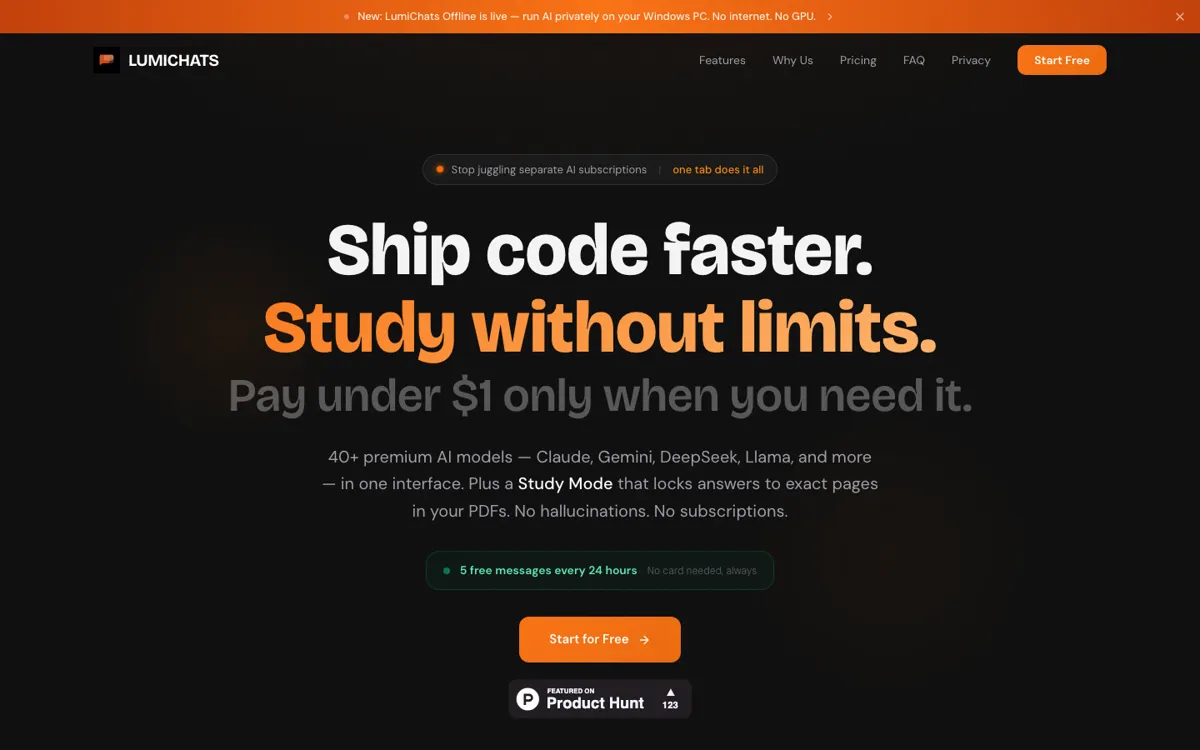
Official Website Snapshot Visit Site ↗

check_circle Pros

  • It combines offline chat, document parsing, OCR, image understanding, coding help, and voice tools in one local desktop setup.
  • The product is free and open source, which lowers the barrier for people who want privacy without committing to a subscription.
  • It supports multiple local model paths, including Ollama, LM Studio, and Hugging Face GGUF files, instead of locking you to one stack.

cancel Cons

  • A broad offline feature list does not erase the usual local-AI friction around downloads, hardware limits, and model setup.
  • The app tries to cover many tasks at once, which can make real-world performance depend heavily on your machine rather than the headline feature list.
  • There is much less third-party discussion than you would want for a privacy tool making such a wide replacement pitch, so trust still relies heavily on trying it yourself.

Should you use it?

Best for: Running everyday AI work on your own machine when you want one free desktop app for local chat, documents, OCR, and model switching.

Skip it if: Skip it if you want cloud-level convenience, polished zero-setup onboarding, or guaranteed strong performance on weaker local hardware.

Is it worth the price?

Free

The free part is real, but free local AI is never friction-free. You save on subscriptions, then pay back some of that advantage through local setup time, model downloads, and whatever compute your own machine can actually handle.

The Free Tier

The reviewed pages position LumiChats as free with no monthly subscription, but real limits still depend on your own hardware, model choices, and local setup path.

Paid Upgrade
Contact for pricing

Paid plans usually unlock higher limits, cleaner exports, and broader commercial use.

One thing to know before you start

Start with the smallest model setup that already covers your main task. If you begin by chasing the biggest local model you can find, you may blame the app for hardware problems that start upstream.

What people actually use it for

Run private AI chats and document work without a browser tab stack

If you normally bounce between hosted chat apps, PDF readers, and local note files, LumiChats tries to compress that into one offline desktop setup. That matters most when the task is everyday reading, writing, and asking questions over your own files without pushing them into a cloud workspace.

Test different local model routes before committing to one stack

If you are deciding between Ollama, LM Studio, or downloaded GGUF models, LumiChats gives you a practical way to compare them inside one app instead of rebuilding your routine from scratch each time. That saves more time than the model switch itself when you are still figuring out what your hardware can realistically support.

What does LumiChats Offline(free) actually do?

LumiChats Offline(free) is built around a simple tension in the AI market: a lot of people want the convenience of a general-purpose assistant, but do not want their files, chats, and prompts living inside another vendor account. The homepage answers that tension with a blunt promise, use Claude, GPT-5, and Gemini in one place, fully offline, with zero data collection and no monthly fee. The docs broaden that further with support for Ollama, LM Studio, Hugging Face GGUF models, OCR, PDFs, voice tools, coding help, and image understanding. In plain terms, the app is trying to be the local replacement for the usual pile of browser tabs and subscription chat tools.

The strongest part of the pitch is range. LumiChats is not just trying to be an offline chatbot. It wants to be the desktop place where you read documents, ask questions over files, run OCR, test models, do lightweight coding work, and switch between different AI backends without moving your data into the cloud. That matters for users who care more about keeping work on-device than squeezing out the absolute best hosted model experience. A free local app becomes much more interesting when it can cover enough daily tasks that you stop opening three or four separate tools for the same project.

The real limit is the same one that hangs over most local AI products: your hardware decides whether the promise feels liberating or annoying. Free and private sound great until a model is too heavy, a feature path takes manual setup, or a broad feature list turns into uneven performance across tasks. Public discussion is also still sparse, which means the idea has stronger evidence than the usage track record. LumiChats is easiest to recommend to people who already expect to manage local models and are happy to trade convenience for control, not to people who want the smoothest possible out-of-the-box assistant.

What you can do with it

Run chats with local or connected models from one desktop app without sending your workspace to a hosted AI chat product.
Handle PDFs, Word files, OCR, voice tasks, coding help, and image understanding inside the same local workspace.
Use Hugging Face GGUF models, Ollama, or LM Studio while keeping conversation data on your own device.

Technical details

deployment
Local-first desktop app
os_support
Windows, Linux, and macOS are listed in the Product Hunt description and docs positioning.
open_source
Yes, the reviewed pages position LumiChats Offline as open source.
privacy_mode
Offline use and zero data collection are central claims in the product positioning.
model_support
Supports local paths through Ollama, LM Studio, and Hugging Face GGUF model downloads.
document_support
Handles PDFs, Word files, OCR, and local knowledge lookups according to the docs.

Top Alternatives to LumiChats Offline(free)

If LumiChats Offline(free) is close but still misses the job, try one of these instead.

Key Questions

What makes LumiChats different from a normal hosted AI chat app?
It is built around local use and zero recurring cost, not a vendor-hosted workspace. The point is to run broad AI tasks on your own machine instead of feeding your files and chats into another cloud account.
Is LumiChats really free?
The product pages position it as free with no monthly subscription. The practical caveat is that local AI still depends on your own hardware and whichever models you decide to run.
Who is LumiChats best for?
It is a better fit for privacy-minded users and local-AI tinkerers than for people who want the smoothest cloud-style onboarding. If you already care about on-device control, the product pitch will make more sense immediately.
What should you test first before trusting LumiChats as a daily app?
Test your main task on your real machine, not just the feature checklist. Local AI products succeed or fail on whether your hardware can run the models and feature paths you actually want to use.