Hopper Review

8.0/10

An AI agent environment for navigating TN3270, datasets, jobs, and z/OS workflows from one mainframe-aware workspace.

Review updated May 2026 By The AI Way Editorial Tested 166+ tools across the site 6 min read
Hypercubic Mac App No Credit Card Required Windows App Freemium

Our Verdict

Hopper is worth opening when the hard part of the job is not writing code from scratch, but moving safely through TN3270 screens, datasets, JCL, JES spool, and CICS steps that normal coding assistants cannot actually operate. Its real value is that the agent works inside the same mainframe session you are viewing, so debugging and change work stay tied to the live environment instead of getting flattened into pasted snippets. The cost is that this is a narrow tool. If your team does not live in z/OS work, Hopper's main advantage disappears fast.

Try it
Free to start, then pay when the limits stop you.
open_in_new Try Hopper
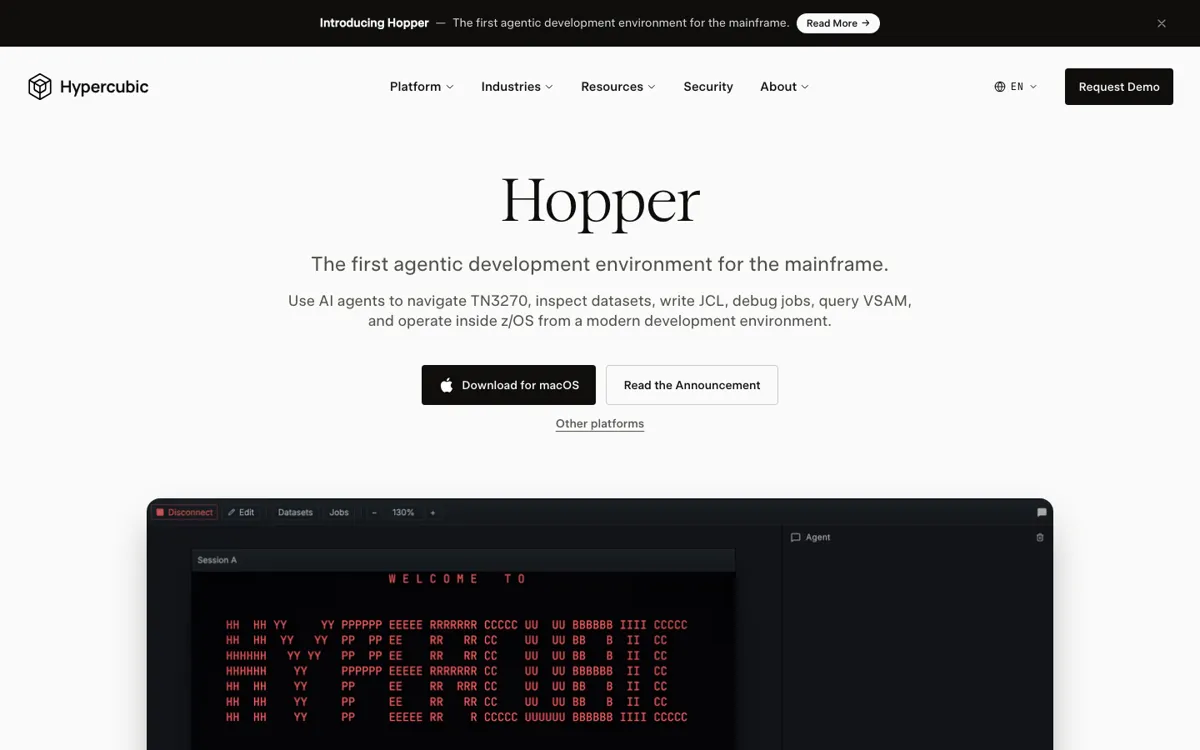
Official Website Snapshot Visit Site ↗

check_circle Pros

  • It tackles a real mainframe bottleneck instead of pretending COBOL work is just another repo chat problem.
  • The shared-session design makes the agent's terminal moves, job submissions, and dataset reads visible instead of hidden behind a black box.
  • The approval flow is strict where it matters, because writes, job submissions, and CICS changes stop for review before anything mutates state.
  • The free Hobby tier with no credit card gives teams a practical way to test the workflow on real mainframe tasks before a sales cycle starts.

cancel Cons

  • The product is highly specialized, so teams without regular TN3270, JES, VSAM, or CICS work will get very little out of it.
  • A lot of the promised payoff depends on shop-specific conventions such as compile procedures, dataset naming, and subsystem quirks that can vary sharply by customer.
  • HN reactions show an obvious trust hurdle around training data, customer IP, and language coverage beyond the cleaner COBOL examples on the landing page.

Should you use it?

Best for: Best for debugging failed jobs, tracing spool output, reading dataset members, and making controlled changes in z/OS environments where the surrounding mainframe workflow is the real time sink.

Skip it if: Skip this if your developers mostly work in Git repos, cloud CI, and ordinary terminals, or if you need a broad coding copilot more than a tool that can operate JES, TN3270, datasets, and CICS safely.

Is it worth the price?

Freemium

The free plan is credible because it lets you test Hopper on real mainframe work instead of a crippled toy tier. You only need the paid tier once security controls, deployment boundaries, or admin governance become part of the buying decision.

The Free Tier

Hobby is free, needs no credit card, runs on macOS, Windows, and Linux, and includes connection to your own mainframe plus core Hopper features.

Paid Upgrade
Custom

Enterprise adds SAML SSO, MCP Server Access, admin and model controls, org-wide privacy controls, no model training, priority support, and on-prem or VPC deployment.

One thing to know before you start

Start with a failed batch job your team already knows well. If Hopper can pull the spool, find the failing step, and stop at the right approval point, you will know faster than any demo whether it fits your shop.

What people actually use it for

Debug a failed batch job from spool to source without hopping across separate tools

Hopper is strongest when the expensive part of the work is tracing a failure across JES output, return codes, dataset state, and the source member that caused it. The official docs show the agent pulling spool, classifying failures, reading the relevant member, and continuing inside the same session. That is a better fit than a generic assistant when the diagnosis path lives in SDSF-style surfaces, not only in code files.

Make controlled changes in a z/OS workflow where every mutation needs review

The product fits teams that want help writing JCL, editing members, or touching CICS resources, but still need a human checkpoint before anything changes state. Hopper's mutating actions pause for approval, and the exact action shows up in chat first. That matters in environments where one careless write or submit step can create operational noise far beyond a normal dev sandbox.

Help newer engineers learn how the shop's mainframe workflow actually hangs together

Hopper can help when the hard part is not COBOL syntax itself, but understanding how datasets, jobs, return codes, terminal screens, and subsystem steps fit together in one working path. The shared session and attachable @ references give a junior developer something more concrete than copied screenshots and tribal knowledge. It will not replace experienced review, but it can shorten the time it takes to see what is happening.

What does Hopper actually do?

Most AI coding tools assume the work happens in a familiar loop: open a repo, read files, run tests, inspect logs, repeat. Mainframe work breaks that pattern almost immediately. The useful clue may be on a TN3270 screen, inside an ISPF flow, buried in JES spool, or tied to a dataset and job chain that never appears inside a normal editor. Hopper matters because it starts from that reality instead of pretending the mainframe can be flattened into pasted snippets and generic repo chat. The landing page keeps showing the same idea in different ways: the hard part is not only writing COBOL or JCL, it is navigating the environment around them safely enough to diagnose and fix real work.

What makes the product more than a niche chatbot is the shared-session design. Hopper opens one mainframe session and exposes it through four panels: terminal, datasets, jobs, and the AI agent. That means the agent can read a member, submit a job, inspect spool, decode VSAM data, or step into CICS while the user still sees the same state on screen. The docs also draw a useful safety line. Read-only actions run immediately, but anything that mutates state, such as writing a member or submitting a job, pauses for approval first. That combination of operational reach and visible control is the core reason Hopper feels like a real product rather than a demo layered on top of terminal screenshots.

The tradeoff is obvious, and it is not small. Hopper only earns its keep in teams where mainframe friction is already expensive, persistent, and tied to a shrinking pool of experienced operators. The HN thread reinforces that point from both sides. Supporters talk about aging COBOL talent, brittle institutional knowledge, and the need for better modernization tooling. Skeptics focus on training data, language coverage, IP risk, and the danger of putting an LLM near mission-critical systems. So the decision is less about whether Hopper looks clever and more about whether it can win trust inside messy, shop-specific z/OS reality. If that trust lands, the product is unusually well placed. If it does not, the narrowness of the category becomes a real constraint.

What you can do with it

Use one workspace for the TN3270 terminal, datasets browser, jobs browser, and AI chat instead of bouncing between separate mainframe tools.
Let the agent read members, write JCL, submit jobs, inspect spool, decode VSAM records, and act in CICS from chat.
Approve every mutating action before Hopper writes a member, submits a job, or changes a resource.
Track JES jobs with return codes and spool counts in a live jobs panel, then attach a failing job straight into chat with @ references.
Download desktop builds for macOS, Windows, and Linux and connect to your own mainframe or request trial credentials.

Technical details

approval_model
Read-only actions run immediately, but writes, job submissions, CICS resource changes, and other mutating actions pause for approval with the exact action shown first.
shared_session_model
Hopper opens one mainframe session and exposes it through four connected panels, terminal, datasets, jobs, and AI chat, so the agent and the user are acting on the same live state instead of separate copies.
runtime_and_deployment
The agent runs client-side on the user's machine, installs nothing on z/OS, and the enterprise tier adds on-prem or VPC deployment plus org-wide privacy controls and no model training on customer data.
mainframe_protocol_boundary
TN3270 is required for the live session, while FTP is optional but needed for datasets, jobs, builds, and most agent tools, which means the product's useful surface area depends on real mainframe protocol access, not just source parsing.

Top Alternatives to Hopper

If Hopper is close but still misses the job, try one of these instead.

Key Questions

Is Hopper replacing the terminal, or working through it?
It works through it. Hopper keeps a real TN3270 terminal in the product and shares that live session across the terminal, datasets, jobs, and AI panels, so the agent is operating in the same environment you are viewing, not hiding it behind a fake abstraction.
What can the agent actually do on a mainframe?
It can do more than explain code. The docs describe tools for reading and writing dataset members, submitting JCL, reading spool, driving the terminal, interacting with CICS, compiling COBOL workflows, and querying VSAM snapshots. The key limit is that mutating actions stop for approval before they run.
Can a team try Hopper before talking to sales?
Yes. The homepage shows a free Hobby plan with no credit card required. It includes the core Hopper feature set and lets you connect to your own mainframe, and the site also offers trial credentials for people who need access to a mainframe to test it.
What is the biggest adoption risk with Hopper?
Trust. The HN discussion quickly moved to training data, IP boundaries, and language coverage because teams running critical mainframe systems will care more about safety and reliability than demo quality. If Hopper cannot earn confidence in those areas, the workflow advantage will not be enough.