Hailuo AI Review

7.3/10

Create short AI videos from text, images, and start-end frames.

Review updated May 2026 By The AI Way Editorial Tested 262+ tools across the site 4 min read
Hailuo AI Image-to-Video SaaS Text-to-Video Web-Based Paid from $9.99/mo

Our Verdict

Hailuo AI is the kind of tool you open when you want a prompt or image to turn into a short video shot fast, not when you need a full editor. Its value is the generation-side control, especially start and end frames on the main creation screen, which helps it feel more directed than a bare prompt box. But the product still looks tuned for short-form experiments and social assets, so serious post-production work will leave this tool quickly.

Try it
Paid product. Starts at $9.99 USD.
open_in_new Visit Hailuo AI
Official Website Snapshot Visit Site ↗

What people actually use it for

Turn a still image into a motion teaser

Hailuo AI fits the moment when you already have a key visual and need to animate it into a short clip for a landing page, social post, or teaser. You upload the image, set the motion target, and use start-end frames to make the movement feel intentional instead of random. That saves time compared with building motion from scratch in a timeline. It becomes less useful when the job needs layered compositing, precise audio timing, or scene-by-scene revisions after the first generation pass.

Prototype ad or meme concepts before full production

The preset categories around ads, funny concepts, pets, and style transfer make Hailuo AI practical for quick concept tests. You can turn a rough prompt into a visible direction, show the team a motion idea, and decide whether it is worth producing properly. That is valuable when speed matters more than polish. It is a weaker fit when the clip is already approved and now needs reliable brand-safe finishing, because the product is built to generate the spark, not to manage the full production handoff.

Generate a short cinematic moment from one prompt

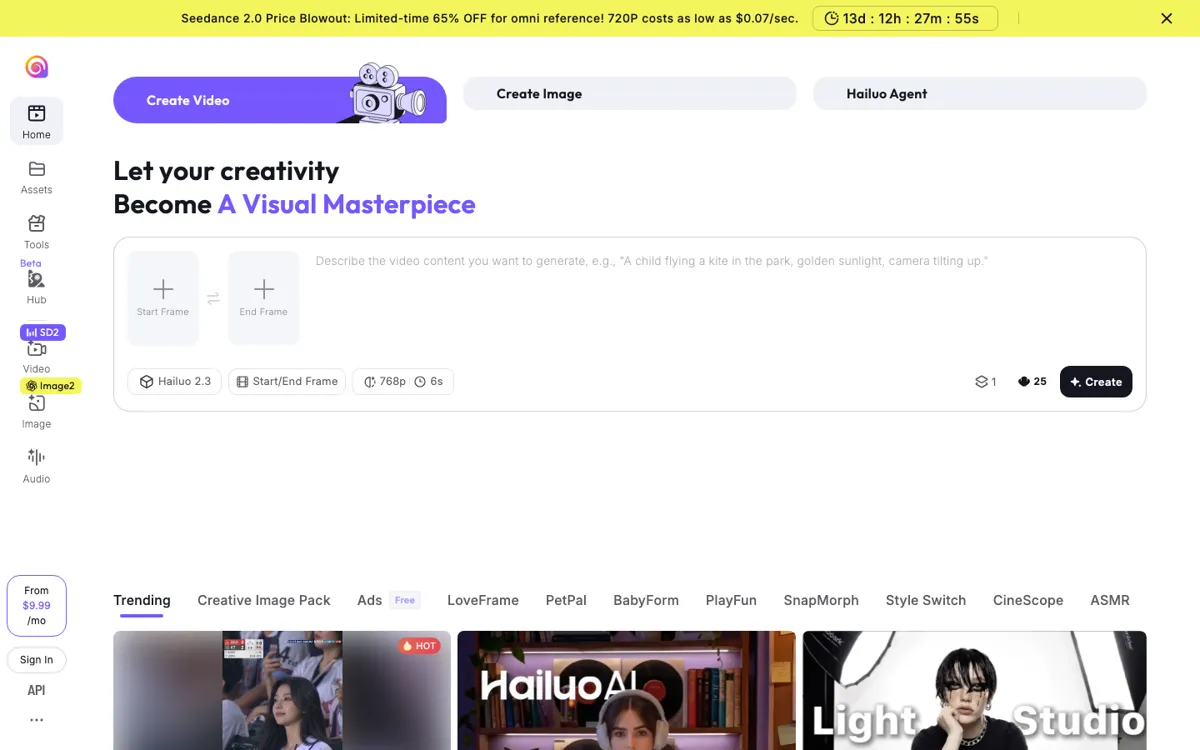
This is the clearest use case. The interface is built around a prompt box, a model selector, a short duration, and a one-click creation flow, which makes it useful for creators chasing a single strong shot rather than a complete video system. You bring in a scene description, tune the visual boundaries, and get a short result quickly enough to iterate. The limitation is obvious: once the work expands from one striking moment to a structured multi-scene piece, you need another tool to carry the rest of the job.

check_circle Pros

  • The main canvas exposes prompt, model, resolution, duration, and start-end frame controls in one place, which makes quick shot iteration practical.
  • Template lanes for ads, style transfer, pets, and meme-style concepts help people start with a format instead of a blank prompt.
  • The product stays focused on fast visual generation rather than forcing users through a full editing workflow first.

cancel Cons

  • The strongest official signals are built around short outputs, so it does not present itself as a full long-form video production environment.
  • Public pricing is visible but not cleanly broken down on a dedicated page from the links reviewed, which makes cost planning harder than it should be.
  • Beta labeling and promotional pricing language suggest a product that is still evolving, which can matter if you need a stable repeatable pipeline.

Should you use it?

Best for: Best for turning a prompt or still image into a short cinematic clip, ad concept, or social-first motion asset before you move into a heavier editor.

Skip it if: Skip this if your job starts after generation, like timeline editing, long-form assembly, multi-scene review, or polished finishing across a full campaign.

Is it worth the price?

Paid Starts at $9.99 USD

This does not look like a casual free playground. The visible monthly entry price and promo language point to a tool that makes sense when fast video generation is part of your regular creative loop, not when you only need a rare experiment once in a while.

The Free Tier

The homepage advertises a free entry path and a visible free-use route, but the reviewed public page did not expose a clean free-limit breakdown worth stating more precisely.

Paid Upgrade
$9.99/month shown on the rendered homepage

Paid entry pricing is promoted on the homepage, but the official pages reviewed did not expose a full public feature breakdown.

One thing to know before you start

Treat the start and end frame controls as the real lever here. If the shot matters, spend your effort shaping the first and last visual states before rewriting the prompt twenty times.

What does Hailuo AI actually do?

A lot of AI video tools promise cinematic output, but many still make the first step feel blunt: type a prompt, wait, and hope the motion lands somewhere close to your idea. That is a problem when the shot itself matters more than the abstract concept. If you are trying to pitch an ad direction, animate a still for social, or test whether a single visual beat can carry a teaser, the pain is not lack of imagination, it is lack of control over the transition from one visual state to the next. You do not need a full post-production stack at that stage, but you do need more guidance than a blank prompt box usually gives you.

Hailuo AI attacks that problem by centering generation controls on the first screen. The product puts text-to-video and image-to-video next to start and end frame options, then shows model choice, 768p output, 6-second duration, and one-click creation in the same workspace. That setup matters because it turns generation into directed shot-building instead of pure lottery prompting. The surrounding preset lanes for ad commerce, style transfer, pets, meme formats, and ASMR also give users narrower starting points, which is useful when speed beats originality and you need to explore formats fast rather than invent every composition from zero.

The limits are just as important. Everything about the official experience points toward short-form generation and experimentation, not long-form editing or careful finishing. The interface sells quick motion, trending templates, and model-driven output, while the visible pricing hook and beta labeling suggest a product still optimizing its creative engine and packaging. That means Hailuo AI is strongest before the real edit begins. If your team needs timeline control, review states, detailed retakes across many scenes, or dependable campaign finishing in one system, this tool becomes an upstream idea generator rather than the place the final work gets done.

What you can do with it

Generate short videos from a text prompt.
Animate still images into motion clips.
Use start and end frames to steer scene movement.
Pick a named generation model, output resolution, and clip length before rendering.
Browse ready-made creative formats for ads, pets, memes, style transfer, and ASMR concepts.
Create visual assets inside the browser without opening a traditional editing timeline first.

Technical details

platform
Web app
deployment
Cloud-hosted generation with Hailuo 2.3 model options, 768p output, and 6-second clip generation shown on the main creator screen
api_available
No public API surfaced on the reviewed official pages

Top Alternatives to Hailuo AI

If Hailuo AI is close but still misses the job, try one of these instead.

Key Questions

Can Hailuo AI generate video from both text and images?
Yes. The official experience exposes both text-to-video and image-to-video creation paths, so you can start from a prompt or from a still visual.
Can you guide motion with more than just one text prompt?
Yes. The creator screen includes start and end frame controls, which gives you a way to shape how a shot begins and finishes instead of relying on one prompt alone.
Is Hailuo AI a full video editor?
No. It looks much closer to a generation tool for short clips than a place to sequence, trim, review, and finish a full long-form project.