Genspark Review

7.4/10

All in one AI workspace for docs, slides, images, video, and agent style tasks

Review updated May 2026 By The AI Way Editorial Tested 262+ tools across the site 4 min read
Genspark Fact Checking Free Forever Meeting Notes SaaS Slide Designer Text-to-Image Text-to-Video Web-Based Writing Assistant Freemium

Our Verdict

Genspark is most attractive if your real problem is AI sprawl. It gives you one place to generate slides, docs, images, videos, notes, and research style outputs without constantly reloading context into separate apps. That convenience is real. The tradeoff is that broad workspaces often feel uneven, where the best use is replacing a messy stack of okay tools, not necessarily beating the strongest specialist in every category.

Try it
Free to start, then pay when the limits stop you.
open_in_new Try Genspark
Official Website Snapshot Visit Site ↗

check_circle Pros

  • It covers an unusually wide spread of workflows, from documents and presentations to image, video, audio, and note taking tasks.
  • The tool catalog makes it easier to stay in one environment when a project moves from research to slides to visuals instead of forcing app hopping.
  • Business and enterprise positioning suggests it is not only chasing casual one off generation, but also repeatable team workflows.
  • Mobile app availability matters if you want the same workspace accessible outside the desktop browser.

cancel Cons

  • The public pages reviewed here do not show exact paid plan pricing, which makes it hard to judge whether consolidation is actually cheaper than a hand picked stack.
  • A huge tool surface can create discovery and quality problems. Some users will want depth in one mode, while Genspark is optimized around breadth.
  • If you already have a favorite specialist for slides, image work, or video, an all in one workspace can feel redundant rather than better.
  • The product language leans heavily on scale and range, so you still have to test whether the specific tool you care about is strong enough for real daily use.

Should you use it?

Best for: People or teams that regularly switch between writing, slides, visual generation, summaries, and research tasks and would rather keep those jobs in one AI workspace than manage a fragmented tool stack.

Skip it if: Skip it if you only need one category, like image generation or presentation design, and you already use a specialist tool you trust, because Genspark's main value is consolidation across modes.

Is it worth the price?

Freemium

The free tool framing works as a low risk way to test breadth, but it does not answer the real buying question. Once you start depending on Genspark across docs, slides, and media tasks, the only thing that matters is whether that one workspace actually replaces enough separate tools to earn its paid seat.

The Free Tier

The tools page explicitly frames Genspark as offering 40 plus free AI tools, but the reviewed pages do not expose exact paid plan limits or upgrade thresholds.

Paid Upgrade

Paid access likely matters when you want heavier workspace usage, broader generation volume, or team features, but the surfaced pages do not publish exact plan pricing.

One thing to know before you start

Use Genspark for cross format projects, not single step tasks. It makes the most sense when you need to go from notes or research into slides, docs, and visuals in one sitting.

What people actually use it for

Turn one idea into slides, docs, and visuals without switching products

If you start with a rough prompt or research question and know you will need a report, a deck, and supporting images, Genspark can reduce the handoff cost between those steps. Instead of rebuilding the same project context in separate apps, you can keep the work inside one workspace and move from writing to presentation to media generation faster.

What does Genspark actually do?

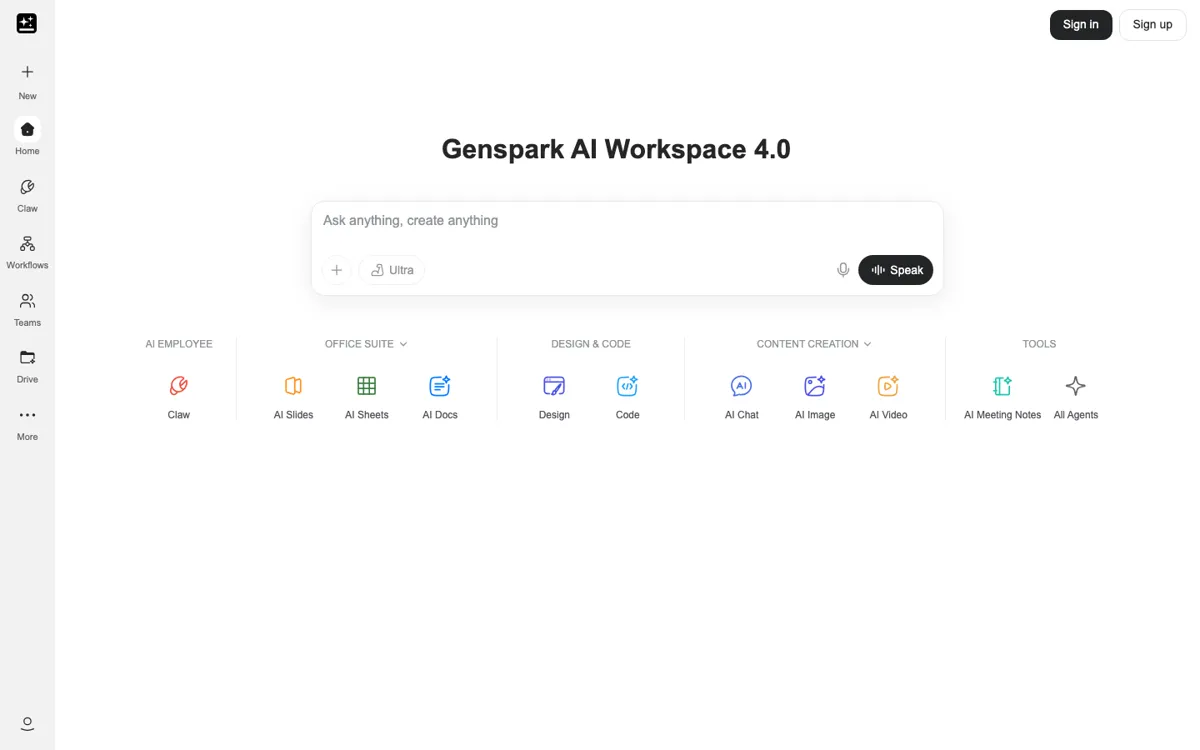
Genspark is easiest to understand as a workspace product, not a single tool. The company is pushing a very broad promise: one place for chat, documents, spreadsheets, slides, media generation, fact checking, note taking, and a long list of task specific generators. That matters because a lot of AI users are no longer looking for one more clever generator. They are looking for fewer tabs, fewer subscriptions, and fewer moments where project context gets lost between tools. Genspark is aiming directly at that fatigue.

The strongest reason to use it is workflow continuity. A project can start as a note, become a report, turn into a deck, and then need supporting visuals or video. In a fragmented stack, each move costs time and often degrades consistency. Genspark's breadth tries to keep those steps close together. That is especially useful for small teams or solo operators who do not want to assemble a custom toolchain for every content or business task. The value is less about one magical output and more about keeping momentum across formats.

The main caution is that all in one AI suites tend to oversell replacement power. You may save time by consolidating, but that does not mean every module is better than a focused specialist. If slides are mission critical, or if image quality is the one thing your workflow lives or dies on, you still need to compare Genspark against category leaders instead of buying the whole premise on convenience alone. It is a strong candidate for reducing tool sprawl, but not an automatic winner for every individual task inside that sprawl.

What you can do with it

Generates documents, slides, reports, and proposals inside one workspace
Covers image, video, music, podcast, and design generation from the same product family
Includes note taking, fact checking, PDF summarizing, and chat style workflows
Offers business and enterprise workspace positioning alongside consumer style tools
Supports mobile app downloads on both iOS and Android

Technical details

platform
Web based workspace that spans chat, documents, slides, spreadsheets, media generation, and task specific AI tools instead of one narrow editor or generator.
deployment
Cloud hosted with consumer, mobile, and business entry points, including iOS and Android app distribution plus a separate business workspace page.
api_available
No public API or developer platform is surfaced in the pages reviewed, which suggests the product is sold as a ready made workspace rather than a composable backend for builders.

Top Alternatives to Genspark

If Genspark is close but still misses the job, try one of these instead.

Key Questions

Is Genspark a single AI tool or a whole suite?
It is much closer to a suite. The product is built around a workspace idea, with tools for documents, slides, visuals, video, notes, and other task specific jobs living under one roof.
Does Genspark make sense if I only need one kind of output?
Usually no. If your workflow lives in one narrow category, a specialist may serve you better. Genspark earns its keep when you regularly cross between multiple formats and tasks.
Can you judge the pricing from the public pages alone?
No. You can confirm that there is a free entry point and a broad tool catalog, but the exact paid plans and usage thresholds are not visible in the material reviewed here.