Cotypist Review

8.0/10

Local Mac autocomplete that finishes your next words inside the apps where you already write.

Review updated August 2026 By The AI Way Editorial 3 min read
Cotypist Mac App No Credit Card Required Privacy Focused Writing Assistant Freemium from USD 6.00/mo

Our Verdict

Cotypist works when typing is the bottleneck and you already know what you want to say. It saves keystrokes better than it writes for you, which is why heavy Mac writers can stick with it daily. The tradeoff is fit: Apple Silicon only, uneven app support, and subscription math tied to writing volume.

Official site
A free plan is listed; verify current limits before upgrading. Starts at USD 6.00.
open_in_new Try Cotypist
Official Website Snapshot Visit Site ↗

check_circle Pros

  • It stays inside your existing apps instead of sending you to a separate drafting tab.
  • Core completions run locally and offline on Apple Silicon Macs.
  • The compatibility and privacy docs are unusually specific.

cancel Cons

  • It only runs on Apple Silicon Macs with macOS 14+.
  • Support is uneven across apps, with some tools still unsupported or partial.
  • Anonymous usage stats and crash reports stay on unless you turn them off.

Should you use it?

Daily Mac writing where keystrokes, not ideas, are the bottleneck.

Skip it if: you are on Windows or Intel Mac, rely on unsupported apps, or need full-draft generation

Is it worth the price?

Freemium Starts at USD 6.00

The free tier is long enough to judge fit because it includes 100 completed words a day and a 30-day Pro trial. Paying only feels obvious if you write enough for keystroke savings to matter every day.

The Free Tier

100 completed words daily, plus a 30-day Pro trial.

Paid Upgrade
$6/mo billed annually

Plus unlocks unlimited completions; Pro adds more Macs, larger models, and per-app instructions.

One thing to know before you start

Test it in the exact apps where you lose time typing, then test it again after the 30-day trial glow wears off. Real fit is about habit and compatibility, not first-demo magic.

What people actually use it for

Email and chat replies

Use Cotypist when you already know what you want to say but do not want to type every word yourself. It can speed up email replies, Slack messages, and support responses because the job is mostly finishing thoughts you were already writing, not inventing content from zero.

Prompt writing for other AI tools

Cotypist is useful when you are already inside another AI product. It can help with prompts in AI sidebars and supported terminal prompts, which makes it a helper for the tools you already use rather than a replacement.

Typing help with less strain

This is one of the more convincing non-hype use cases. Non-native English writers, dyslexic typists, one-handed writers, and people with wrist strain can get value because Cotypist reduces the amount of manual typing without forcing them into a cloud writing workflow.

What does Cotypist actually do?

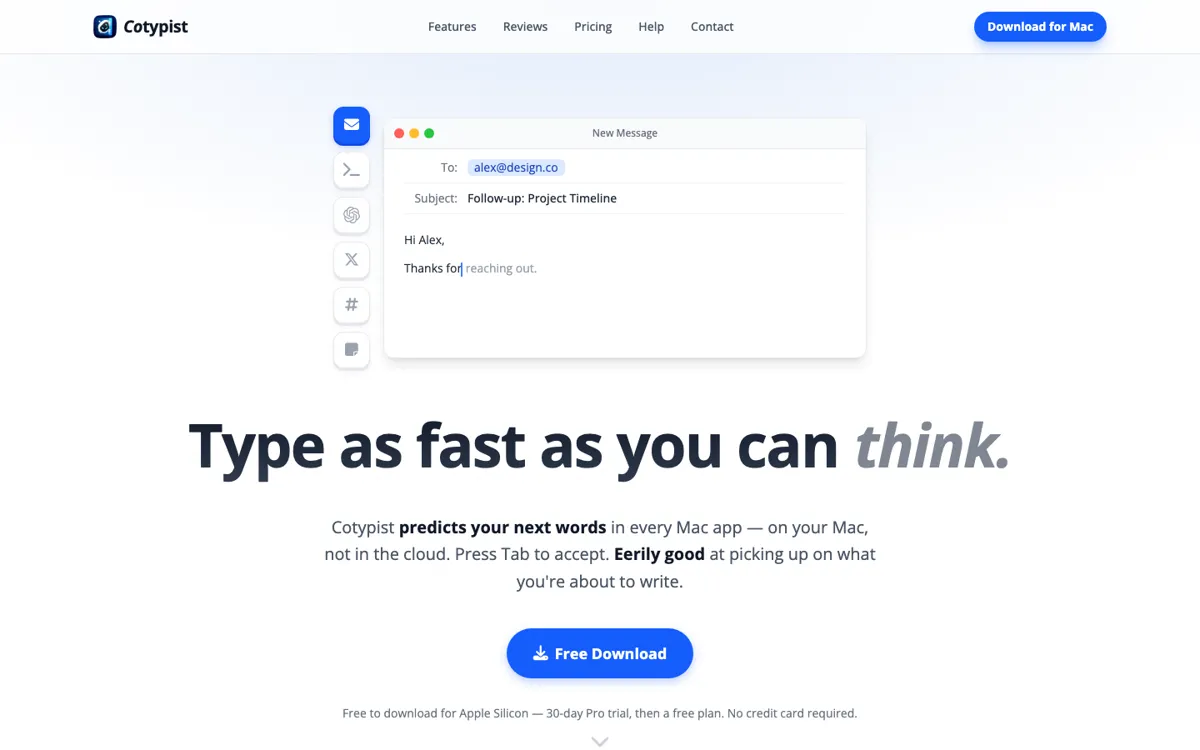
Cotypist makes more sense when you compare it to keyboard friction, not to ChatGPT. It lives in the background on a Mac and offers inline completions in the places where you already write. You keep typing in Mail, Slack, Notes, Notion, or a browser, and Cotypist tries to land the next word before you do.

The strongest differentiator is that the product runs locally. Accessibility permission is required, while screen recording, clipboard access, and personalization are optional. That said, "local" is not the same thing as "nothing ever leaves the machine" by default: the app's own privacy docs say anonymous usage statistics and crash reports are enabled unless you switch them off.

What you can do with it

Predict next words in Mac text fields and accept them with Tab.
Run locally on Apple Silicon Macs with offline completion support.
Work across many Mac apps, with setup notes and unsupported cases documented publicly.
Offer custom instructions on Plus and per-app instructions on Pro.
Support AI sidebars and some terminal prompt workflows rather than only normal document apps.

Technical details

app_coverage
Compatibility docs openly list supported, setup-needed, and unsupported apps.
completion_mode
Inline predictions land inside supported apps instead of a separate chat window.
context_controls
Screen, clipboard, and personalization context are optional rather than required.
device_requirement
Runs on Apple Silicon Macs with macOS 14 or later.

Top Alternatives to Cotypist

If Cotypist is close but still misses the job, try one of these instead.

Key Questions

Does Cotypist have a real free plan?
Yes. The free tier includes 100 completed words a day, and every new install starts with a 30-day Pro trial without requiring a credit card.
Can Cotypist replace ChatGPT or another writing assistant?
No. Cotypist is built to finish the words you were already about to type, not to research, outline, or draft large pieces from scratch.
Will Cotypist work in every Mac app?
No. It works in many apps, but not all. Some need setup, some only support mirror-mode or sidebar chats, and several apps are explicitly unsupported.
Why do people complain about the pricing if the app is good?
Because the product feels more like a local utility than a cloud subscription, so some users expect a one-time purchase or cheaper upgrade path. The value case is strong for heavy daily typists, but much weaker for lighter users.