Statewright Review

8.6/10

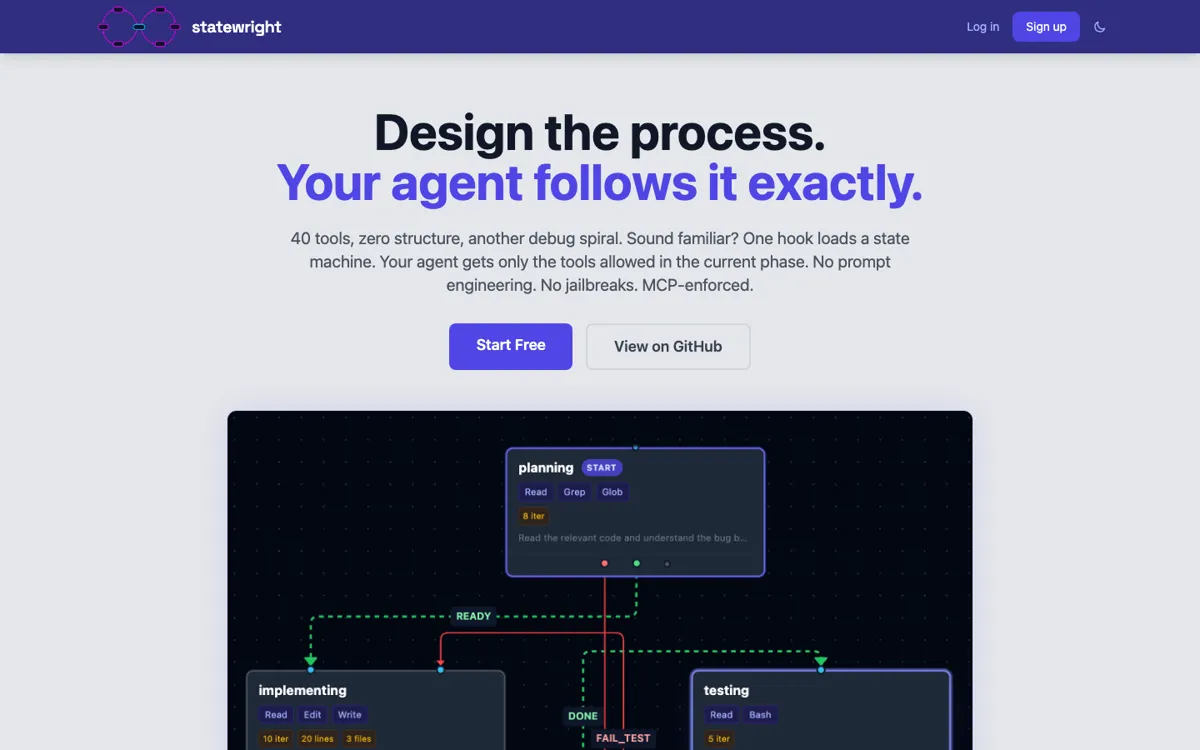
A visual state-machine builder that gives AI agents durable workflows, guardrails, and shared memory.

Review updated May 2026 By The AI Way Editorial Tested 166+ tools across the site 6 min read
Statewright AI Agents App Integration Free Forever Workflow Builder Freemium from $20.00/mo

Our Verdict

Statewright is easiest to justify when an agent workflow has grown past prompt tinkering and turned into something that needs explicit states, memory, and stop points. Its biggest advantage is that it makes the agent's path visible, so teams can see where it should branch, wait, retry, or escalate instead of trusting a long hidden chain of prompts. The tradeoff is that this only pays off for teams building serious agent systems. For simple one-shot automations, the structure will feel heavier than the problem.

Try it
Free to start, then pay when the limits stop you. Starts at $20.00 USD.
open_in_new Try Statewright
Official Website Snapshot Visit Site ↗

check_circle Pros

  • It gives agent teams a concrete way to model branching, memory, and approvals instead of stuffing all the behavior into prompt text.
  • The visual state-machine layer makes it easier to inspect why the agent went down one path and not another.
  • Tool support through MCP, APIs, webhooks, and custom actions makes the product useful beyond demo-only chat flows.
  • The free tier lowers the barrier to testing whether explicit state management actually improves a real agent workflow.

cancel Cons

  • The product is much less useful if your agent only needs short, one-shot interactions instead of long-running workflows.
  • Teams still need to think clearly about state design, tool boundaries, and failure handling, because the canvas does not remove bad workflow decisions.
  • HN discussion shows that developers will judge it against code-first orchestration patterns, so the product has to keep proving that the visual layer adds clarity rather than extra ceremony.

Should you use it?

Best for: Best for building agent workflows that need visible branching, durable memory, tool orchestration, and approval points once the flow is too complex to trust to prompt glue alone.

Skip it if: Skip this if your use case is mostly a chatbot wrapper, a single prompt plus tool call, or a tiny automation that does not need persistent state, branching, or human checkpoints.

Is it worth the price?

Freemium Starts at $20.00 USD

The free tier is enough to answer the real question: does your agent workflow actually need explicit states and memory, or are you adding structure for its own sake? Paid tiers only become easier to justify once the workflow is already working and the bottleneck shifts to collaboration or governance.

The Free Tier

Free includes one project and enough access to test the builder before a team needs more projects or collaboration features.

Paid Upgrade
$20/month

Paid tiers unlock more projects, collaboration, and stronger team or organization controls on top of the same core workflow model.

One thing to know before you start

Start by modeling one agent flow that already breaks in production. If the state map makes the failure path obvious, you will know quickly whether the product is solving a real coordination problem or just adding a nicer diagram.

What people actually use it for

Build a multi-step support or operations agent that needs clear stop points

Statewright fits workflows where the agent cannot just answer once and finish. If it has to gather input, call tools, wait for a response, branch on a result, and sometimes hand off for approval, the state-machine model gives the team a cleaner way to see that path. That is more useful than prompt glue when the cost of a bad branch is a real customer or operations mistake.

Replace hidden prompt chains with a workflow the whole team can inspect

A lot of agent systems become hard to debug because the logic is scattered across prompts, callbacks, and ad hoc conditions. Statewright is useful when the bigger problem is visibility, not generation quality. Putting states, transitions, and memory on a shared canvas helps the team see where the agent loops, where context gets lost, and where human review should enter the flow.

Prototype agent products before locking the orchestration into framework code

The free tier and visual editor make Statewright a practical place to test whether an agent workflow even deserves deeper engineering investment. A team can map the sequence, connect tools, and prove that the flow shape works before burying it in a bigger codebase. That is especially useful when the product idea is still changing and the coordination logic matters more than polishing the final implementation.

What does Statewright actually do?

A lot of agent products look convincing when they handle one prompt well, then start breaking once the job needs memory, branching, and controlled handoffs. The failure is not always the model itself. It is often the invisible workflow wrapped around it. One prompt calls a tool, another prompt guesses what happened before, and a callback somewhere decides whether the agent should continue or stop. Once the flow grows, nobody can see the whole path clearly. That makes debugging painful and makes guardrails feel bolted on after the fact. Statewright is aimed at that stage, where an agent is no longer a neat demo and has become a system that needs structure.

The core move is to treat the agent as a state machine instead of a long hidden chain of prompt logic. Statewright gives teams a visual builder where they can define states, transitions, memory, tool calls, and review points in one flow. That matters because the workflow becomes inspectable after the first run. You can see where the agent should retry, where it should branch, where it should pause for approval, and what information it should carry into the next step. The platform also supports MCP, APIs, webhooks, and custom actions, so the product is built for real orchestration work, not just diagramming ideas about agents.

The tradeoff is that this layer only earns its keep when the workflow is genuinely complicated enough to justify it. If the job is basically one prompt plus one tool call, Statewright is more process than value. Even when the product is a good fit, teams still have to think carefully about state boundaries, failure handling, and what should stay automated versus what should stop for a human. The visual model helps, but it does not rescue a badly designed agent. Statewright is strongest when your problem is agent coordination under real complexity, not when you just want a faster way to ship a chatbot shell.

What you can do with it

Map an agent's states, transitions, tools, and memory on a visual canvas instead of hiding the flow inside prompts and callback code.
Add MCP servers, APIs, webhooks, and custom actions so the agent can act through connected tools rather than only answer text.
Persist context between states, which helps the workflow remember what it already collected before the next step runs.
Insert approvals, retries, and branching logic where the agent should stop, ask for help, or take a safer path.
Start free, collaborate in the browser, and move to paid tiers as the workflow needs more projects, teammates, or control.

Technical details

tooling_surface
The platform is built around MCP, APIs, webhooks, and custom actions, which means the workflow is designed to orchestrate external tools instead of acting like a closed chat sandbox.
state_machine_runtime
Statewright models agent behavior as explicit states and transitions, which keeps long-running agent workflows inspectable instead of burying the logic inside prompt chains.
human_control_boundary
The product is built for workflows that can branch, pause, retry, or escalate, which gives teams an explicit place to add review and control boundaries once an agent should stop acting on its own.
memory_and_context_model
Workflows can persist shared memory between states, so the agent can carry forward what it already gathered rather than recomputing context on every turn.

Top Alternatives to Statewright

If Statewright is close but still misses the job, try one of these instead.

Key Questions

What is Statewright actually replacing in an agent stack?
It replaces a lot of hidden workflow glue. Instead of spreading state logic across prompts, tool wrappers, and callback code, Statewright gives the team one visible place to define states, transitions, memory, and stop points.
Is Statewright for simple chatbots?
Not really. It can be used there, but the product makes more sense once the workflow needs durable state, branching, approvals, or multiple tool steps. If the flow is basically one prompt and one answer, it is probably more structure than you need.
Can you try Statewright before paying?
Yes. The pricing page shows a free tier, which is enough to test whether explicit state management improves one real workflow before you move into paid collaboration or larger-scale usage.
Why would a team choose this over a code-first framework?
A team would choose it when visibility and shared understanding matter as much as raw flexibility. If the hard problem is seeing and governing the workflow, the visual state-machine layer can be more useful than keeping everything inside code.