Realistic AI Image Generator Review

6.8/10

Create photorealistic portraits, product shots, headshots, ad images, and concept visuals from text prompts.

Review updated June 2026 By The AI Way Editorial Tested 321+ tools across the site 4 min read
Realistic AI Image Generator Commercial Rights Image-to-Image Product Photography SaaS Text-to-Image Web-Based Freemium from $14.90/mo

Our Verdict

Realistic AI Image Generator is a narrow, practical pick for quick photo-style visuals: product shots, headshots, campaign mockups, and social images. Its value is not a rare model claim; it is the simple front door, reference-image input, resolution controls, and ready prompt gallery. The main tradeoff is transparency: free access exists, but the exact free credit allowance is not stated before the paid plans.

Try it
Free to start, then pay when the limits stop you. Starts at $14.90 USD.
open_in_new Try Realistic AI Image Generator
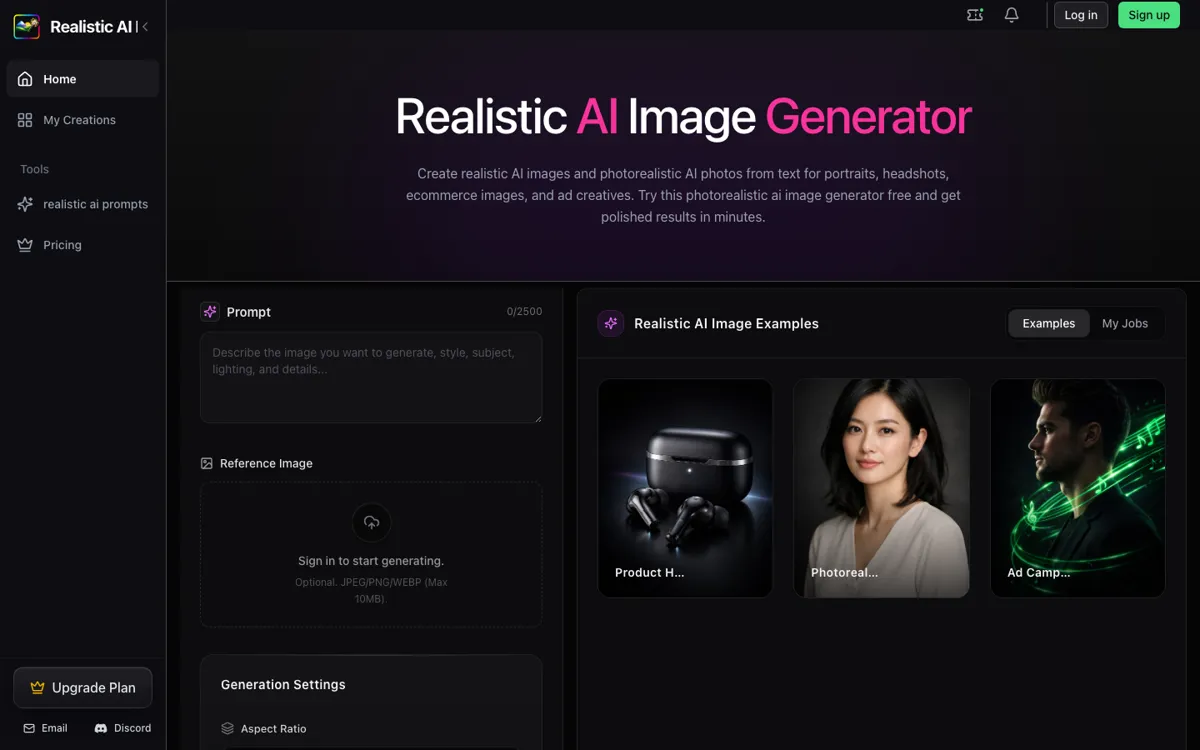
Official Website Snapshot Visit Site ↗

What people actually use it for

Ecommerce product visuals

Create product hero shots, store images, and campaign concepts when a full studio shoot is too slow for early testing or small batches.

Ad creative exploration

Generate several photo-style directions for paid social, banner ads, launch pages, or campaign moodboards before committing to one visual route.

Headshots and portraits

Turn prompts into polished portrait or headshot drafts for profiles, team pages, resumes, creator thumbnails, or brand experiments.

check_circle Pros

  • Covers the common commercial image jobs in one place: portraits, headshots, ecommerce product shots, lifestyle scenes, ad creatives, and concept images.
  • Gives users concrete controls before generation, including aspect ratio, resolution, output format, and optional reference image upload.
  • The prompt gallery reduces blank-page work because users can copy examples for product photos, corporate headshots, lifestyle scenes, and ads.

cancel Cons

  • The free starting point is not fully quantified, so users cannot see the exact free credit allowance before signing in.
  • The underlying image model or provider is not named, which makes it harder to compare output quality against tools like Midjourney, Leonardo, or DALL-E before testing.

Should you use it?

Best for: Fast photorealistic mockups for product pages, paid social concepts, LinkedIn-style headshots, ecommerce listing images, lifestyle visuals, and pitch-deck image directions.

Skip it if: Skip it if you need a named model stack, advanced image editing canvas, batch brand-system controls, or a proven enterprise asset pipeline.

Is it worth the price?

Freemium Starts at $14.90 USD

Free access is useful for checking whether the generator can match your prompt style, but the paid plans are where the product becomes predictable. Basic is the entry point for light paid projects, Pro is the better fit for regular marketing or ecommerce work, and Max is for higher output because it adds more credits, longer history, and more running jobs at once.

The Free Tier

Free access is mentioned, but the exact free credit allowance is not stated.

Paid Upgrade
$14.90/month

Basic includes 220 credits/month, up to 44 1K images, 30-day history, standard queue, reference image support, no watermark, and commercial use.

One thing to know before you start

Start from the prompt gallery, then replace only the product, scene, lighting, and camera details. That gives you a stronger first result than writing a vague prompt from scratch.

What does Realistic AI Image Generator actually do?

The strongest part of Realistic AI Image Generator is how quickly it gets from a commercial image idea to a usable draft. The first screen gives the core controls: prompt, optional reference image, aspect ratio, resolution, and output format. That setup fits jobs where the user already knows the shot they want, such as a perfume bottle on a studio pedestal, a corporate headshot on a neutral background, or a rainy city fashion ad that needs a first visual direction before production.

The prompt gallery is more useful than a generic inspiration page because it is organized by real visual jobs. Portraits, headshots, product photos, lifestyle scenes, ad creatives, and concept images each include complete prompt patterns with subject, lighting, environment, camera look, texture, and finish. For a user who is not good at prompt writing, that is the fastest path from a rough idea to a first image worth refining, downloading, or turning into a paid ad test for review this week.

Pricing is credit-based across three paid plans. Basic is $14.90 per month with 220 credits and up to 44 1K images. Pro is $29.90 per month with 700 credits, faster queue, 90-day history, two running jobs, no watermark, reference images, and commercial use. Max is $49.90 per month with 1,600 credits, 180-day history, fastest queue, and four running jobs. The free entry point is real, but the exact free credit amount is not visible before the paid tiers.

What you can do with it

Generate photorealistic images from text prompts up to 2,500 characters.
Upload optional JPEG, PNG, or WEBP reference images up to 10MB.
Choose aspect ratios including Auto, 1:1, 16:9, 9:16, 4:3, and 3:4.
Select 1K, 2K, or 4K resolution and download outputs as PNG or JPG.
Use prompt examples for portraits, headshots, product photos, lifestyle scenes, ad creatives, and concept images.
View recent generations in a signed-in creation history.

Technical details

platform
Web app with prompt input, optional reference-image upload, aspect-ratio controls, resolution controls, output-format controls, and signed-in creation history.
deployment
Hosted online service; self-hosting and local deployment are not documented.
api_available
Public API availability is not documented.

Top Alternatives to Realistic AI Image Generator

If Realistic AI Image Generator is close but still misses the job, try one of these instead.

Key Questions

What can Realistic AI Image Generator create?
It can create photo-style portraits, product photos, marketing visuals, lifestyle scenes, headshots, ad images, and concept images from prompts.
Can it use a reference image?
Yes. The generator accepts an optional JPEG, PNG, or WEBP reference image up to 10MB.
What output settings are available?
Users can choose aspect ratios such as 1:1, 16:9, 9:16, 4:3, and 3:4, select 1K, 2K, or 4K resolution, and download PNG or JPG output.
Is commercial use allowed?
Yes on paid plans. Basic, Pro, and Max include commercial use and no watermark.
Is it free?
Yes, free access is mentioned. The paid plans start at $14.90 per month, but the exact free credit allowance is not stated before the paid tiers.