Open Vibe Review

8.2/10

Learn to ship a real SaaS with Claude Code or another coding agent, without staying stuck at prompt roulette.

Review updated May 2026 By The AI Way Editorial Tested 174+ tools across the site 5 min read
Open Vibe AI Agents CLI Tool Free Forever No Credit Card Required Open Source Repo Awareness Free

Our Verdict

Open Vibe is for people who like the speed of AI coding agents but hate not knowing why the app broke. Instead of handing you a polished no-code shell, it turns your agent into a tutor inside the build loop, so each feature ships with an explanation of the system behind it. The catch is that you still need to bring your own agent account and commit real time, so this lands better as a structured build-and-learn path than as an instant app generator.

Try it
Free to start.
open_in_new Try Open Vibe
Official Website Snapshot Visit Site ↗

What people actually use it for

Learn SaaS architecture while shipping your first serious app

Open Vibe fits the founder who keeps opening AI coding tools, gets a login screen or dashboard scaffold quickly, then freezes when auth, database writes, or payment wiring start to break. The live diagrams and guided modules are aimed at that exact moment. Instead of sending you back to a long video course, it keeps you inside the build, lets you ask why a route, query, or UI step works, and uses your real app as the teaching surface.

check_circle Pros

  • It attacks the biggest weakness in vibe coding, the part where you can ship snippets but cannot explain the auth, payment, or data flow after the fact.
  • The course runs on your own machine and your own codebase, which is a cleaner setup than learning inside a locked hosted builder you may leave later.
  • The Open SaaS track gives learners a production-shaped stack with auth, payments, admin, email, and AI hooks instead of toy tutorial projects.
  • Free, open source, and MIT licensed is a strong trust signal for a learning product that wants you to invest weeks of build time.

cancel Cons

  • It is not a one-click app builder, so people looking for a fast finished product without learning the moving parts may find it slower than a hosted vibe-coding tool.
  • You still need your own coding agent setup, so the project being free does not remove the separate cost of whatever outside agent or model access you choose.
  • The roadmap is still uneven, with several modules marked coming soon, which means some parts of the promised journey are not filled in yet.

Should you use it?

Best for: Founders, indie hackers, and first-time SaaS builders who want to build a real app in Claude Code or Cursor while learning why the stack works, especially around auth, payments, and database flows.

Skip it if: Skip it if you just want an AI builder to spit out a finished dashboard by tonight, because Open Vibe is built around understanding the system while you ship, not around hiding the system from you.

Is it worth the price?

Free

Open Vibe itself is free, open source, and available without a signup wall. The separate cost question is the tooling around it: if you use a paid coding agent or paid model API, that spend belongs to that outside toolchain rather than to Open Vibe itself.

The Free Tier

The site says Open Vibe is 100% free, open source, MIT licensed, and requires no signup. You still need your own compatible coding agent, and any paid access there is separate from Open Vibe itself.

Paid Upgrade
Contact for pricing

Paid plans usually unlock higher limits, cleaner exports, and broader commercial use.

One thing to know before you start

If you try Open Vibe, use it on a SaaS idea you actually care about. The product is strongest when the lesson and the build are the same thing, because that is where the tutor-in-the-loop model pays off.

What does Open Vibe actually do?

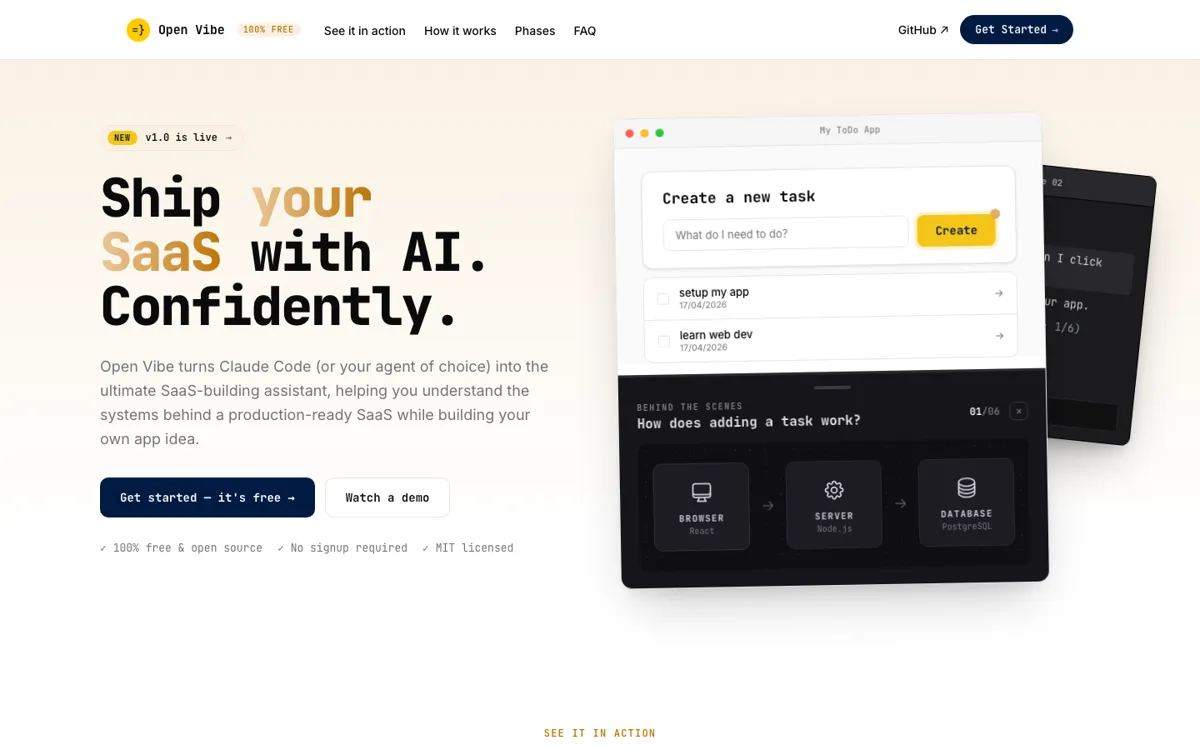
The main reason Open Vibe stands out is that it treats confusion as the product gap to fix. Plenty of AI coding tools already help you generate a feature, restyle a screen, or patch a broken route. The problem comes one step later, when you are staring at a working app you cannot explain. Open Vibe is built around that exact failure mode. Vibe coding is fast, but every prompt can turn into a blind gamble, and most tutorials explain toy examples instead of the app you actually want to ship. By dropping a structured course pack into an agent like Claude Code, it tries to keep the speed of AI building while forcing the missing context back into the workflow. That makes it less of a builder and more of a build-along operating system for learning real SaaS mechanics on the way to launch.

What makes the setup practical is the stack choice. Open Vibe does not stop at hello-world screens. It points learners at Open SaaS, Wasp's production-ready template, so the learning path happens inside an app shape that already includes auth, payments, admin, email, and AI-ready hooks. That matters because many beginners do not get stuck on writing a button, they get stuck when the app needs gated access, billing, and real data flow. The product's live browser overlays and phase-based modules are designed to explain those moving parts while you are touching them. It is a stronger proposition than generic prompt packs because the material is tied to a real full-stack app skeleton instead of a bag of detached tips. If the goal is to come out with both a launched app and a mental model of how it hangs together, this structure makes sense.

The biggest caveat is that Open Vibe still asks for patience and outside tooling. The project itself is free, but it does not include the coding agent you use alongside it, so any paid agent account or model API bill sits outside Open Vibe rather than inside its own pricing. It also asks you to learn in public with your own codebase on your own machine, which is empowering for some users and heavier for others. Several modules are still marked coming soon, so the promise is ahead of the finished curriculum in places. That means the best user is not someone shopping for a frictionless no-code shortcut. It is someone who already suspects that pure prompt-driven building leaves too much hidden, and is willing to trade some speed now for fewer black-box surprises later. For that audience, Open Vibe looks much more useful than another agent wrapper that only celebrates how fast code appears on screen.

What you can do with it

Drops a course pack into Claude Code, Codex, Cursor, and similar agents through a single install prompt
Uses live diagrams and step-by-step tutoring to explain what the React, server, and database layers are doing
Includes two learning tracks, one for basic web apps and one built on the Open SaaS starter with auth, payments, admin, email, and AI hooks
Runs locally on your own machine instead of trapping the project inside a hosted vibe-coding platform
Ships as a free MIT-licensed project with GitHub access and no signup wall

Technical details

platform
The course pack is plain Markdown that runs inside local coding agents like Claude Code, Codex, Copilot, Cursor, and Open Code, rather than inside a hosted web IDE.
deployment
Setup installs Node.js and Wasp CLI, then teaches on top of the Open SaaS starter so learners build locally first and can later deploy a production-shaped SaaS with auth, payments, admin, email, and AI-ready pieces.
api_available
There is no separate Open Vibe product API. The setup depends on whatever agent you bring, and that agent must be able to read files and execute terminal commands.

Top Alternatives to Open Vibe

If Open Vibe is close but still misses the job, try one of these instead.

Key Questions

Is Open Vibe a coding course or a SaaS builder?
It is closer to a guided build-and-learn layer than a traditional course or a pure builder. The point is to ship a real SaaS app with an AI coding agent while learning the system behind the app, not to sit through detached lessons or click through a no-code wizard.