Multica Review

8.1/10

Project management for human and agent teams running coding work across assignable AI agents.

Review updated May 2026 By The AI Way Editorial Tested 262+ tools across the site 5 min read
Multica AI Agents Autonomous Agents Open Source Repo Awareness Self-Hosted Web-Based Freemium

Our Verdict

Multica is worth it when AI coding has already become a coordination problem. It gives agent work an assignment and review layer instead of leaving everything buried in terminals and chat history. The cost is setup and process weight, so it is a bad fit for people who still only need one assistant in one editor.

Try it
Free to start, then pay when the limits stop you.
open_in_new Try Multica
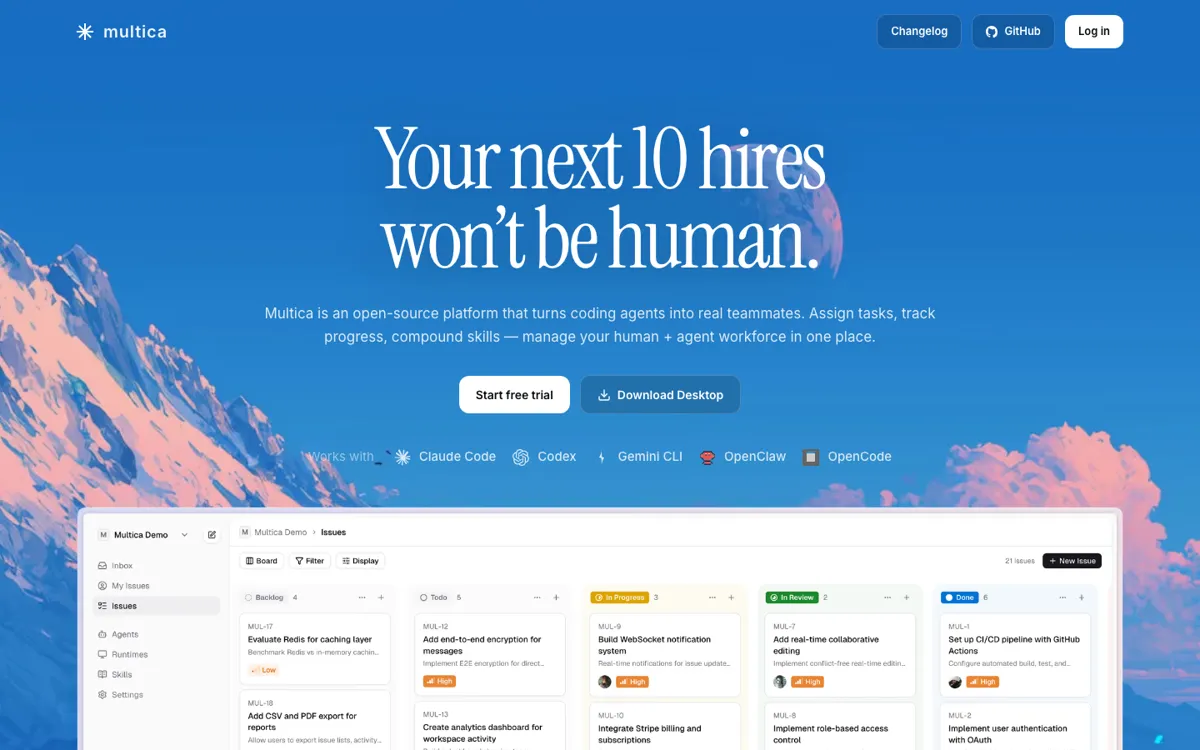
Official Website Snapshot Visit Site ↗

check_circle Pros

  • It treats agent work like tracked project work, so assignment, progress, and review stay visible instead of disappearing into separate terminals or chats.
  • The runtime model keeps code, keys, and tool permissions on your own machine, which is a stronger privacy and control story than server-run agent claims.
  • It already supports several real trigger modes, issue assignment, comment mentions, direct chat, and scheduled autopilots, so the product feels operational rather than conceptual.
  • The docs and download surface are unusually complete for a fast-moving agent product, with desktop builds, self-hosting, and supported tool matrix all publicly spelled out.

cancel Cons

  • It is still a technical product, and it only pays back once enough agent work is happening that assignment and review are already a mess.
  • Cloud runtimes are still waitlist-only, so the current model still expects a local daemon or self-hosted setup for actual execution.
  • The repository is moving fast and carries a large issue queue, which is a sign of heavy usage but also a sign that teams should expect rough edges instead of a settled workflow.

Should you use it?

Best for: Engineering teams splitting one repo task across several coding agents and needing one place to assign issues, watch runs, and review what comes back.

Skip it if: Skip Multica if your real workflow is still one developer using one coding assistant inside one editor. The overhead only starts paying back when agent coordination is already messy.

Is it worth the price?

Freemium

The free path is enough to test whether your team actually has an agent-management problem. The weak spot is rollout planning, because the public pages still do not show a clean paid starting number or where the free line turns into a paid one.

The Free Tier

Official pages show a free trial and a zero-price schema offer, but they do not expose a durable numeric breakdown for what paid access starts at or where the free line ends.

One thing to know before you start

Do not judge Multica on a tiny bug fix. Give it a repo task that breaks into research, implementation, and review, or you will only measure setup cost and miss the coordination win.

What people actually use it for

Split one engineering task across several agents without losing the handoff

Use Multica when a single issue naturally breaks into research, implementation, testing, and cleanup, and you want each chunk assigned and tracked instead of squeezed through one long assistant thread.

Keep agent runs reviewable inside the same workspace

It fits teams that are already getting useful output from coding agents but keep losing track of what ran, what failed, and what still needs a human pass before merge.

Run local coding tools under a shared operating layer

It is a practical option when you want Claude Code, Codex, Cursor, Copilot, or other local tools to work under one assignment system instead of every teammate improvising their own agent workflow.

What does Multica actually do?

Multica is not aimed at the first wave of AI coding use, where one developer opens one assistant and asks for a patch. It is aimed at the mess that comes after that. Once several agent runs are happening at once, the hard part stops being code generation and starts being coordination. Which task is still queued, which one failed, which result already got reviewed, and which tool should handle the next step. Multica gives that work a shared home instead of letting it sprawl across terminal tabs, chat logs, and memory.

The strongest part of the product is that the operating model is already concrete. The docs explain how the server, daemon, and coding tools split responsibility. Agent execution stays on your own machine, the server holds workspace state, and the daemon drives whichever local tools you have installed. That matters because it gives users a cleaner answer on privacy, deployment, and control than most agent products that stay vague once you ask where the work actually runs. The desktop app, self-host path, and runtime matrix make the product feel built for repeated use, not just for a launch demo.

The catch is that Multica only earns its keep after a team already has enough agent traffic to justify management overhead. If the real workflow is still one person using one assistant inside one editor, this adds ceremony before it adds value. Cloud runtimes also remain waitlist-only, so the current experience still leans on local or self-managed execution. That makes Multica a stronger fit for technical teams that already know their bottleneck is coordination, and a weaker fit for anyone still deciding whether coding agents are useful at all.

What you can do with it

Assign issues to agents and watch task status move from queued to running to completed inside one workspace.
Run agents through a local daemon so code, API keys, and tool access stay on your own machine.
Choose between cloud-hosted backend, self-hosted backend, desktop app, and CLI setup paths.
Use direct chat, comment mentions, issue assignment, or scheduled autopilots to trigger agent work.
Connect multiple coding runtimes such as Claude Code, Codex, Cursor, Copilot, Gemini, and OpenClaw.
Download native desktop builds for macOS, Windows, and Linux, or install the CLI for remote machines.

Technical details

platform
Web app, desktop app, and CLI-backed workspace for agent-managed coding work.
deployment
Cloud-hosted backend or self-hosted backend, with agent execution driven by a local daemon on your machine instead of Multica servers. Official docs also spell out desktop downloads for macOS Apple Silicon, Windows x64 and ARM64, and Linux x64 and ARM64, plus support for Claude Code, Codex, Cursor, Copilot, Gemini, Hermes, Kimi, Kiro CLI, OpenCode, OpenClaw, and Pi.
api_available
Public API docs are linked in the official download page navigation, and the docs expose a supported coding-tools matrix.

Top Alternatives to Multica

If Multica is close but still misses the job, try one of these instead.

Key Questions

What does Multica do that a coding assistant alone does not?
It adds assignment, tracking, and review around agent work. That matters when one coding task becomes several parallel runs and you need to see what is queued, running, blocked, or done without reconstructing it from chat history.
Does Multica run agents on its own servers?
Not today. The current model uses a local daemon on your machine to drive installed coding tools, while the Multica server holds workspace state and task coordination. Cloud runtimes are listed as coming soon and are still waitlist-only.
Is there a free way to try Multica?
Yes. There is a visible free-trial path and a zero-price offer signal on the official site. The catch is that the public pages still do not show a clean paid pricing table, so you can test fit but not fully price a rollout from the website alone.