Lightfield Review

7.9/10

An AI-native CRM that captures customer context and lets agents run follow-up work for you.

Review updated May 2026 By The AI Way Editorial Tested 166+ tools across the site 5 min read
Lightfield AI Agents API Available Autonomous Agents B2B CRM Integration Meeting Notes SaaS Sales Automation Security Transcription Web-Based Workflow Builder Paid from $79.00/mo

Our Verdict

Lightfield is for teams that want the CRM to do the after-call work, not just store the result. The big draw is that it keeps pulling customer context into one place, then lets agents draft follow-ups, update records, answer deal questions, and run outbound tasks from that memory. The tradeoff is price and product shape. At $79 per user per month to start, this is not a casual replacement for a lightweight CRM, and the deeper value only shows up if your team actually wants agent-driven workflows layered on top of sales data.

Try it
Paid product. Starts at $79.00 USD.
open_in_new Visit Lightfield
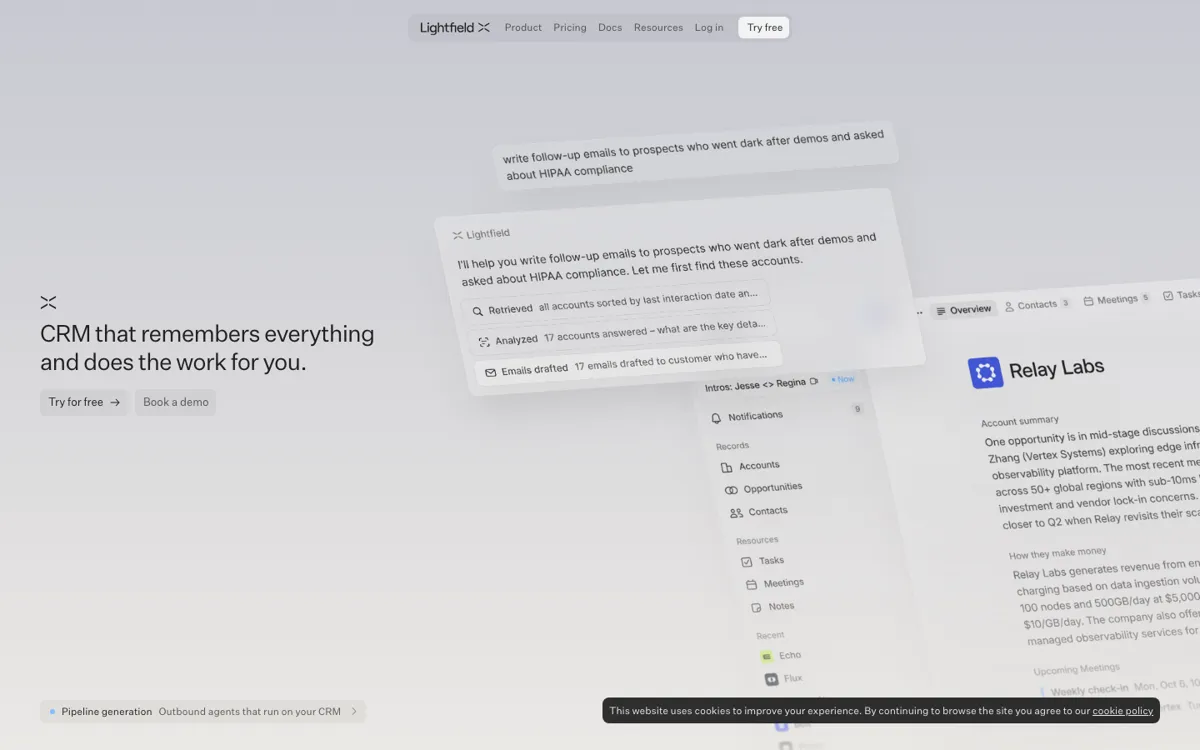
Official Website Snapshot Visit Site ↗

check_circle Pros

  • It goes past note capture and treats the CRM as a place where agents can update records, draft work, and run follow-up actions.
  • Meeting prep, recording, transcription, summaries, and cited Q&A all tie back to the same account and deal history.
  • The docs show unusually broad builder access for this category, including HTTP, SDKs, CLI, and MCP.

cancel Cons

  • There is no true low-cost entry point on the pricing page. The starter tier begins at $79 per user per month.
  • A lot of the value depends on trusting Lightfield with emails, calls, transcripts, and CRM history, which can slow security review.
  • The stronger automation pieces are easier to justify for serious GTM teams than for small teams that only need a basic pipeline tracker.

Should you use it?

Best for: Best for sales teams that run a lot of calls and want one place to capture meetings, update records, draft follow-ups, and prep the next conversation without logging everything by hand.

Skip it if: Skip it if you just need a cheap contact database or a simple kanban pipeline, because the pricing and agent-heavy setup make more sense when you want automation to act on CRM data, not merely store it.

Is it worth the price?

Paid Starts at $79.00 USD

The startup tier is priced like a serious operating tool, not a freemium experiment. The cost starts to make sense if Lightfield is replacing manual note logging, meeting recap work, CRM cleanup, and some outbound prep. If your team will only use it for pipeline visibility, the entry price is harder to defend.

Paid Upgrade
$79 per user per month

The paid entry plan includes core CRM functions, call intelligence, automated enrichment and record updates, unlimited agent queries and actions, and a configurable data model.

One thing to know before you start

Test it with a real sales week, not a fake demo account. The product is easier to judge when you let it ingest live meetings, emails, and follow-up work, because that is when you see whether the CRM really stays current without reps cleaning it up afterward.

What people actually use it for

Run follow-up from the same place that stores the call

After a sales call, let Lightfield keep the transcript attached to the right account and opportunity, pull out commitments, and draft the next email using the customer's own words. That matters when reps lose momentum after meetings because the follow-up still lives in somebody's head an hour later.

Find the right accounts to re-open

Search across old calls, notes, and email threads to find deals that went quiet after a strong signal, then route them back into action with a tailored revival message. This saves time when the team remembers the deal felt promising but cannot quickly reconstruct why it stalled.

Run outbound on CRM context instead of a fresh list

Use pipeline generation when you want scoring, contact selection, warm intro paths, and outreach sequences to start from your real customer history instead of a cold database. That is more valuable than a generic outbound tool when your best messaging depends on what your team already learned in calls and email threads.

What does Lightfield actually do?

Most CRMs still assume your team will do the janitorial work. Someone has to type meeting notes, move deals, update fields, chase missing account data, and explain what changed when leadership asks. Lightfield is trying to remove that routine by treating emails, meeting transcripts, and customer conversations as first-class CRM inputs. The homepage makes that point clearly: you are supposed to sell while the system captures the context and keeps the records moving. That matters if your current process breaks down right after the meeting ends, when good information is still fresh but nobody wants to log it.

The more interesting layer is what happens after the data lands in the CRM. Lightfield does not stop at storing transcripts or writing summaries. It presents the CRM as a place where agents can prospect into new accounts, draft follow-ups, answer questions with citations, update stages, backfill fields, and operate on both structured data and conversation history. The docs strengthen that pitch by describing a context graph, natural-language workflow steps, and public beta access through HTTP, SDKs, CLI, and MCP. So the real product is not only memory capture. It is a CRM that is meant to be queried and acted on by software agents.

That also explains the boundary. Lightfield is easier to justify for a company that wants its CRM to become part data layer, part execution layer for go-to-market work. If you only need lightweight pipeline tracking, the product can feel like overkill, especially with a paid entry tier that already sits above many casual tools. But if your team keeps losing deal context between calls, follow-ups, and pipeline hygiene, Lightfield is selling a tighter loop: capture what happened, keep it attached to the account, then let agents do the boring work that usually falls back on reps or RevOps.

What you can do with it

Automatically pulls emails, meetings, and customer conversations into CRM records.
Lets you build agents with prompts to prospect, manage follow-ups, and coach deals.
Searches calls, emails, and notes, then answers with citations to the original conversations.
Records, transcribes, and summarizes meetings inside the platform.
Supports workflow automation triggered by webhooks, CRM changes, or schedules.
Offers API, SDKs, CLI, and MCP access for teams building on top of the CRM.

Technical details

platform
Web app CRM with a context graph that ties accounts, opportunities, and contacts to emails and meeting transcripts.
deployment
Workflow triggers can run from webhooks, CRM data changes, or schedules.
api_available
Public beta API with direct HTTP access plus Python, TypeScript, Go, CLI, and MCP interfaces.

Key Questions

Will Lightfield replace a standalone meeting note app, or is it doing something bigger?
It is doing something bigger. The recorder and transcript matter, but the core point is that every call, email, and follow-up stays tied to the CRM record so agents can update fields, answer questions, and draft the next action from that history.
Can you build on top of Lightfield, or are you stuck inside the app?
You can build on top of it. The docs show HTTP access plus Python, TypeScript, and Go SDKs, as well as CLI and MCP support, though the API is still in public beta.
Is there a real free plan to test before paying?
There is no clearly published free tier on the pricing page. The lowest priced option shown is Startup at $79 per user per month, and the 'Try for Free' CTA does not explain any separate free-plan limits.