Letterly Review

7.7/10

Turn voice notes into cleaner messages, notes, posts, and drafts from a mobile-first app.

Review updated May 2026 By The AI Way Editorial Tested 262+ tools across the site 4 min read
Letterly Android App iOS App Mac App Multi-language Note-Taking Summarization Transcription Web-Based Writing Assistant Freemium

Our Verdict

Letterly is most useful when you do your first draft by talking, not typing. Its value is not raw transcription accuracy alone, but the fact that it cleans up messy speech into something closer to sendable writing, which saves time on texts, notes, summaries, and quick drafts. The catch is that it still looks strongest as a personal capture tool, so if you need serious collaboration, rich desktop editing, or a fully transparent pricing model, the edges show faster.

Try it
Free to start, then pay when the limits stop you.
open_in_new Try Letterly
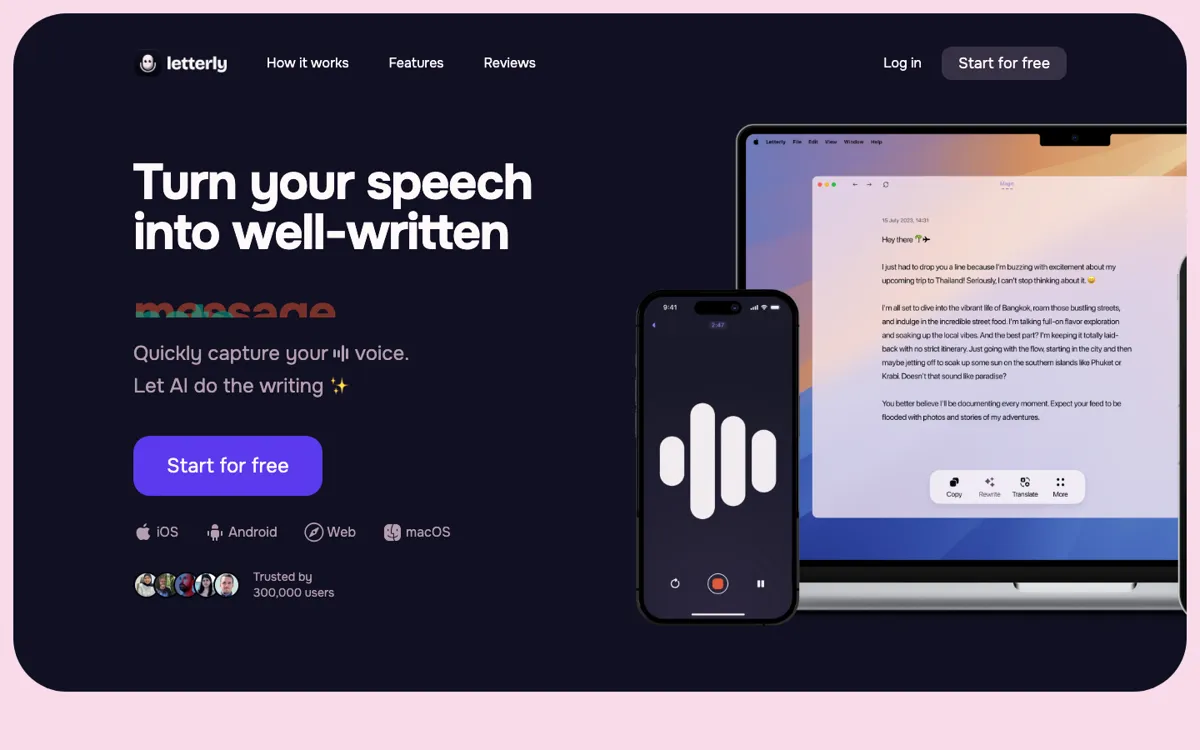
Official Website Snapshot Visit Site ↗

check_circle Pros

  • It does more than dump a transcript. The app is built to reshape spoken thoughts into cleaner notes, messages, summaries, and rewrites you can use right away.
  • The cross-device footprint is practical for daily use, with iOS, Android, Mac, web, and Windows on the roadmap.
  • The MCP layer gives it a second life beyond note capture, because saved voice notes can flow into Claude, ChatGPT, Cursor, and other assistants for search, rewrite, translation, and follow-up work.

cancel Cons

  • There is no clear public pricing table on the fetched official pages, which makes it harder to judge long-term cost before signing up.
  • Public review snippets suggest the app is better at fast cleanup than at advanced formatting or deeper collaboration workflows.
  • If you already type quickly and mainly need a strict verbatim transcript, the rewrite-first approach may feel like extra interpretation instead of a benefit.

Should you use it?

Best for: People who capture ideas, messages, journal notes, or first drafts by voice and want those recordings turned into cleaner text they can actually send or reuse.

Skip it if: Skip it if you need transparent pricing upfront, heavy team collaboration, or a desktop-first writing environment with deeper formatting control.

Is it worth the price?

Freemium

Letterly clearly pushes a free-start flow, but the official pages fetched here do not show a concrete pricing table. That means the product may still be easy to try, yet you cannot confidently model long-term usage cost from the public site alone.

The Free Tier

The site repeatedly pushes 'Start for free', but the fetched official pages do not expose concrete free-plan limits.

One thing to know before you start

Test Letterly with a messy real-world voice dump, not a clean scripted sentence. Its value shows up when you ramble, change direction, and still want the output to come back readable.

What people actually use it for

Turn walking thoughts into notes you can actually use

Letterly fits the moment when an idea shows up away from the keyboard and you want more than a raw transcript later. You can speak a messy note while walking, driving, or between meetings, then get back cleaner text that is easier to save, send, or turn into a task. That is more valuable than basic dictation when the problem is not capturing every word, but rescuing the thought before it disappears.

What does Letterly actually do?

A lot of speech-to-text apps promise speed but hand you back a block of words that still needs rewriting before it is useful. That is fine for archival transcription, but it is weak for day-to-day thinking, where the real goal is to get from a half-formed spoken idea to a usable message, note, or draft with as little cleanup as possible. Letterly is pointed at that exact gap. The app presents itself as AI speech to clear text, and that framing matters because it is not trying to be a meeting recorder first or a full publishing studio first. It is trying to make rough spoken input usable as everyday writing.

The product also has more workflow depth than a bare voice memo app. Rewrite options, summaries, Merge Notes, Text Replacements, and saved audio segments all push it toward active note handling rather than one-time dictation. The platform spread helps too: iOS, Android, Mac, and web are already live, with Windows listed as coming soon. On top of that, the MCP layer lets saved voice notes move into tools like Claude, ChatGPT, and Cursor, which means Letterly can act as the intake layer for broader AI work instead of ending at the note itself.

The main limitation is that Letterly still looks like a personal writing accelerator more than a deeply managed workspace. Public review snippets praise fast cleanup and polished output, but they also point to weaker advanced formatting, collaboration, and desktop depth. Pricing visibility is another weak spot, because the official pages we fetched push a free start without laying out a clear public plan table. So the product is easiest to recommend when your pain is messy voice capture, not when you need a transparent procurement process or a full team writing system.

What you can do with it

Capture spoken thoughts and turn them into clearer text for messages, notes, posts, and emails.
Apply rewrite options so rough dictation comes back in a cleaner format.
Use Text Replacements to expand spoken shortcuts while dictating.
Merge notes and keep recording segments saved for later playback.
Connect voice notes to Claude, ChatGPT, Cursor, and other MCP-compatible assistants.
Run across iOS, Android, Mac, web, with Windows listed as coming soon.

Technical details

platform
Mobile-first app with iOS, Android, Mac, and web access, plus Windows marked as coming soon.
deployment
Cloud-backed capture and rewrite workflow that can pass saved voice notes into MCP-compatible AI tools from the app and web experience.
api_available
No public API was surfaced in the official pages fetched, but Letterly exposes MCP connectors for Claude, ChatGPT, Cursor, and similar assistants.

Top Alternatives to Letterly

If Letterly is close but still misses the job, try one of these instead.

Key Questions

Is Letterly mainly a transcription app?
Not really. It starts from speech, but the product is more about turning messy dictation into cleaner writing than about preserving a strict verbatim transcript.
What devices does Letterly support right now?
The official site links to iOS, Android, Mac, and web access. Windows is listed as coming soon on the public pages we checked.
Can Letterly work with other AI tools after capture?
Yes. Its MCP pages say you can connect saved voice notes to Claude, ChatGPT, Cursor, and other assistants for rewrite, search, translation, and follow-up note work.
What kind of writing is Letterly best at?
It is best at fast personal writing, things like messages, notes, summaries, and rough first drafts spoken into your phone. It is less convincing when the job needs deeper formatting control or heavier collaboration.