Kling3 AI Review

6.2/10

Generate text-to-video, image-to-video, and motion-controlled AI clips from a credit-based web studio.

Review updated June 2026 By The AI Way Editorial Tested 311+ tools across the site 5 min read
Kling3 AI Commercial Rights Image-to-Video Text-to-Video Video Effects Web-Based Paid from $9.90/mo

Our Verdict

Kling3 AI is worth testing when you want a simple web page for prompt video, image animation, or character motion transfer. Its best use is fast proof-of-concept work: prompt a scene, animate a product image, or map a reference motion onto a character. The main thing to watch is credit use on this site, because repeated retries can matter more than the low entry price.

Try it
Paid product. Starts at $9.90 USD.
open_in_new Visit Kling3 AI
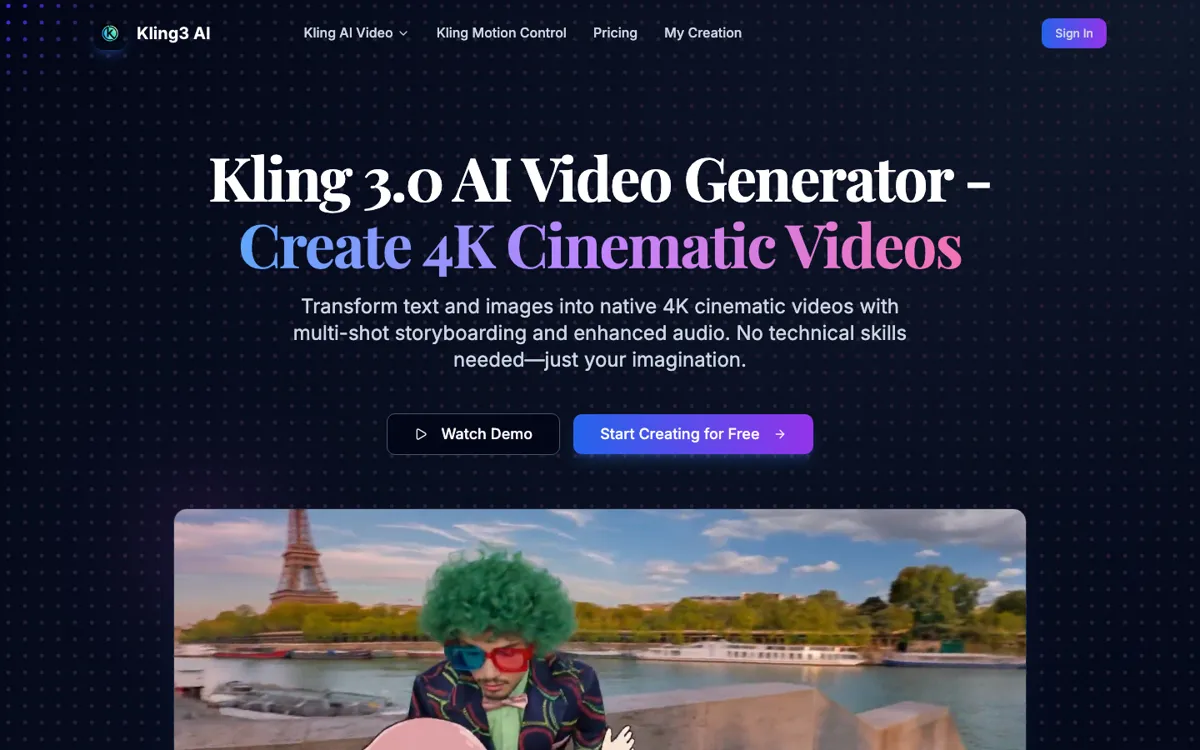
Official Website Snapshot Visit Site ↗

check_circle Pros

  • Motion Control gives a concrete sequence: upload a still character image, upload a motion video, choose quality, then generate an animated result.
  • Even the $9.9 Basic pack includes no-watermark download and commercial-use rights, which matters for ads and client rough cuts.
  • Credit math is visible enough to estimate small jobs: Motion Control shows 3 credits per second for Standard and 4 credits per second for Pro.
  • The site keeps text-to-video, image-to-video, and motion transfer in the same navigation instead of scattering them across separate tools.

cancel Cons

  • The credit model makes repeated retries more expensive than the $9.9 starting point suggests.
  • The 4K headline does not map cleanly to every paid tier: Basic is 720p, and the higher public packs list 1080p exports.
  • API access is marked as coming soon, so developers should not choose it for an integration that needs a live API today.

Should you use it?

Best for: Making quick AI video drafts where you already have a prompt, product image, character image, or motion reference and need a generated clip before deciding whether the idea deserves a more trusted production tool.

Skip it if: Skip it if you need a live API today, strict 4K entitlement by plan, or an approved vendor path for sensitive brand assets.

Is it worth the price?

Paid Starts at $9.90 USD

The $9.9 Basic pack is enough for a small test batch, but 99 credits can disappear quickly when each video costs 2-10 credits and Motion Control charges by the second. Move up only after you know how many seconds and retries your actual prompt style burns.

Paid Upgrade
$9.9 for 99 credits

Paid packs add credits for HD text-to-video or image-to-video generation, no-watermark download, commercial-use license, queue priority on higher tiers, and more concurrent jobs on higher tiers.

One thing to know before you start

Run the same prompt through a $9.9 pack with disposable images before uploading client assets. Track credits per usable second, not credits per generation, because failed or mediocre attempts are the real budget leak.

What people actually use it for

Animate a product or character image for a short ad test

Use Kling3 AI when you have one strong still image and need to see whether motion makes it usable for a short ad, landing-page hero, or social post. The image-to-video and Motion Control pages are the clearest fit: upload the image, add a prompt or motion reference, then compare whether the generated clip is good enough to justify a more polished edit. This is a test-before-production pass, not a replacement for a full brand video pipeline.

Turn a written scene into a cinematic rough cut

The text-to-video page fits creators who can describe camera movement, scene mood, and subject action in a prompt. Use prompts that include camera direction, lighting, action order, and scene changes, because vague prompts are likely to burn credits before they produce a usable clip. This site charges by limited packs, not by final usable result.

Copy motion from a reference clip onto a static character

Motion Control is the most specific reason to try this site instead of a generic prompt box. You upload a character image plus a reference video, then choose Standard or Pro quality before generating. That makes sense for avatar gestures, education clips, creator intros, or pitch mockups where the motion reference matters more than inventing a whole scene from text.

What does Kling3 AI actually do?

Kling3 AI sits in the credit-pack corner of AI video: users pay for a pool of credits, then spend those credits on generated clips. The useful part is that the site exposes concrete creation surfaces instead of only publishing a model landing page. The main video page has a prompt box, duration control, aspect ratio, and generated-video preview area. The Motion Control page is even more explicit, asking for a character image, a motion reference video, orientation mode, prompt, sound setting, and quality selection. Those details make it easier to understand what a user actually does before paying.

The product is strongest when the job is narrow: make a short clip from text, animate an image, or transfer a motion reference onto a character. That is a real task for marketers, small creators, and founders who need rough visual proof before hiring editors or opening a heavier studio. The pricing page gives enough operational detail to judge early cost: Basic is $9.9 for 99 credits, Major is $29.9 for 330 credits, Profession is $49.9 for 600 credits, and Highest is $99.9 for 1250 credits. Video generation is described as 2-10 credits depending on length and resolution.

The appeal is clearest when the job is visual testing, not final production planning. Kling3 AI gives users a direct credit-pack path with text-to-video, image-to-video, and motion transfer surfaces. The important distinction is that this site's visible pages are the evidence base; broader demand for AI video should not be treated as public reputation for this exact domain. For low-risk experiments, it is reasonable to start small here. For sensitive footage, approved-vendor requirements, or API plans, compare the account and billing flow before buying larger packs.

What you can do with it

Generate AI videos from text prompts with duration and aspect-ratio controls.
Animate still images into video clips through image-to-video generation.
Upload a character image and a motion reference video for Motion Control animation.
Choose standard or pro motion-control quality, with credits charged per generated second.
Use credit packs for HD exports, no-watermark downloads, commercial-use rights, and faster queues.
Switch between the site's text-to-video, image-to-video, and motion-control creation pages.

Technical details

platform
Web-based generator with prompt input, image upload, video upload, profile area, and payment plans.
deployment
Cloud-hosted only; no self-hosted or offline mode is exposed.
api_available
API access is marked as coming soon on the Highest plan, not generally available now.

Top Alternatives to Kling3 AI

If Kling3 AI is close but still misses the job, try one of these instead.

Key Questions

Is Kling3 AI the same listing as Kling AI?
No. Kling3 AI uses `kling3ai.co`, while the existing Kling product is listed separately at `kling.ai`. Treat Kling3 AI as its own credit-pack access site and compare billing details before larger spend.
How much does Kling3 AI cost?
The public pricing page starts at $9.9 for 99 credits. Higher packs list $29.9 for 330 credits, $49.9 for 600 credits, and $99.9 for 1250 credits.
Does Kling3 AI have a free plan?
A permanent free plan is not clear. Treat the free path as a trial or limited registration-credit test until the account screen proves otherwise.
What is the most concrete feature on Kling3 AI?
Motion Control is the clearest differentiated use case. It asks for a static image and a reference video, then uses credits per second to generate character animation.