Anomaly AI Review

7.4/10

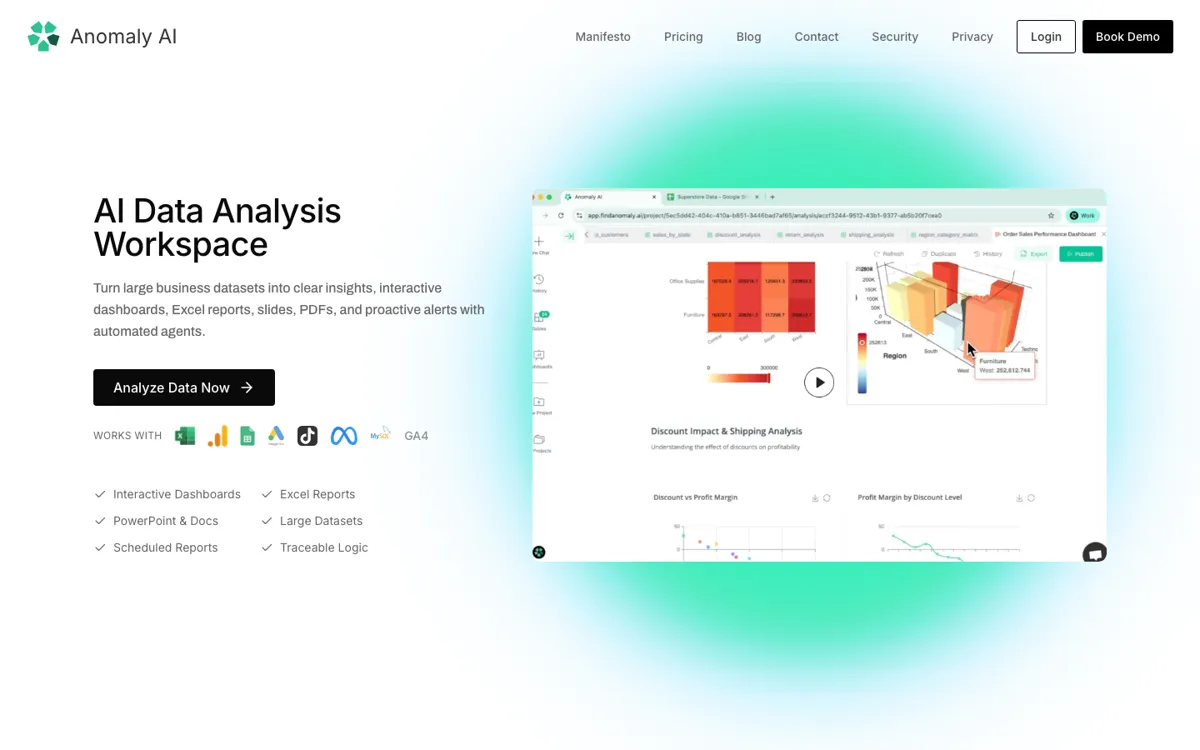
Analyze large business datasets and turn them into dashboards, reports, slides, PDFs, and scheduled updates.

Review updated June 2026 By The AI Way Editorial Tested 321+ tools across the site 5 min read
Anomaly AI B2B Production Workflows SaaS Team Collaboration Web-Based Workflow Builder Freemium from $25.00/mo

Our Verdict

Anomaly AI is worth shortlisting when a team has outgrown one-off spreadsheet analysis but still needs outputs that look like dashboards, decks, PDFs, and scheduled reports. Its main value is the reviewable logic layer: users can inspect calculations and assumptions before sending the result to a client, manager, or board. The tradeoff is that this is a reporting and analysis workspace, not a live streaming monitoring system or a full BI replacement.

Try it
Free to start, then pay when the limits stop you. Starts at $25.00 USD.
open_in_new Try Anomaly AI
Official Website Snapshot Visit Site ↗

What people actually use it for

Large spreadsheet investigation

Upload a CSV or Excel file that is too large or too messy for normal spreadsheet work, then ask for the driver behind a revenue drop, margin leak, conversion change, or operational bottleneck.

Client-ready reporting

Connect recurring marketing, finance, or operations data and turn the same analysis into a dashboard, PDF, slide deck, or Excel report that can be reviewed before it is sent.

Scheduled business review

Use connected sources and scheduled reports when the team needs the same KPI pack every week or month, with calculations and assumptions visible enough to check.

check_circle Pros

  • Turns the same source data into several useful artifacts: dashboards, Excel reports, slides, docs, PDFs, and scheduled emails.
  • Keeps analysis logic visible enough for a human to review SQL, filters, assumptions, and calculations before sharing the result.
  • Handles spreadsheet-heavy work better than a basic chatbot because uploads can reach 1GB and recurring sources can be connected.

cancel Cons

  • PostgreSQL is still marked as coming soon, so teams using it as a primary database need another path for now.
  • It should not be used as live anomaly monitoring; the documented fit is dashboards, scheduled reports, and proactive reporting rather than real-time streaming alerts.

Should you use it?

Best for: Weekly business reporting, client analytics packs, CAC or funnel investigations, margin reviews, and spreadsheet-to-dashboard jobs where the numbers must be checked before anyone presents them.

Skip it if: Skip it if you need a real-time incident or metric monitoring system, a mature enterprise BI platform with every connector already covered, or a local/offline analytics tool.

Is it worth the price?

Freemium Starts at $25.00 USD

The free plan is enough to test whether your files and questions produce useful charts or dashboards. Pro becomes the practical floor once scheduled reports, shareable dashboards, or regular analysis runs matter, because the jump from 60 credits to 1,000 credits changes it from trial usage to weekly work. Team pricing only makes sense when multiple people need shared workspaces, billing, usage visibility, and admin controls.

The Free Tier

60 credits/month, described as about 32 insights with charts or about 8 dashboards.

Paid Upgrade
$25/month

Pro includes 1,000 credits/month, shareable dashboards, auto report scheduling, and priority support.

One thing to know before you start

Start with one painful recurring report, not a broad data dump. Give Anomaly AI the source, the metric definition, and the presentation format you need, then review the generated logic before turning it into a scheduled report.

What does Anomaly AI actually do?

Anomaly AI is strongest when the input is real business data rather than a neat demo table. Supported sources cover Excel files, CSVs, GA4, ad accounts, Search Console, Google Sheets, BigQuery, Snowflake, and MySQL. That matters because many teams do not need another blank chat box; they need a place to upload the file from finance, connect the warehouse table from analytics, or pull a weekly marketing export, then ask a concrete question and get a reportable answer that can survive review.

The important product choice is the visible logic. A basic chatbot can summarize a small file, but it becomes hard to trust once the dataset gets larger or the result is going into a board deck. Anomaly AI emphasizes reviewable SQL, assumptions, filters, calculations, source data, and metric definitions. That makes it better suited to work where a wrong chart is expensive: client reporting, funnel diagnosis, margin analysis, finance reviews, and executive updates where someone will ask how the number was produced.

The pricing model is credit-based inside a SaaS plan. Free gives 60 credits per month, roughly enough for first tests and a handful of dashboards. Pro at $25 per month gives 1,000 credits, shareable dashboards, scheduled reports, and priority support. Team at $45 per seat per month adds shared workspace controls, team billing, usage visibility, collaboration, and admin controls. Enterprise is the path for SSO, SAML, custom SLA, dedicated support, larger credit needs, and security requirements that need a sales conversation.

What you can do with it

Upload Excel and CSV files up to 1GB for AI-assisted analysis.
Connect recurring sources including BigQuery, Snowflake, MySQL, GA4, Google Sheets, Google Ads, TikTok Ads, Meta Ads, and Search Console.
Generate interactive dashboards, Excel reports, slides, documents, PDFs, and scheduled email reports from business data.
Review the logic behind structured analysis, including SQL, assumptions, filters, calculations, and source data.
Scan datasets for quality issues such as inconsistencies, duplicates, missing values, date formats, and outliers.
Schedule recurring reports and checks for weekly or monthly business reviews.

Technical details

platform
Web workspace for uploaded Excel/CSV files and connected business data sources such as GA4, Google Ads, Search Console, BigQuery, Snowflake, MySQL, and Google Sheets.
deployment
Cloud-hosted SaaS operated on Microsoft Azure East US, with Azure PostgreSQL and per-customer Azure Data Lake Storage containers.
api_available
Public API availability is not documented.

Top Alternatives to Anomaly AI

If Anomaly AI is close but still misses the job, try one of these instead.

Key Questions

What size files can Anomaly AI analyze?
Excel and CSV uploads are supported up to 1GB. For larger or regularly updated datasets, the better route is a connected warehouse or database such as BigQuery, Snowflake, or MySQL.
Is Anomaly AI only for Excel files?
No. Excel and CSV are the easiest starting point, but the product also supports connected sources such as BigQuery, Snowflake, GA4, Google Sheets, and MySQL.
How is it different from uploading a file to a chatbot?
The difference is reviewability and output format. Anomaly AI is built around structured analysis, dashboards, reports, recurring outputs, and visible logic instead of a single chat answer.
Does Anomaly AI do real-time monitoring?
No, not in the live-streaming sense. The right fit is dashboards, scheduled reports, and proactive reporting, not continuous metric streaming.
How does Anomaly AI charge for usage?
Plans include monthly credits, and each AI agent step costs 0.5 credits. That includes actions such as running a query, transforming data, building a chart or KPI, or regenerating a dashboard card.