Best AI Email Assistant Review

6.9/10

Turn Gmail service inquiries into lead queues, quote summaries, and reviewable reply drafts.

Review updated June 2026 By The AI Way Editorial Tested 321+ tools across the site 4 min read
Best AI Email Assistant B2B Customer Support Privacy Focused SaaS Sales Automation Web-Based Writing Assistant Freemium

Our Verdict

Use Best AI Email Assistant when customer quotes arrive through Gmail and the daily pain is deciding which messages need action first. Its best move is turning a mixed inbox into lead, quote, and follow-up queues while keeping the owner in charge of the final reply. Confirm plan limits before moving a full sales inbox into it.

Try it
Free to start, then pay when the limits stop you.
open_in_new Try Best AI Email Assistant
Official Website Snapshot Visit Site ↗

check_circle Pros

  • Turns raw Gmail inquiries into a lead queue with intent, urgency, missing fields, and quote context.
  • Keeps quote ranges and reply drafts reviewable before anything reaches the customer.
  • Fits service businesses with repeatable estimate patterns, such as cleaning, repair, landscaping, and moving.

cancel Cons

  • Public plan limits and starting price are not visible before upgrade discovery.

Should you use it?

Best for: Local service operators who receive quote requests in Gmail and need a same-day queue for urgent leads, missing job details, and customer reply drafts.

Skip it if: Skip it if your team needs a full CRM with pipeline automation, multi-channel sales reporting, or automatic outbound sending.

Is it worth the price?

Freemium

Small teams can evaluate the intake flow before committing, but they should confirm Gmail import limits and paid upgrade terms before using it as the main quote inbox.

One thing to know before you start

Start with a small Gmail import limit and review only service-inquiry messages first. If the extracted service type, timing, and missing fields are reliable on those, then expand the import window.

What people actually use it for

Recover missed quote requests

Import recent Gmail messages, filter for service inquiries and high-priority items, then review the messages that need same-day owner attention.

Prepare customer reply drafts

Use the extracted service type, location, timing, urgency, and missing fields to draft a customer response that the owner can edit before sending.

Sort a local service inbox

Separate customer inquiries from ads, finance, personal, system, and general business messages so the quote queue is not buried under routine email.

What does Best AI Email Assistant actually do?

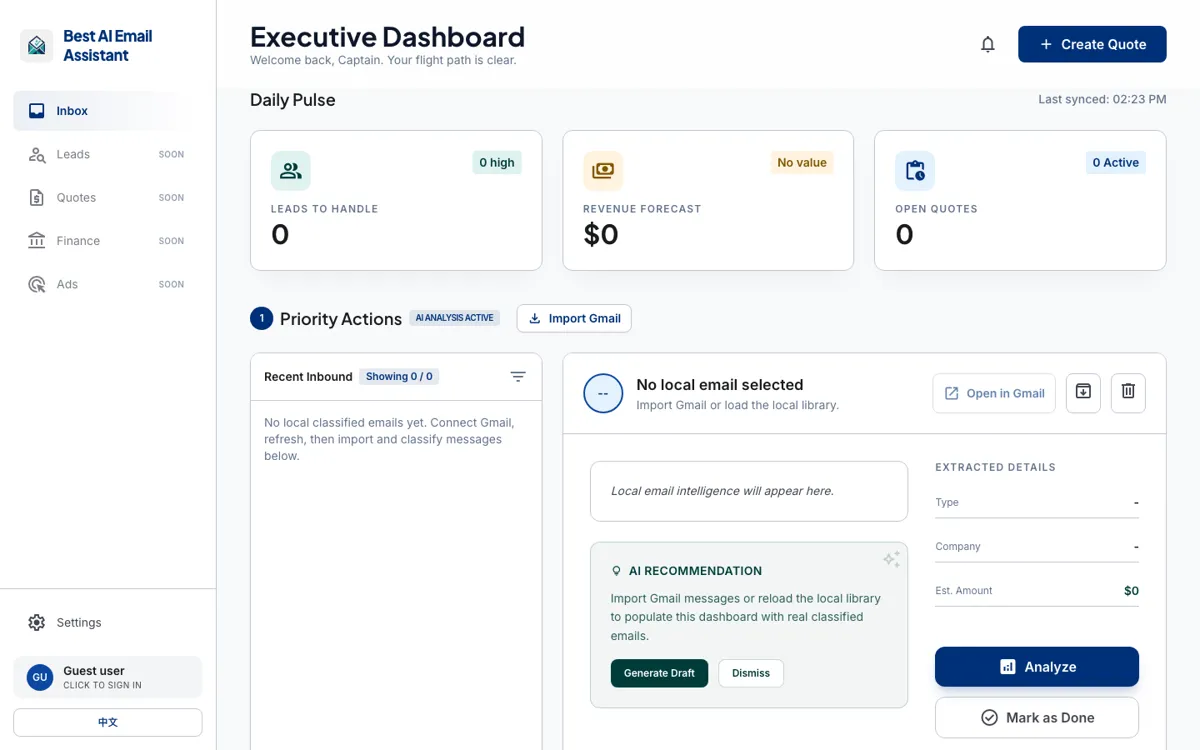
Best AI Email Assistant is narrower than most AI email assistants. It is not trying to become a new email client for every kind of worker. The product is built around Gmail messages that can turn into service revenue: a customer asks about a move-out clean, a repair visit, a landscaping cleanup, a moving estimate, or another job that needs a quick quote. The dashboard pulls those messages into a local library, classifies them, and gives the owner a smaller queue to review.

The quote prep path is the useful center of the product. After import, the system separates lead value, extracts service type, location, timing, urgency, missing fields, and an estimate range, then prepares a reply draft. That order matters because service owners often need to ask one missing question before they can quote. A draft that exposes the missing field is more useful than a polished reply that hides the uncertainty.

Privacy and control are handled more carefully than the average inbox demo. Gmail access is read-only, imported email content can stay in the local workspace by default, and metadata or stats can sync separately when configured. AI summaries, recommendations, quote ranges, and reply drafts are still review material. That makes the right operating model clear: use it as a triage and drafting layer, not as an autopilot for pricing or customer commitments.

What you can do with it

Imports recent Gmail messages into a local email library for review.
Classifies messages by lead, business, advertising, finance, personal, system, and other categories.
Highlights service intent, urgency, missing fields, and quote details before a reply is drafted.
Shows owner-facing queues for high-priority, pending, completed, and business-focus emails.
Prepares AI recommendations and customer reply drafts without automatically sending them.
Keeps imported email content local by default while allowing metadata and stats to sync separately.

Technical details

platform
Web dashboard with Gmail import, local email library, inbox filters, lead queue, quote panel, and draft review controls.
deployment
Imported email indexes and preferences are stored locally in the app; account/workspace records and metadata may sync when a database is configured.
api_available
An API Status link is present, but no public API documentation or integration endpoint is visible.

Top Alternatives to Best AI Email Assistant

If Best AI Email Assistant is close but still misses the job, try one of these instead.

Key Questions

What does Best AI Email Assistant do?
It turns Gmail messages into an owner review queue for service leads, quote details, and customer reply drafts. The core job is intake and prioritization, not replacing the business owner.
Can it send replies automatically?
No automatic sending is confirmed. The product is framed around recommendations and drafts that the owner checks before relying on them.
Is it only for Gmail?
Gmail is the confirmed inbox source. The product page shows Gmail import, Gmail search, Gmail connection controls, and a read-only Gmail access policy.
Does it publish pricing?
No public starting price is exposed up front. Treat pricing as unknown until the product shows plan limits or upgrade terms.